

Close Menu
Tech Savvyed
  • Home
  • News
  • Artificial Intelligence
  • Gadgets
  • Apps
  • Mobile
  • Gaming
  • Accessories
  • More
    • Web Stories
    • Spotlight
    • Press Release

Subscribe to Updates

Get the latest tech news and updates directly to your inbox.

What's On
New report confirms Anthropic’s Claude bypassed a paywall to access Georgia vote counts

New report confirms Anthropic’s Claude bypassed a paywall to access Georgia vote counts

26 October 2026
Grok’s Odyssey is seven minutes of nothing happening beautifully

Grok’s Odyssey is seven minutes of nothing happening beautifully

26 October 2026
OnePlus made clip-on earbuds that don’t care which ear they’re on

OnePlus made clip-on earbuds that don’t care which ear they’re on

26 October 2026
Facebook X (Twitter) Instagram
Tech Savvyed
SUBSCRIBE
  • Home
  • News
  • Artificial Intelligence
  • Gadgets
  • Apps
  • Mobile
  • Gaming
  • Accessories
  • More
    • Web Stories
    • Spotlight
    • Press Release
Tech Savvyed
Home»News»The Galaxy Z Fold 8, Fold 8 Ultra, and Flip 8 let you ditch your laptop’s grainy webcam
News

The Galaxy Z Fold 8, Fold 8 Ultra, and Flip 8 let you ditch your laptop’s grainy webcam

News RoomBy News Room29 July 20262 Mins Read
The Galaxy Z Fold 8, Fold 8 Ultra, and Flip 8 let you ditch your laptop’s grainy webcam
Share
Facebook Twitter Reddit Telegram Pinterest Email

Samsung’s latest foldables can double as a USB webcam for your laptop. The Galaxy Z Fold 8, Fold 8 Ultra, and Flip 8 all support the USB webcam feature, which first debuted on Pixel phones back in 2023 before Samsung brought it to the Galaxy S26 series earlier this year.

How webcam mode works

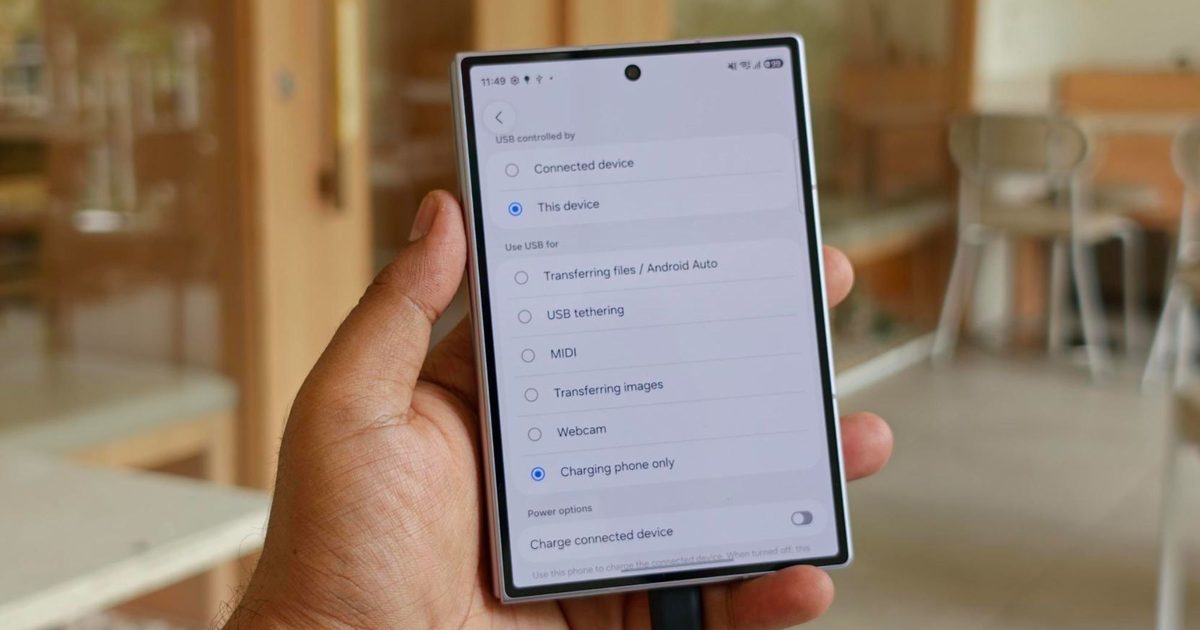
Android Authority has confirmed the USB webcam option is available on all three new Galaxy Z series devices, making them the first Samsung foldables to offer the feature. As with the Galaxy S26 series, the option appears in the USB settings menu that can be accessed by tapping the notification that pops up when the phone is plugged into a PC.

Selecting the Webcam option under the “Use USB for” list routes the phone’s camera feed directly to the video calling app running on the connected computer. No extra apps or drivers are required on either end.

The hinge gives foldables an edge

Using webcam mode on a Galaxy S26 requires users to prop up the device on a holder or lean it against something to keep the camera angled correctly. Samsung’s new foldables make things easier, as they can be folded halfway so the hinge holds the phone upright and angled toward the user, no stand or case required.
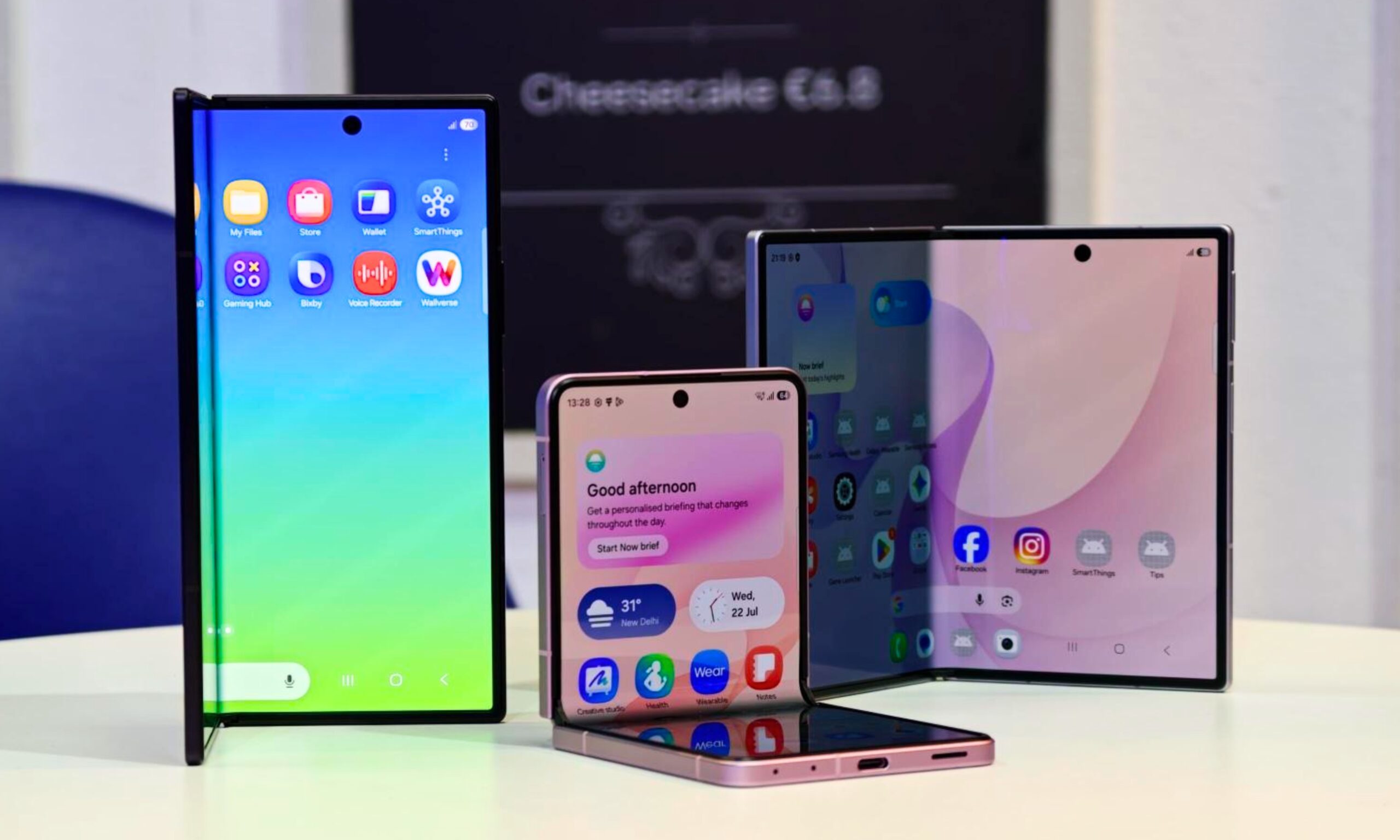
Galaxy foldables with its screen visible

That built-in stand functionality removes a step Galaxy S26 owners still have to work around, either by buying a separate phone mount or improvising with household items. It’s a small difference, but one that makes the feature more practical on a foldable than it ever was on a standard slab phone.

Convenience set aside, webcam mode offers users a real jump in quality compared to built-in webcams. The main camera on all three models comfortably outclasses most laptop webcams on the market, so users will notice a major improvement in video call quality the moment they switch over. If that sounds like a feature you’d like on your phone, you can preorder the Galaxy Z Fold 8, Fold 8 Ultra, or Flip 8 right away, or buy them when they go on sale on August 7.

Share. Facebook Twitter Pinterest LinkedIn Telegram Reddit Email
Previous ArticleInstapaper just had its biggest update in years, and it’s packed with goodies
Next Article I tried Dell’s sleek XPS 13 and it’s a breath of fresh air for budget Windows laptops

Related Articles

New report confirms Anthropic’s Claude bypassed a paywall to access Georgia vote counts

New report confirms Anthropic’s Claude bypassed a paywall to access Georgia vote counts

26 October 2026
Grok’s Odyssey is seven minutes of nothing happening beautifully

Grok’s Odyssey is seven minutes of nothing happening beautifully

26 October 2026
OnePlus made clip-on earbuds that don’t care which ear they’re on

OnePlus made clip-on earbuds that don’t care which ear they’re on

26 October 2026
Samsung Galaxy S27 could finally shed the laggard chip image with next-gen Exynos chip

Samsung Galaxy S27 could finally shed the laggard chip image with next-gen Exynos chip

26 October 2026
Xiaomi 17T review: The most practical phone I’ve used in a while that’s also a rare bargain

Xiaomi 17T review: The most practical phone I’ve used in a while that’s also a rare bargain

26 October 2026
NVIDIA’s RTX Spark could be the best thing to happen to Qualcomm Snapdragon

NVIDIA’s RTX Spark could be the best thing to happen to Qualcomm Snapdragon

26 October 2026
Demo
Stay In Touch
  • Facebook
  • Twitter
  • Pinterest
  • Instagram
  • YouTube
  • Vimeo
Don't Miss
Grok’s Odyssey is seven minutes of nothing happening beautifully

Grok’s Odyssey is seven minutes of nothing happening beautifully

By News Room26 October 2026

Some of the best shots in Grok Imagine’s AI-made Odyssey don’t contain actors. Ancient landscapes…

OnePlus made clip-on earbuds that don’t care which ear they’re on

OnePlus made clip-on earbuds that don’t care which ear they’re on

26 October 2026
Samsung Galaxy S27 could finally shed the laggard chip image with next-gen Exynos chip

Samsung Galaxy S27 could finally shed the laggard chip image with next-gen Exynos chip

26 October 2026
Xiaomi 17T review: The most practical phone I’ve used in a while that’s also a rare bargain

Xiaomi 17T review: The most practical phone I’ve used in a while that’s also a rare bargain

26 October 2026
Tech Savvyed
Facebook X (Twitter) Instagram Pinterest
  • Privacy Policy
  • Terms of use
  • Advertise
  • Contact
© 2026 Tech Savvyed. All Rights Reserved.

Type above and press Enter to search. Press Esc to cancel.