


Close Menu
Tech Savvyed
  • Home
  • News
  • Artificial Intelligence
  • Gadgets
  • Apps
  • Mobile
  • Gaming
  • Accessories
  • More
    • Web Stories
    • Spotlight
    • Press Release

Subscribe to Updates

Get the latest tech news and updates directly to your inbox.

What's On
Grok’s Odyssey is seven minutes of nothing happening beautifully

Grok’s Odyssey is seven minutes of nothing happening beautifully

26 October 2026
OnePlus made clip-on earbuds that don’t care which ear they’re on

OnePlus made clip-on earbuds that don’t care which ear they’re on

26 October 2026
Samsung Galaxy S27 could finally shed the laggard chip image with next-gen Exynos chip

Samsung Galaxy S27 could finally shed the laggard chip image with next-gen Exynos chip

26 October 2026
Facebook X (Twitter) Instagram
Tech Savvyed
SUBSCRIBE
  • Home
  • News
  • Artificial Intelligence
  • Gadgets
  • Apps
  • Mobile
  • Gaming
  • Accessories
  • More
    • Web Stories
    • Spotlight
    • Press Release
Tech Savvyed
Home»News»Instapaper just had its biggest update in years, and it’s packed with goodies
News

Instapaper just had its biggest update in years, and it’s packed with goodies

News RoomBy News Room29 July 20262 Mins Read
Instapaper just had its biggest update in years, and it’s packed with goodies
Share
Facebook Twitter Reddit Telegram Pinterest Email

Apps like Instapaper are essential for keeping my reading goals in check. I cannot always read an article in full when I come across it, so the ability to save articles in a read-it-later app is a must-have feature for me. After Pocket’s demise, Instapaper became the alternative most people flocked to. 

And now the company just handed its users a massive update to be thankful for. The company rebuilt its website from scratch, redesigned the iOS app around Apple’s Liquid Glass look, and finally brought AI Voices to Android. Let’s break down what’s actually new.

What’s new on the rebuilt Instapaper website?

This is only the second full rewrite of Instapaper’s website since 2008, so yeah, it’s a big deal. The new site adds a 3-column reading view on bigger screens, letting you browse and read at the same time. If that’s not your thing, you can switch it off from the profile menu.

Multi-select got a serious upgrade too. You can now shift+click to grab a range of articles, and Select All actually selects everything instead of just what’s visible. Add in a full set of keyboard shortcuts for archiving, tagging, moving, and deleting articles, and power users are going to have a field day.

Instapaper also claims the new site loads over 60% faster, which you’ll notice the moment you open it. Worried about the old layout? Instapaper is keeping the previous version alive at old.instapaper.com through the end of 2026, so nothing disappears overnight.

What’s new in Instapaper 10 for iPhone and Android?

Instapaper 10 might be the app’s biggest iOS redesign in over a decade. It adopts Apple’s Liquid Glass design, adds article counts to every section, and lets you sort folders and tags however you like. It also adds four new reading fonts, a condensed article list view, and a home screen widget showing your current read and recent saves.
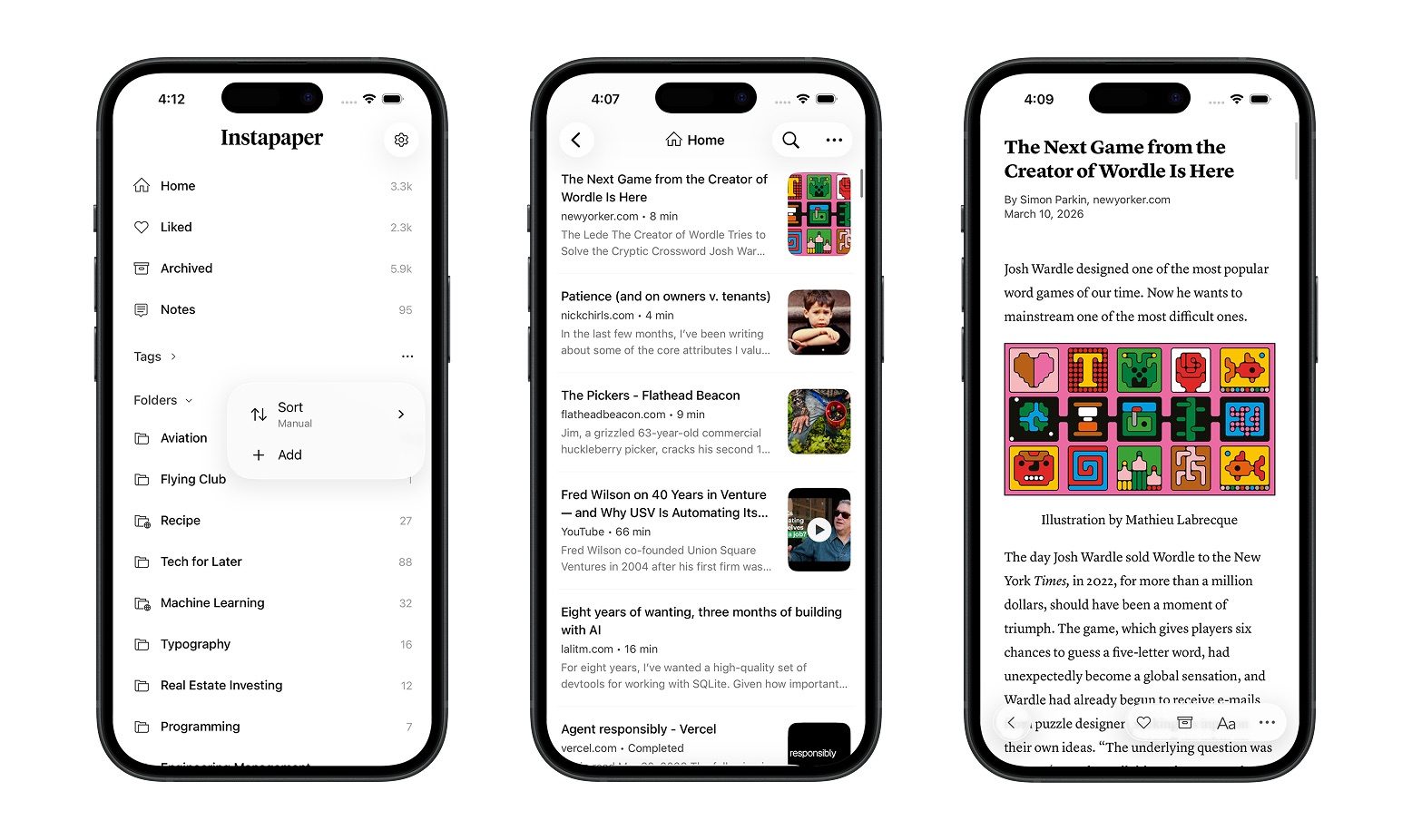
Instapaper 10 iOS app

Android users aren’t left out either. Instapaper rebuilt its text-to-speech system from the ground up to finally bring AI Voices to Android, matching a feature iOS users have enjoyed for a while.

Between the faster website, the redesigned iOS app, and Android catching up on AI Voices, this update touches every corner of Instapaper. If you’ve been saving articles for later and never getting around to them, now might be the time to actually open the app again.

Share. Facebook Twitter Pinterest LinkedIn Telegram Reddit Email
Previous ArticleSony is bringing two new affordable headphones with more color options
Next Article The Galaxy Z Fold 8, Fold 8 Ultra, and Flip 8 let you ditch your laptop’s grainy webcam

Related Articles

Grok’s Odyssey is seven minutes of nothing happening beautifully

Grok’s Odyssey is seven minutes of nothing happening beautifully

26 October 2026
OnePlus made clip-on earbuds that don’t care which ear they’re on

OnePlus made clip-on earbuds that don’t care which ear they’re on

26 October 2026
Samsung Galaxy S27 could finally shed the laggard chip image with next-gen Exynos chip

Samsung Galaxy S27 could finally shed the laggard chip image with next-gen Exynos chip

26 October 2026
Xiaomi 17T review: The most practical phone I’ve used in a while that’s also a rare bargain

Xiaomi 17T review: The most practical phone I’ve used in a while that’s also a rare bargain

26 October 2026
NVIDIA’s RTX Spark could be the best thing to happen to Qualcomm Snapdragon

NVIDIA’s RTX Spark could be the best thing to happen to Qualcomm Snapdragon

26 October 2026
3 Mac apps I discovered in 2026 that prove useful software doesn’t have to be boring

3 Mac apps I discovered in 2026 that prove useful software doesn’t have to be boring

26 October 2026
Demo
Stay In Touch
  • Facebook
  • Twitter
  • Pinterest
  • Instagram
  • YouTube
  • Vimeo
Don't Miss
OnePlus made clip-on earbuds that don’t care which ear they’re on

OnePlus made clip-on earbuds that don’t care which ear they’re on

By News Room26 October 2026

The OnePlus Buds Clip are a new pair of open-ear earbuds built around a simple…

Samsung Galaxy S27 could finally shed the laggard chip image with next-gen Exynos chip

Samsung Galaxy S27 could finally shed the laggard chip image with next-gen Exynos chip

26 October 2026
Xiaomi 17T review: The most practical phone I’ve used in a while that’s also a rare bargain

Xiaomi 17T review: The most practical phone I’ve used in a while that’s also a rare bargain

26 October 2026
NVIDIA’s RTX Spark could be the best thing to happen to Qualcomm Snapdragon

NVIDIA’s RTX Spark could be the best thing to happen to Qualcomm Snapdragon

26 October 2026
Tech Savvyed
Facebook X (Twitter) Instagram Pinterest
  • Privacy Policy
  • Terms of use
  • Advertise
  • Contact
© 2026 Tech Savvyed. All Rights Reserved.

Type above and press Enter to search. Press Esc to cancel.