Close Menu
Tech Savvyed
  • Home
  • News
  • Artificial Intelligence
  • Gadgets
  • Apps
  • Mobile
  • Gaming
  • Accessories
  • More
    • Web Stories
    • Spotlight
    • Press Release

Subscribe to Updates

Get the latest tech news and updates directly to your inbox.

What's On
OpenAI introduces stricter ChatGPT interventions to prevent the misuse of AI for child exploitation

OpenAI introduces stricter ChatGPT interventions to prevent the misuse of AI for child exploitation

16 November 2026
GTA 6 might take over 50 hours to complete, and that’s barely scratching the surface

GTA 6 might take over 50 hours to complete, and that’s barely scratching the surface

16 November 2026
Apos x Community Rock Lobster IEMs review: I plugged them into my favorite playlist. Now I get the name.

Apos x Community Rock Lobster IEMs review: I plugged them into my favorite playlist. Now I get the name.

16 November 2026
Facebook X (Twitter) Instagram
Tech Savvyed
SUBSCRIBE
  • Home
  • News
  • Artificial Intelligence
  • Gadgets
  • Apps
  • Mobile
  • Gaming
  • Accessories
  • More
    • Web Stories
    • Spotlight
    • Press Release
Tech Savvyed
Home»Gaming»Make Room For GTAVI By Deleting Your PS5 Trophy Clips
Gaming

Make Room For GTAVI By Deleting Your PS5 Trophy Clips

News RoomBy News Room16 November 20262 Mins Read
Make Room For GTAVI By Deleting Your PS5 Trophy Clips
Share
Facebook Twitter Reddit Telegram Pinterest Email

Hard drive space is a premium commodity, and its value has never been more apparent than in the approximately two and a half days leading up to the launch of Grand Theft Auto VI. The game is a whopping 209 GB, but thankfully you can purchase the game and preload it now – which you should do because who knows if the servers are going to be able to handle the strain of what is officially the most pre-ordered game ever on both PlayStation and Xbox platforms.

The easy (and likely necessary) answer is to delete the big games you aren’t currently playing off your hard drive, but there is a cache of arguably unnecessary data on PlayStation 5 that might get you there before you have to make hard decisions.

You may have turned it off (Settings > Capture and Broadcasts > Captures > Trophies under the Auto-captures section > Save Trophy Videos under the Video Clips section > Change to None), which if that is the case, then I’m sorry. I can’t help you. But the default setting which maybe you’ve never touched, is saving a lot of unnecessary video.

Every time you get a Trophy on PlayStation 5, it creates a short video clip that I bet you never have and never will watch. Here’s how to delete all those videos fairly quickly to free up at least some space.

First up, go to the Media Gallery. The quickest way to do that is to press the screenshot button to the left of the touchpad, tap over to the most recent media capture on the left, press X, and then press the Go to Media Gallery button.


Next, go to the Trophies tab, go to the Sort and Filter option (the downward arrow with the three lines), and change Media Type to Video Clips.


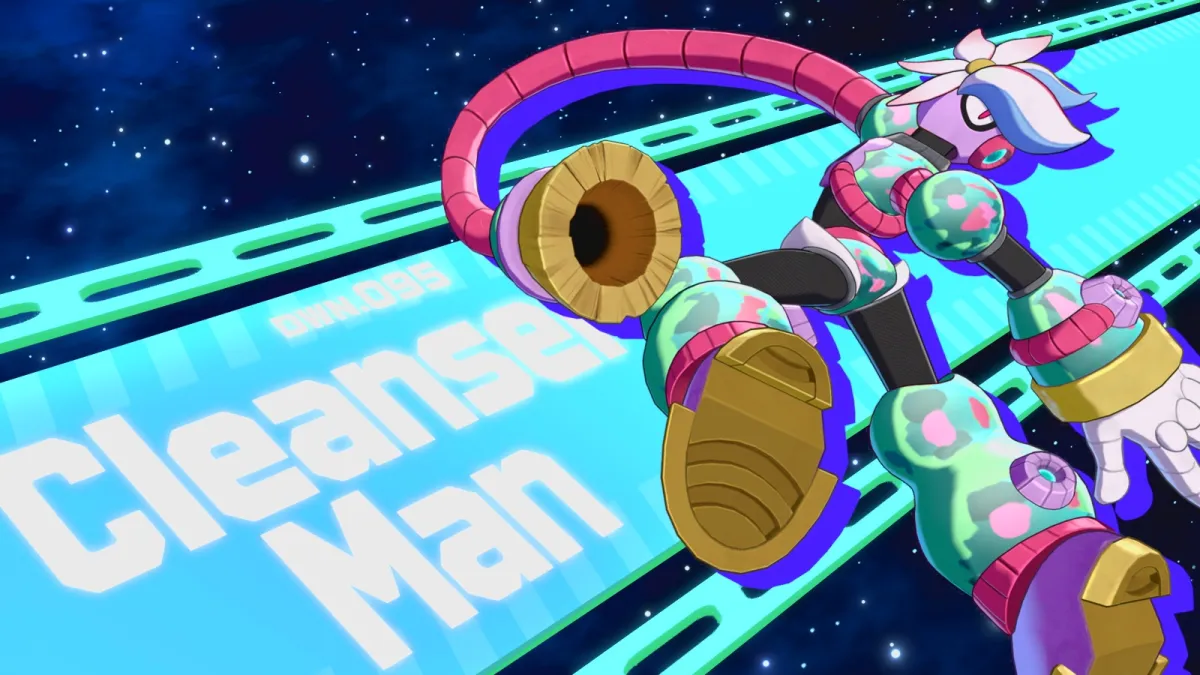
After that, go back a few screens and go to the Select Multiple option (the overlapping squares with the check mark on it). Go ahead and press the Select All option, then press Delete, and then hold your breath and commit by pressing Delete again.


In taking screenshots to write this little article, I deleted 110 14-second clips. That’s about 25 minutes of video footage, which ain’t nothing. Maybe it will help you not delete that one game that you started three years ago that you are definitely going to get back to any day now.
Share. Facebook Twitter Pinterest LinkedIn Telegram Reddit Email
Previous ArticleThe best TVs to buy this holiday season: A guide to best value options for every budget.
Next Article Apos x Community Rock Lobster IEMs review: I plugged them into my favorite playlist. Now I get the name.

Related Articles

Dual Override’s Boss Design Contest Winner

Dual Override’s Boss Design Contest Winner

16 November 2026
Frontiers Of Pandora For The Third Time

Frontiers Of Pandora For The Third Time

16 November 2026
Reliving The 2000s In World Of Warcraft: Forever (Feat. John Carson)

Reliving The 2000s In World Of Warcraft: Forever (Feat. John Carson)

14 November 2026
The Video Games And More You Should Play This Weekend – November 13, 2026

The Video Games And More You Should Play This Weekend – November 13, 2026

13 November 2026
Metal Gear Solid 4: Guns Of The Patriots: Part 8 – A Nostalgic Island Getaway

Metal Gear Solid 4: Guns Of The Patriots: Part 8 – A Nostalgic Island Getaway

13 November 2026
God Of War Sons Of Sparta Gets PS4 Version And New Content Next Monday

God Of War Sons Of Sparta Gets PS4 Version And New Content Next Monday

13 November 2026
Demo
Stay In Touch
  • Facebook
  • Twitter
  • Pinterest
  • Instagram
  • YouTube
  • Vimeo
Don't Miss
GTA 6 might take over 50 hours to complete, and that’s barely scratching the surface

GTA 6 might take over 50 hours to complete, and that’s barely scratching the surface

By News Room16 November 2026

The clock is ticking, and we’re inching closer to the release date of Grand Theft…

Apos x Community Rock Lobster IEMs review: I plugged them into my favorite playlist. Now I get the name.

Apos x Community Rock Lobster IEMs review: I plugged them into my favorite playlist. Now I get the name.

16 November 2026
Make Room For GTAVI By Deleting Your PS5 Trophy Clips

Make Room For GTAVI By Deleting Your PS5 Trophy Clips

16 November 2026
The best TVs to buy this holiday season: A guide to best value options for every budget.

The best TVs to buy this holiday season: A guide to best value options for every budget.

16 November 2026
Tech Savvyed
Facebook X (Twitter) Instagram Pinterest
  • Privacy Policy
  • Terms of use
  • Advertise
  • Contact
© 2026 Tech Savvyed. All Rights Reserved.

Type above and press Enter to search. Press Esc to cancel.