



Close Menu
Tech Savvyed
  • Home
  • News
  • Artificial Intelligence
  • Gadgets
  • Apps
  • Mobile
  • Gaming
  • Accessories
  • More
    • Web Stories
    • Spotlight
    • Press Release

Subscribe to Updates

Get the latest tech news and updates directly to your inbox.

What's On
Yet another study says AI is bad for elections, and the rabbit hole gets worse

Yet another study says AI is bad for elections, and the rabbit hole gets worse

21 July 2026
X finally rebuilt its neglected Android app, and it only took a year

X finally rebuilt its neglected Android app, and it only took a year

21 July 2026
Gemini Notebook’s new Collections arrive just as Google turns it into a bigger workspace

Gemini Notebook’s new Collections arrive just as Google turns it into a bigger workspace

21 July 2026
Facebook X (Twitter) Instagram
Tech Savvyed
SUBSCRIBE
  • Home
  • News
  • Artificial Intelligence
  • Gadgets
  • Apps
  • Mobile
  • Gaming
  • Accessories
  • More
    • Web Stories
    • Spotlight
    • Press Release
Tech Savvyed
Home»News»Buying a monitor? This Mac app can expose problems before the return window closes
News

Buying a monitor? This Mac app can expose problems before the return window closes

News RoomBy News Room20 July 20262 Mins Read
Buying a monitor? This Mac app can expose problems before the return window closes
Share
Facebook Twitter Reddit Telegram Pinterest Email

Making a brand-new tech purchase doesn’t always carry the guarantee of a perfectly functioning unit. But a tiny Mac app called Screen Test can help you find a defect before it gets too late. Screen Test (version 1.1) is a native macOS utility containing more than 25 patterns and diagnostic tools for evaluating built-in and external displays. It can help reveal dead or stuck pixels, backlight bleeding, and other issues. The app works completely offline, so you don’t have to rely on browser tabs or an internet connection.

Every pixel gets scrutinized

Screen Test fills the display with carefully selected colors, grids, grayscale steps, and other patterns that make subtle panel defects easier to spot. A solid-color cycle can expose pixels that remain permanently dark or stuck on one color, while uniform gray and black screens can reveal backlight bleed and inconsistent brightness across the panel.

Version 1.1 introduces seven additional tools:

  • An automated dead-pixel cycle
  • A text-resolution chart
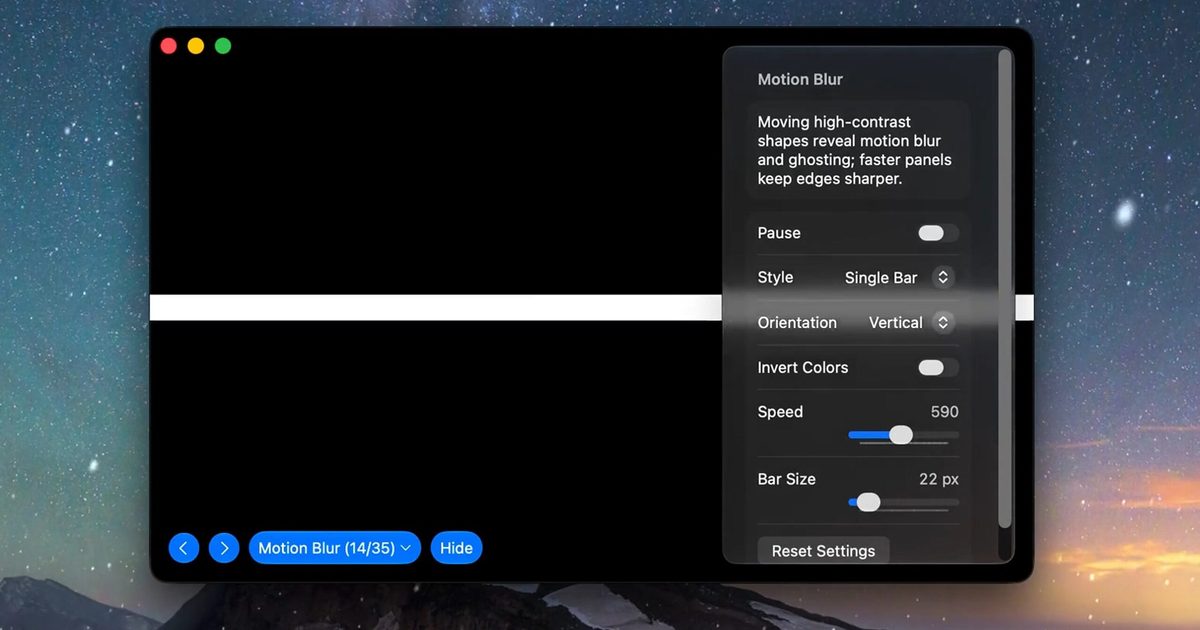
  • A motion-blur and ghosting test
  • Customizable solid-color fills
  • Checkerboard contrast patterns
  • Grayscale steps
  • Editable text for evaluating sharpness.

The motion test should prove especially useful when inspecting a gaming monitor, where slow pixel transitions can leave trails behind moving objects. Text patterns can also highlight subpixel rendering or sharpness problems that become obvious during everyday work, even when games and videos appear acceptable.

Four dollars could protect a much larger purchase

Most core features are available free of charge. A $3.99 lifetime purchase unlocks the remaining advanced options, with no recurring subscription. The Mac App Store lists the download at just 1.5MB and requires macOS 14 or later. Apple’s privacy label also states that the developer does not collect data from the app.

Screen Test cannot automatically certify a display or provide the numerical accuracy measurements produced by a colorimeter. Its developer describes the results as a visual reference and warns that the app does not replace professional testing equipment. However, it can be helpful when buying an external monitor, a new MacBook, or a secondhand display.

Share. Facebook Twitter Pinterest LinkedIn Telegram Reddit Email
Previous ArticleMicrosoft wants to stop screenshot leaks, one Edge tab at a time
Next Article Why Tax Uncertainty Is Becoming a Bigger Concern for Leeds Families and Business Owners

Related Articles

Yet another study says AI is bad for elections, and the rabbit hole gets worse

Yet another study says AI is bad for elections, and the rabbit hole gets worse

21 July 2026
X finally rebuilt its neglected Android app, and it only took a year

X finally rebuilt its neglected Android app, and it only took a year

21 July 2026
Gemini Notebook’s new Collections arrive just as Google turns it into a bigger workspace

Gemini Notebook’s new Collections arrive just as Google turns it into a bigger workspace

21 July 2026
Snapseed Camera now lets Android users save original photos and add geotags

Snapseed Camera now lets Android users save original photos and add geotags

21 July 2026
Ghost Recon could finally be making the comeback fans have been asking for

Ghost Recon could finally be making the comeback fans have been asking for

21 July 2026
Google Photos adds a quick toggle between AI and classic search

Google Photos adds a quick toggle between AI and classic search

21 July 2026
Demo
Stay In Touch
  • Facebook
  • Twitter
  • Pinterest
  • Instagram
  • YouTube
  • Vimeo
Don't Miss
X finally rebuilt its neglected Android app, and it only took a year

X finally rebuilt its neglected Android app, and it only took a year

By News Room21 July 2026

Android users have spent years receiving the rougher version of X. Now, the company has…

Gemini Notebook’s new Collections arrive just as Google turns it into a bigger workspace

Gemini Notebook’s new Collections arrive just as Google turns it into a bigger workspace

21 July 2026
Snapseed Camera now lets Android users save original photos and add geotags

Snapseed Camera now lets Android users save original photos and add geotags

21 July 2026
Ghost Recon could finally be making the comeback fans have been asking for

Ghost Recon could finally be making the comeback fans have been asking for

21 July 2026
Tech Savvyed
Facebook X (Twitter) Instagram Pinterest
  • Privacy Policy
  • Terms of use
  • Advertise
  • Contact
© 2026 Tech Savvyed. All Rights Reserved.

Type above and press Enter to search. Press Esc to cancel.



