



Close Menu
Tech Savvyed
  • Home
  • News
  • Artificial Intelligence
  • Gadgets
  • Apps
  • Mobile
  • Gaming
  • Accessories
  • More
    • Web Stories
    • Spotlight
    • Press Release

Subscribe to Updates

Get the latest tech news and updates directly to your inbox.

What's On
You can paint this wearable on your skin like a tattoo to monitor your heart and brain activity

You can paint this wearable on your skin like a tattoo to monitor your heart and brain activity

15 July 2026
Starlink V5 is here, and it’s lighter, smarter, and far more efficient

Starlink V5 is here, and it’s lighter, smarter, and far more efficient

15 July 2026
PlayStation Store’s Summer Sale starts July 15 with up to 75% off hundreds of games

PlayStation Store’s Summer Sale starts July 15 with up to 75% off hundreds of games

15 July 2026
Facebook X (Twitter) Instagram
Tech Savvyed
SUBSCRIBE
  • Home
  • News
  • Artificial Intelligence
  • Gadgets
  • Apps
  • Mobile
  • Gaming
  • Accessories
  • More
    • Web Stories
    • Spotlight
    • Press Release
Tech Savvyed
Home»News»Windows users can finally pick when updates stop with Microsoft’s latest patch
News

Windows users can finally pick when updates stop with Microsoft’s latest patch

News RoomBy News Room15 July 20262 Mins Read
Windows users can finally pick when updates stop with Microsoft’s latest patch
Share
Facebook Twitter Reddit Telegram Pinterest Email

Patch Tuesday updates are usually a shrug-and-install affair, but Microsoft’s July 2026 release actually gives you something to be excited about.

You can grab this update, tagged KB5101650, right now through Settings, or manually via the Microsoft Update Catalog if you’d rather not wait for it to roll out.

So what’s the big Windows Update change here?

Head to Settings, then Windows Update, and you’ll find a new calendar tool that lets you pause updates by simply picking an end date up to 35 days out. 

Once that window closes, Windows will resume checking for updates unless you go back in and pause it again. It’s not a true “forever” pause since you still have to renew it manually. 

However, it’s still a massive upgrade over the old system, which only let you delay updates for a handful of days at a time before forcing your hand again.
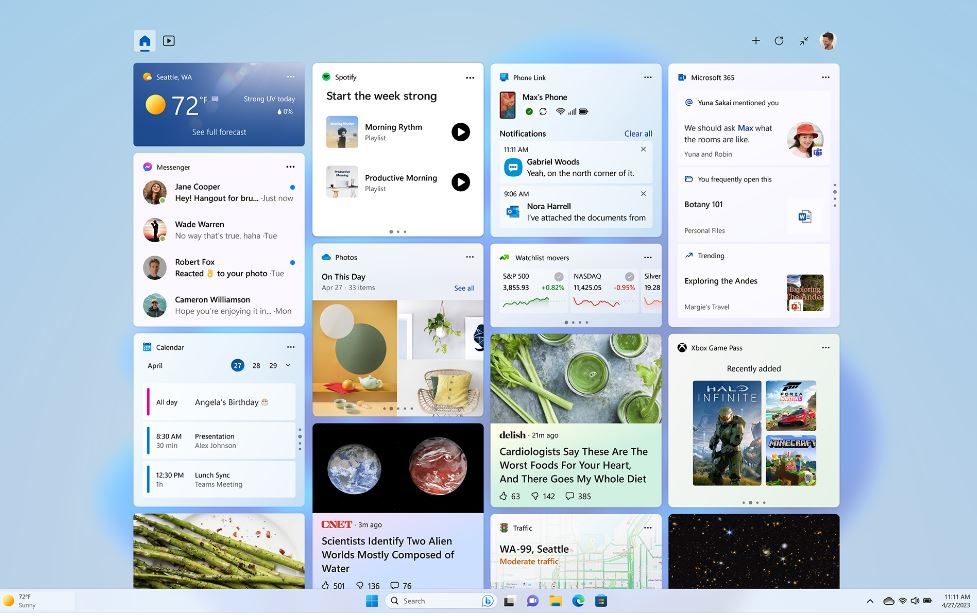
Windows 11 Widgets pictured in a screenshot.

What else is packed into this update?

Point-in-time Restore is arguably the bigger deal in the long term. Windows now automatically creates restore points covering your apps, settings, and personal files. So, if something breaks, you can roll your whole PC back to a recent working state instead of troubleshooting blindly. 

Widgets also got a much-needed decluttering. They no longer pop open on hover, open straight to the dashboard by default, and give you real control over notification badges. Accessibility gains a screen tint option to reduce eye strain, plus there’s a Magnifier that lets you enter an exact zoom percentage. 

File Explorer now surfaces quick actions like “Ask Copilot” when you hover over a file, even on work and school accounts. Under the hood, PCs with more than 32GB of memory can now run larger local AI models thanks to a tweak to the Graphics Kernel.

Share. Facebook Twitter Pinterest LinkedIn Telegram Reddit Email
Previous ArticlePebble is finally catching up on Time 2 orders, and I appreciate the transparency
Next Article PlayStation Store’s Summer Sale starts July 15 with up to 75% off hundreds of games

Related Articles

You can paint this wearable on your skin like a tattoo to monitor your heart and brain activity

You can paint this wearable on your skin like a tattoo to monitor your heart and brain activity

15 July 2026
Starlink V5 is here, and it’s lighter, smarter, and far more efficient

Starlink V5 is here, and it’s lighter, smarter, and far more efficient

15 July 2026
PlayStation Store’s Summer Sale starts July 15 with up to 75% off hundreds of games

PlayStation Store’s Summer Sale starts July 15 with up to 75% off hundreds of games

15 July 2026
Pebble is finally catching up on Time 2 orders, and I appreciate the transparency

Pebble is finally catching up on Time 2 orders, and I appreciate the transparency

14 July 2026
Can AI audiobooks narrate better than humans? This study says many listeners think so

Can AI audiobooks narrate better than humans? This study says many listeners think so

14 July 2026
Gemini can make sense of the world around you, but don’t let it observe your children just yet

Gemini can make sense of the world around you, but don’t let it observe your children just yet

14 July 2026
Demo
Stay In Touch
  • Facebook
  • Twitter
  • Pinterest
  • Instagram
  • YouTube
  • Vimeo
Don't Miss
Starlink V5 is here, and it’s lighter, smarter, and far more efficient

Starlink V5 is here, and it’s lighter, smarter, and far more efficient

By News Room15 July 2026

Not every hardware upgrade needs to be about speed. With Starlink V5, SpaceX is betting…

PlayStation Store’s Summer Sale starts July 15 with up to 75% off hundreds of games

PlayStation Store’s Summer Sale starts July 15 with up to 75% off hundreds of games

15 July 2026
Windows users can finally pick when updates stop with Microsoft’s latest patch

Windows users can finally pick when updates stop with Microsoft’s latest patch

15 July 2026
Pebble is finally catching up on Time 2 orders, and I appreciate the transparency

Pebble is finally catching up on Time 2 orders, and I appreciate the transparency

14 July 2026
Tech Savvyed
Facebook X (Twitter) Instagram Pinterest
  • Privacy Policy
  • Terms of use
  • Advertise
  • Contact
© 2026 Tech Savvyed. All Rights Reserved.

Type above and press Enter to search. Press Esc to cancel.



