



Close Menu
Tech Savvyed
  • Home
  • News
  • Artificial Intelligence
  • Gadgets
  • Apps
  • Mobile
  • Gaming
  • Accessories
  • More
    • Web Stories
    • Spotlight
    • Press Release

Subscribe to Updates

Get the latest tech news and updates directly to your inbox.

What's On
Samsung’s cheaper Galaxy S26 FE may get one camera feature I absolutely loved

Samsung’s cheaper Galaxy S26 FE may get one camera feature I absolutely loved

18 August 2026
Spotify’s Playlist Notes make it easier to add context to your favorite picks

Spotify’s Playlist Notes make it easier to add context to your favorite picks

18 August 2026
YouTube is making view counts bigger, but creators aren’t getting any richer

YouTube is making view counts bigger, but creators aren’t getting any richer

18 August 2026
Facebook X (Twitter) Instagram
Tech Savvyed
SUBSCRIBE
  • Home
  • News
  • Artificial Intelligence
  • Gadgets
  • Apps
  • Mobile
  • Gaming
  • Accessories
  • More
    • Web Stories
    • Spotlight
    • Press Release
Tech Savvyed
Home»News»Spotify’s Playlist Notes make it easier to add context to your favorite picks
News

Spotify’s Playlist Notes make it easier to add context to your favorite picks

News RoomBy News Room18 August 20262 Mins Read
Spotify’s Playlist Notes make it easier to add context to your favorite picks
Share
Facebook Twitter Reddit Telegram Pinterest Email

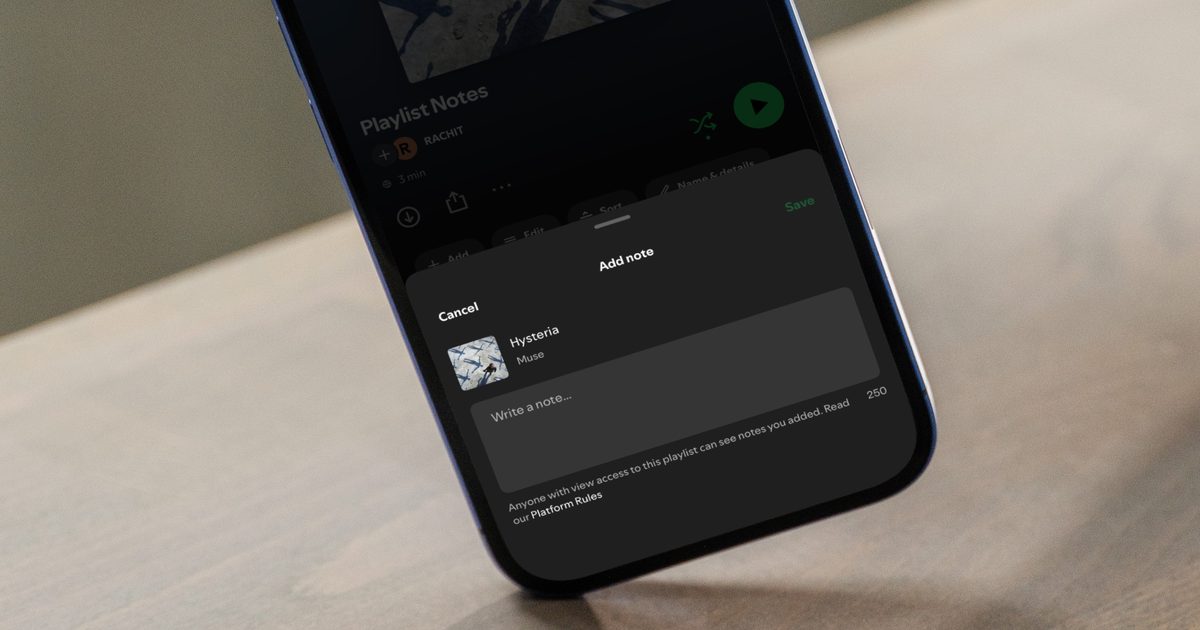
If you have ever wondered why a specific song made its way to a playlist, Spotify’s new Playlist Notes feature is here to help. The feature lets editors and users add context to their songs, podcasts, and audiobook picks. 

The feature joins the long line of playlist improvements, including custom cover art, the ability to organize playlists into folders, and smooth transitions between tracks, that make it easier to personalize your listening experience and make your playlists feel more like your own.

What exactly are playlist notes?

Playlist Notes let you attach a quick thought next to any song, podcast episode, or audiobook inside a playlist you made or collaborate on. Maybe a track reminds you of a road trip, or an episode changed how you see something. Now you can share that context without ever leaving the app.

The feature grew out of an earlier idea called User Notes, and Spotify’s editors are getting first access. They will use it to explain why a track made the cut on some of Spotify’s biggest playlists, covering everything from the reasoning behind a pick to why it feels culturally relevant right now.

Alongside the notes, you also get Editor Profiles, which show an editor’s favorite tracks and albums, plus every playlist they work on. It’s a fun way to actually know who is picking the songs you’re vibing to.

Where can you find these notes?

Editor notes are currently rolling out to Free and Premium users aged 16 and up in the US, Canada, the UK, Ireland, Australia, and New Zealand. For now, look for them on playlists like Today’s Top Hits, RapCaviar, Hot Country, All New Pop, Mint, and Fresh Finds Hip-Hop. 

Tap Notes at the top of these playlists to start reading, and tap an editor’s name to browse their profile. You’ll also spot these notes in Now Playing, even when you’re listening outside the playlist where the note first appeared.
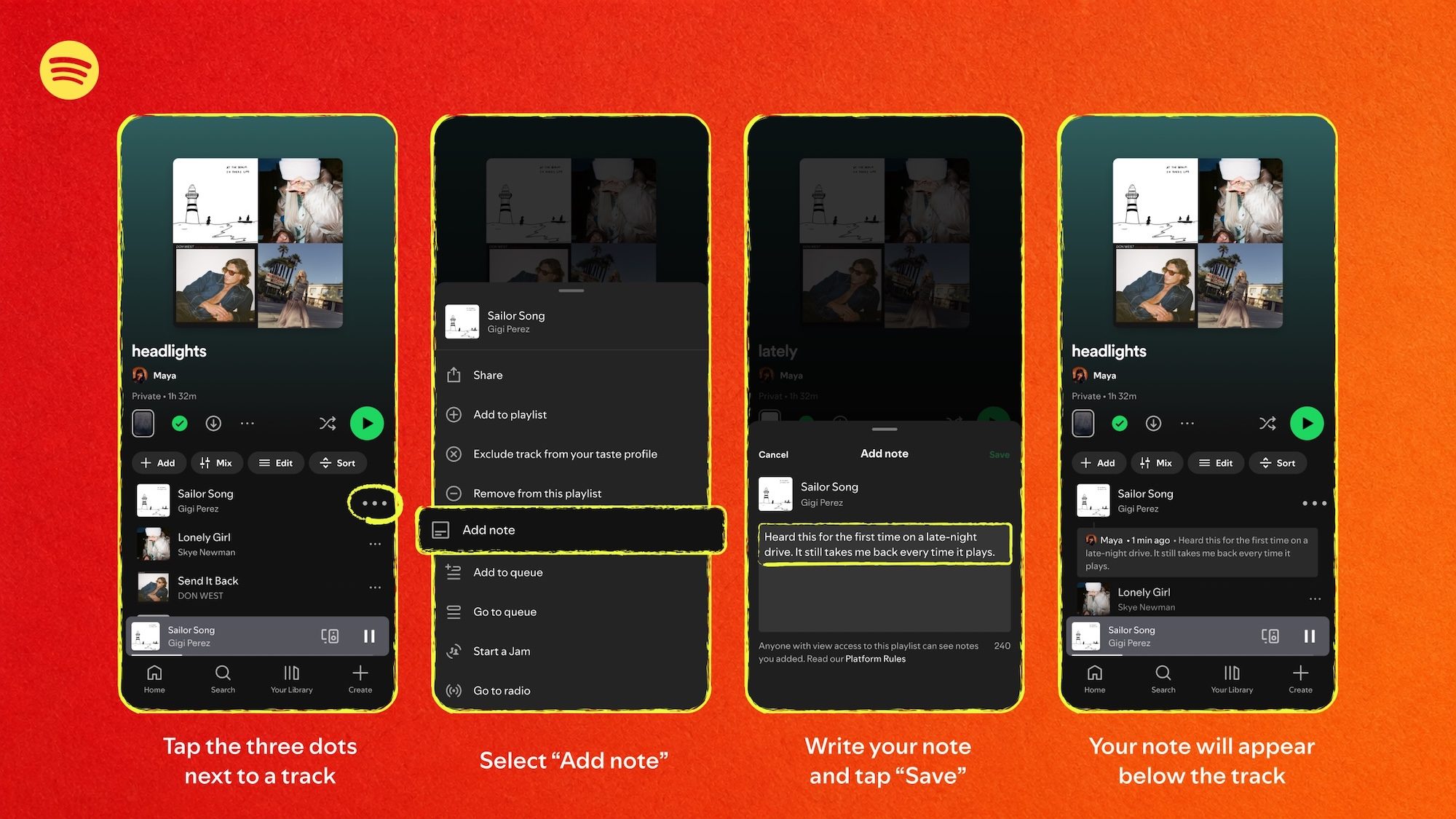
Playlist Notes Infographic for song

You can also add your own notes. Open a playlist you own or collaborate on, tap the three dots next to a track, and hit Add Note. Just remember that anyone who can view your playlist can also read your notes, so keep that in mind before getting too personal.

Playlist Notes for personal playlists are already rolling out on iOS and Android in over 100 markets, so update your app if you don’t see it yet.

Share. Facebook Twitter Pinterest LinkedIn Telegram Reddit Email
Previous ArticleYouTube is making view counts bigger, but creators aren’t getting any richer
Next Article Samsung’s cheaper Galaxy S26 FE may get one camera feature I absolutely loved

Related Articles

Samsung’s cheaper Galaxy S26 FE may get one camera feature I absolutely loved

Samsung’s cheaper Galaxy S26 FE may get one camera feature I absolutely loved

18 August 2026
YouTube is making view counts bigger, but creators aren’t getting any richer

YouTube is making view counts bigger, but creators aren’t getting any richer

18 August 2026
Viture Pro 2 review: Affordable glasses that I loved more for work than play

Viture Pro 2 review: Affordable glasses that I loved more for work than play

18 August 2026
Apple just accidentally revealed its camera-equipped AirPods

Apple just accidentally revealed its camera-equipped AirPods

18 August 2026
CMF’s next earbuds are coming, and I have a pretty good guess what they are

CMF’s next earbuds are coming, and I have a pretty good guess what they are

18 August 2026
Apple Wallet driver’s licenses are coming to North Carolina, but there’s a catch

Apple Wallet driver’s licenses are coming to North Carolina, but there’s a catch

18 August 2026
Demo
Stay In Touch
  • Facebook
  • Twitter
  • Pinterest
  • Instagram
  • YouTube
  • Vimeo
Don't Miss
Spotify’s Playlist Notes make it easier to add context to your favorite picks

Spotify’s Playlist Notes make it easier to add context to your favorite picks

By News Room18 August 2026

If you have ever wondered why a specific song made its way to a playlist,…

YouTube is making view counts bigger, but creators aren’t getting any richer

YouTube is making view counts bigger, but creators aren’t getting any richer

18 August 2026
Viture Pro 2 review: Affordable glasses that I loved more for work than play

Viture Pro 2 review: Affordable glasses that I loved more for work than play

18 August 2026
Apple just accidentally revealed its camera-equipped AirPods

Apple just accidentally revealed its camera-equipped AirPods

18 August 2026
Tech Savvyed
Facebook X (Twitter) Instagram Pinterest
  • Privacy Policy
  • Terms of use
  • Advertise
  • Contact
© 2026 Tech Savvyed. All Rights Reserved.

Type above and press Enter to search. Press Esc to cancel.



