



Close Menu
Tech Savvyed
  • Home
  • News
  • Artificial Intelligence
  • Gadgets
  • Apps
  • Mobile
  • Gaming
  • Accessories
  • More
    • Web Stories
    • Spotlight
    • Press Release

Subscribe to Updates

Get the latest tech news and updates directly to your inbox.

What's On
I went hands-on with Samsung Galaxy Z Fold 8 Ultra. It’s peak foldable in an old garb. 

I went hands-on with Samsung Galaxy Z Fold 8 Ultra. It’s peak foldable in an old garb. 

23 July 2026
Samsung makes it easier to run multiple apps on Galaxy Z Flip 8’s cover screen

Samsung makes it easier to run multiple apps on Galaxy Z Flip 8’s cover screen

23 July 2026
The LG C6 OLED is great out of the box. These settings make it even better.

The LG C6 OLED is great out of the box. These settings make it even better.

23 July 2026
Facebook X (Twitter) Instagram
Tech Savvyed
SUBSCRIBE
  • Home
  • News
  • Artificial Intelligence
  • Gadgets
  • Apps
  • Mobile
  • Gaming
  • Accessories
  • More
    • Web Stories
    • Spotlight
    • Press Release
Tech Savvyed
Home»News»Samsung makes it easier to run multiple apps on Galaxy Z Flip 8’s cover screen
News

Samsung makes it easier to run multiple apps on Galaxy Z Flip 8’s cover screen

News RoomBy News Room23 July 20262 Mins Read
Samsung makes it easier to run multiple apps on Galaxy Z Flip 8’s cover screen
Share
Facebook Twitter Reddit Telegram Pinterest Email

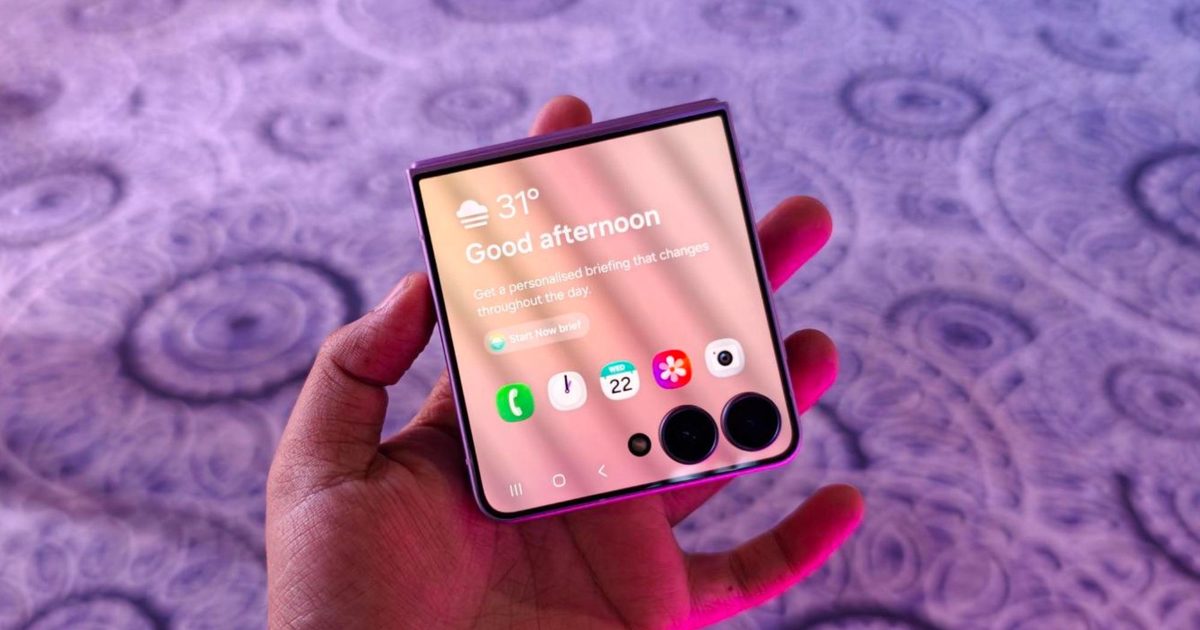
Samsung is finally making the Galaxy Z Flip’s cover screen much more useful. With the new Galaxy Z Flip 8, you no longer have to rely on workarounds to access more apps without unfolding the phone. Instead, Samsung has expanded native support on the FlexWindow, allowing 16 apps to run directly on the outer display and also making it much easier to launch virtually any other app.

The update addresses one of the biggest complaints Flip users have had for years and brings Samsung up to the level of rivals like Motorola, whose Razr series has long offered a more flexible cover screen experience.

Which apps can you use on the Galaxy Z Flip 8 cover screen?

Samsung ships the Z Flip 8 with 16 apps supported out of the box. 12 of them are fully optimized system apps, including Bixby, Samsung Browser, Calculator, Calendar, Camera, Clock, Contacts, Gallery, Samsung Health, Notes, Phone, and Voice Recorder, all accessible through a native app drawer.

The remaining four are third-party apps that matter for daily use. Google Maps, Google Messages, Netflix, and YouTube are grouped under a section called Labs, although Samsung notes that the experience may not always be perfect. Samsung also improved Now Bar and Now Nudge for quicker glanceable access.

What if your favorite app is not officially supported?

Samsung has not removed the option to run unsupported apps. Instead, it has made the process much easier. The Good Lock MultiStar module is still required for apps that are not officially optimized, but the Galaxy Z Flip 8 now shows a prompt on the cover screen that helps you install and set it up. Older Flip models required users to search through settings while the phone was unfolded, making the feature less obvious.

Android Authority also reports that Samsung plans to bring this updated cover screen experience to the Galaxy Z Flip 7. However, it is still unclear whether older Galaxy Z Flip models will receive the same improvements through a future One UI 9 update.

Share. Facebook Twitter Pinterest LinkedIn Telegram Reddit Email
Previous ArticleThe LG C6 OLED is great out of the box. These settings make it even better.
Next Article I went hands-on with Samsung Galaxy Z Fold 8 Ultra. It’s peak foldable in an old garb. 

Related Articles

I went hands-on with Samsung Galaxy Z Fold 8 Ultra. It’s peak foldable in an old garb. 

I went hands-on with Samsung Galaxy Z Fold 8 Ultra. It’s peak foldable in an old garb. 

23 July 2026
The LG C6 OLED is great out of the box. These settings make it even better.

The LG C6 OLED is great out of the box. These settings make it even better.

23 July 2026
A MacBook Neo refresh may already be in testing and could address its biggest performance bottlenecks

A MacBook Neo refresh may already be in testing and could address its biggest performance bottlenecks

23 July 2026
The MacBook Air and iMac are next in line for Apple’s OLED push

The MacBook Air and iMac are next in line for Apple’s OLED push

23 July 2026
What Features Should You Look for in an AI-Powered Laptop or Copilot+ PC?

What Features Should You Look for in an AI-Powered Laptop or Copilot+ PC?

22 July 2026
Fold 8 Ultra vs. Fold 7: Upgrades across the board, but is the Ultra really worth the upgrade?

Fold 8 Ultra vs. Fold 7: Upgrades across the board, but is the Ultra really worth the upgrade?

22 July 2026
Demo
Stay In Touch
  • Facebook
  • Twitter
  • Pinterest
  • Instagram
  • YouTube
  • Vimeo
Don't Miss
Samsung makes it easier to run multiple apps on Galaxy Z Flip 8’s cover screen

Samsung makes it easier to run multiple apps on Galaxy Z Flip 8’s cover screen

By News Room23 July 2026

Samsung is finally making the Galaxy Z Flip’s cover screen much more useful. With the…

The LG C6 OLED is great out of the box. These settings make it even better.

The LG C6 OLED is great out of the box. These settings make it even better.

23 July 2026
A MacBook Neo refresh may already be in testing and could address its biggest performance bottlenecks

A MacBook Neo refresh may already be in testing and could address its biggest performance bottlenecks

23 July 2026
The MacBook Air and iMac are next in line for Apple’s OLED push

The MacBook Air and iMac are next in line for Apple’s OLED push

23 July 2026
Tech Savvyed
Facebook X (Twitter) Instagram Pinterest
  • Privacy Policy
  • Terms of use
  • Advertise
  • Contact
© 2026 Tech Savvyed. All Rights Reserved.

Type above and press Enter to search. Press Esc to cancel.



