


Close Menu
Tech Savvyed
  • Home
  • News
  • Artificial Intelligence
  • Gadgets
  • Apps
  • Mobile
  • Gaming
  • Accessories
  • More
    • Web Stories
    • Spotlight
    • Press Release

Subscribe to Updates

Get the latest tech news and updates directly to your inbox.

What's On
Edifier’s new budget headphones put song lyrics on the earcups and I’m confused

Edifier’s new budget headphones put song lyrics on the earcups and I’m confused

16 May 2026
I can’t live without iPhone shortcuts. These 7 are my favorites that you must try, too.

I can’t live without iPhone shortcuts. These 7 are my favorites that you must try, too.

16 May 2026
OpenAI is bringing in the mighty Codex tool to the ChatGPT app on your phone

OpenAI is bringing in the mighty Codex tool to the ChatGPT app on your phone

16 May 2026
Facebook X (Twitter) Instagram
Tech Savvyed
SUBSCRIBE
  • Home
  • News
  • Artificial Intelligence
  • Gadgets
  • Apps
  • Mobile
  • Gaming
  • Accessories
  • More
    • Web Stories
    • Spotlight
    • Press Release
Tech Savvyed
Home»News»OpenAI’s Codex now has a tiny AI pet that keeps you updated while you code
News

OpenAI’s Codex now has a tiny AI pet that keeps you updated while you code

News RoomBy News Room4 May 20262 Mins Read
OpenAI’s Codex now has a tiny AI pet that keeps you updated while you code
Share
Facebook Twitter Reddit Telegram Pinterest Email

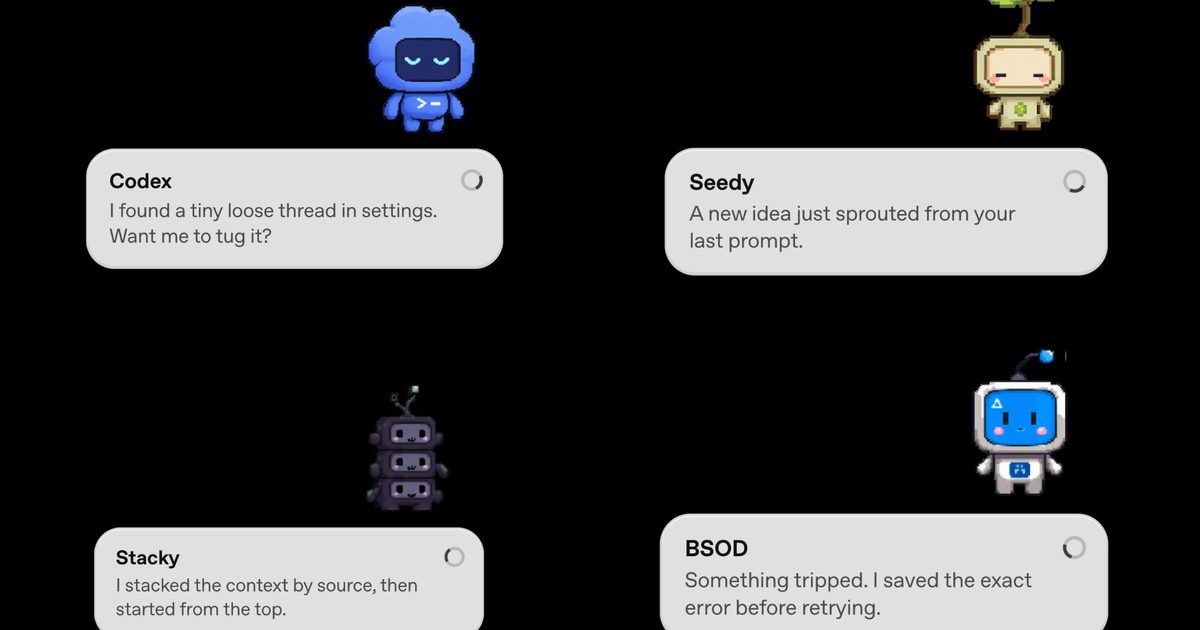
If you’re into vibe coding, OpenAI just made it a lot more adorable. The company has rolled out Codex Pets, a brand-new feature for its Codex desktop app that adds animated companions to your screen while you work. Codex is OpenAI’s agentic coding tool that handles tasks on your behalf. It runs in the background and gets things done, and now it has a tiny mascot to go with it.

So, what exactly is a Codex Pet?

A Codex Pet is an optional animated companion that floats as an overlay on top of your screen, even when the Codex app itself is minimized. It shows you what Codex is currently working on through small message bubbles and alerts you when a task wraps up or when it needs your input.

If your pet pops up mid-task, you can click on it to send a reply directly to the agent. It is a passive status indicator that doubles as a lightweight two-way channel. Eight built-in pets are available right out of the box, all designed in a cute pixel-art style.

How to get a Codex Pet?

Getting a Codex Pet is simple. Just open the Codex app and type “/pet” to summon or dismiss your companion. If you want something more personal, use the “/hatch” command. Hatch is a bundled tool that takes any image you upload and turns it into a fully animated pet, saved locally in your Codex home folder so you can share it with others.

The community has already taken to it, and fan-made sharing sites have appeared online within hours of the launch. OpenAI is even running a limited-time contest where 10 of their favorite custom pets win their creators 30 days of ChatGPT Pro.

Beyond the pets, the same update also introduced config auto-import, which allows Codex to detect and pull in settings from other coding agents, such as Claude Code. There is also a new dictation dictionary in Settings, where you can save abbreviations and phrases so voice input stops getting them wrong.

Share. Facebook Twitter Pinterest LinkedIn Telegram Reddit Email
Previous ArticleIt’s time we blindly stop believing that Snapdragon phones are superior
Next Article I used the iPhone Air for 6 months, here’s the only thing that I miss

Related Articles

Edifier’s new budget headphones put song lyrics on the earcups and I’m confused

Edifier’s new budget headphones put song lyrics on the earcups and I’m confused

16 May 2026
I can’t live without iPhone shortcuts. These 7 are my favorites that you must try, too.

I can’t live without iPhone shortcuts. These 7 are my favorites that you must try, too.

16 May 2026
OpenAI is bringing in the mighty Codex tool to the ChatGPT app on your phone

OpenAI is bringing in the mighty Codex tool to the ChatGPT app on your phone

16 May 2026
Asus ROG and Xreal just built the AR glasses gamers have been waiting for, at a price that stings

Asus ROG and Xreal just built the AR glasses gamers have been waiting for, at a price that stings

16 May 2026
YouTube is giving creators a new weapon against AI deepfakes

YouTube is giving creators a new weapon against AI deepfakes

16 May 2026
Microsoft is finally fixing the most annoying thing about Windows 11

Microsoft is finally fixing the most annoying thing about Windows 11

16 May 2026
Demo
Stay In Touch
  • Facebook
  • Twitter
  • Pinterest
  • Instagram
  • YouTube
  • Vimeo
Don't Miss
I can’t live without iPhone shortcuts. These 7 are my favorites that you must try, too.

I can’t live without iPhone shortcuts. These 7 are my favorites that you must try, too.

By News Room16 May 2026

The iPhone Shortcuts app reminds me of Minecraft. It might be relatively easy to jump…

OpenAI is bringing in the mighty Codex tool to the ChatGPT app on your phone

OpenAI is bringing in the mighty Codex tool to the ChatGPT app on your phone

16 May 2026
Asus ROG and Xreal just built the AR glasses gamers have been waiting for, at a price that stings

Asus ROG and Xreal just built the AR glasses gamers have been waiting for, at a price that stings

16 May 2026
YouTube is giving creators a new weapon against AI deepfakes

YouTube is giving creators a new weapon against AI deepfakes

16 May 2026
Tech Savvyed
Facebook X (Twitter) Instagram Pinterest
  • Privacy Policy
  • Terms of use
  • Advertise
  • Contact
© 2026 Tech Savvyed. All Rights Reserved.

Type above and press Enter to search. Press Esc to cancel.