



Close Menu
Tech Savvyed
  • Home
  • News
  • Artificial Intelligence
  • Gadgets
  • Apps
  • Mobile
  • Gaming
  • Accessories
  • More
    • Web Stories
    • Spotlight
    • Press Release

Subscribe to Updates

Get the latest tech news and updates directly to your inbox.

What's On
The Video Games And More You Should Play This Weekend – September 4, 2026

The Video Games And More You Should Play This Weekend – September 4, 2026

5 September 2026
Grand Theft Auto VI Extended Look Reactions + The – Sep 4, 2026

Grand Theft Auto VI Extended Look Reactions + The – Sep 4, 2026

4 September 2026
Metal Gear Solid 4: Guns Of The Patriots: Part 2 – Old Snake Learns New Tricks | Super Replay

Metal Gear Solid 4: Guns Of The Patriots: Part 2 – Old Snake Learns New Tricks | Super Replay

4 September 2026
Facebook X (Twitter) Instagram
Tech Savvyed
SUBSCRIBE
  • Home
  • News
  • Artificial Intelligence
  • Gadgets
  • Apps
  • Mobile
  • Gaming
  • Accessories
  • More
    • Web Stories
    • Spotlight
    • Press Release
Tech Savvyed
Home»News»OpenAI patches ChatGPT desktop after user backlash over its recent redesign
News

OpenAI patches ChatGPT desktop after user backlash over its recent redesign

News RoomBy News Room18 July 20262 Mins Read
OpenAI patches ChatGPT desktop after user backlash over its recent redesign
Share
Facebook Twitter Reddit Telegram Pinterest Email

ChatGPT‘s desktop app is getting a much-needed course correction. When OpenAI merged Chat, Work, and Codex into one unified desktop app roughly a week ago, the experience came with more issues than intended, burying basic features like chat history and making it awkward to switch between modes. Now OpenAI has rolled out a batch of fixes based on feedback to make the app feel consistent regardless of which device you use.

Evening! We’ve gotten lots of great feedback on the new ChatGPT desktop app (which we didn’t get totally quite right on the first try), and as a result, we’ve made some changes.

1/ ChatGPT conversation history and projects are now visible in the sidebar. Also, your Chat and Work… pic.twitter.com/ffacbMdukN

— Tibo (@thsottiaux) July 17, 2026

What is changing in the ChatGPT desktop app?

One of the biggest additions is the return of conversation history and Projects to the desktop sidebar. Instead of hunting through different screens, you can quickly jump back into previous chats or ongoing work from a single place.

OpenAI has also enabled Chat and Work history syncing across the web, desktop, and mobile apps. That means your conversations stay up to date no matter which device you use. However, Local Tasks remain stored only on your computer and are not synchronized across devices.

The desktop app also gets a dedicated switch for moving between Chat and Work mode. The layout now matches the experience on the web and mobile, making it easier to move between personal conversations and work-related tasks without relearning the interface.

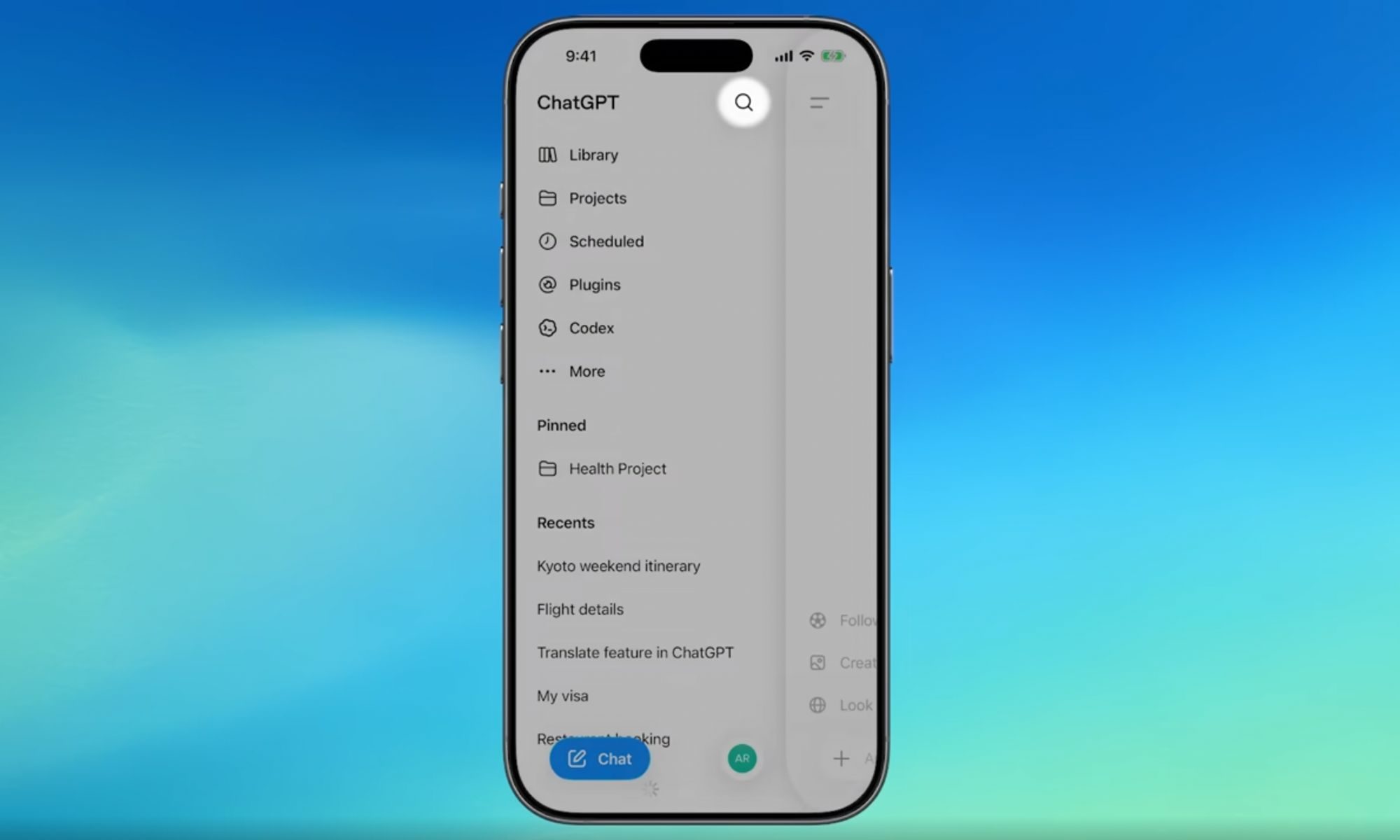
Yesterday, OpenAI also rolled out a major search upgrade that lets you find old chats, projects, documents, and images from one place, alongside a bunch of teen safety features and parental controls.
chatgpt-new-search

Why does this update matter?

OpenAI says these changes are a direct response to user feedback after the redesigned ChatGPT desktop app missed the mark. The company also confirmed that Codex mode remains unchanged, while promising to continue shipping frequent improvements based on user feedback.

These fixes are now live across every ChatGPT plan, including free accounts, and you can access them by updating your desktop app. For now, ChatGPT’s desktop app looks a lot closer to what users expected from the start.

Share. Facebook Twitter Pinterest LinkedIn Telegram Reddit Email
Previous ArticleAnother Apple price hike just landed, this time on Apple One
Next Article What Makes a Laser Printer Better for Small Business Workflows?

Related Articles

Soundcore Space 2 Pro headphones promise crystal-clear calls with Anker’s new AI chip

Soundcore Space 2 Pro headphones promise crystal-clear calls with Anker’s new AI chip

3 September 2026
Xbox Cloud Gaming is about to become a lot more appealing to casual gamers with a new pay-as-you-go option

Xbox Cloud Gaming is about to become a lot more appealing to casual gamers with a new pay-as-you-go option

3 September 2026
Lenovo reveals iMac rival that upstages Apple with more goodies at a lower price

Lenovo reveals iMac rival that upstages Apple with more goodies at a lower price

3 September 2026
Motorola’s new Edge 70 Plus packs a 200MP camera and a massive battery

Motorola’s new Edge 70 Plus packs a 200MP camera and a massive battery

3 September 2026
We got GTA VI limited-edition DualSense controllers before GTA VI

We got GTA VI limited-edition DualSense controllers before GTA VI

3 September 2026
Anker unveils smarter chargers and power banks built to fight heat and battery degradation

Anker unveils smarter chargers and power banks built to fight heat and battery degradation

3 September 2026
Demo
Stay In Touch
  • Facebook
  • Twitter
  • Pinterest
  • Instagram
  • YouTube
  • Vimeo
Don't Miss
Grand Theft Auto VI Extended Look Reactions + The – Sep 4, 2026

Grand Theft Auto VI Extended Look Reactions + The – Sep 4, 2026

By News Room4 September 2026

It’s a packed week of The Game Informer Show. Marcus, Charles, and Eric discuss last…

Metal Gear Solid 4: Guns Of The Patriots: Part 2 – Old Snake Learns New Tricks | Super Replay

Metal Gear Solid 4: Guns Of The Patriots: Part 2 – Old Snake Learns New Tricks | Super Replay

4 September 2026
Way Of The Sword’s Easy Mode Expertly – Sep 4, 2026

Way Of The Sword’s Easy Mode Expertly – Sep 4, 2026

4 September 2026
Two Nintendo Directs Air Next Week – Sep 4, 2026

Two Nintendo Directs Air Next Week – Sep 4, 2026

4 September 2026
Tech Savvyed
Facebook X (Twitter) Instagram Pinterest
  • Privacy Policy
  • Terms of use
  • Advertise
  • Contact
© 2026 Tech Savvyed. All Rights Reserved.

Type above and press Enter to search. Press Esc to cancel.



