



Close Menu
Tech Savvyed
  • Home
  • News
  • Artificial Intelligence
  • Gadgets
  • Apps
  • Mobile
  • Gaming
  • Accessories
  • More
    • Web Stories
    • Spotlight
    • Press Release

Subscribe to Updates

Get the latest tech news and updates directly to your inbox.

What's On
OnePlus is ending its US operations pretty soon, says report

OnePlus is ending its US operations pretty soon, says report

14 July 2026
Microsoft is finally fixing the worst thing about Windows Search, but you can’t try it just yet

Microsoft is finally fixing the worst thing about Windows Search, but you can’t try it just yet

14 July 2026
How to install iOS 27 public beta on your iPhone?

How to install iOS 27 public beta on your iPhone?

14 July 2026
Facebook X (Twitter) Instagram
Tech Savvyed
SUBSCRIBE
  • Home
  • News
  • Artificial Intelligence
  • Gadgets
  • Apps
  • Mobile
  • Gaming
  • Accessories
  • More
    • Web Stories
    • Spotlight
    • Press Release
Tech Savvyed
Home»News»Microsoft is finally fixing the worst thing about Windows Search, but you can’t try it just yet
News

Microsoft is finally fixing the worst thing about Windows Search, but you can’t try it just yet

News RoomBy News Room14 July 20262 Mins Read
Microsoft is finally fixing the worst thing about Windows Search, but you can’t try it just yet
Share
Facebook Twitter Reddit Telegram Pinterest Email

Windows Search has been a mess for years, and I do not use that word lightly. Open it to find a file, and you get trending Bing topics, Microsoft Store promotions, and an AI tools tile that just opens a browser. 

That is changing, but not immediately for all users. Microsoft is rolling out a batch of Windows Search improvements to Insiders in the Experimental channel, and for once, this isn’t just a fresh coat of paint.

What do the Windows Search improvements include?

The search home screen has been decluttered. It ditches the trending topics and “games for you” carousel in favor of a simple, less infuriating list of recent searches. It’s less flashy, I’d say, but it’s also less like opening a mini-homepage every time you press the Windows key when you didn’t even need one.

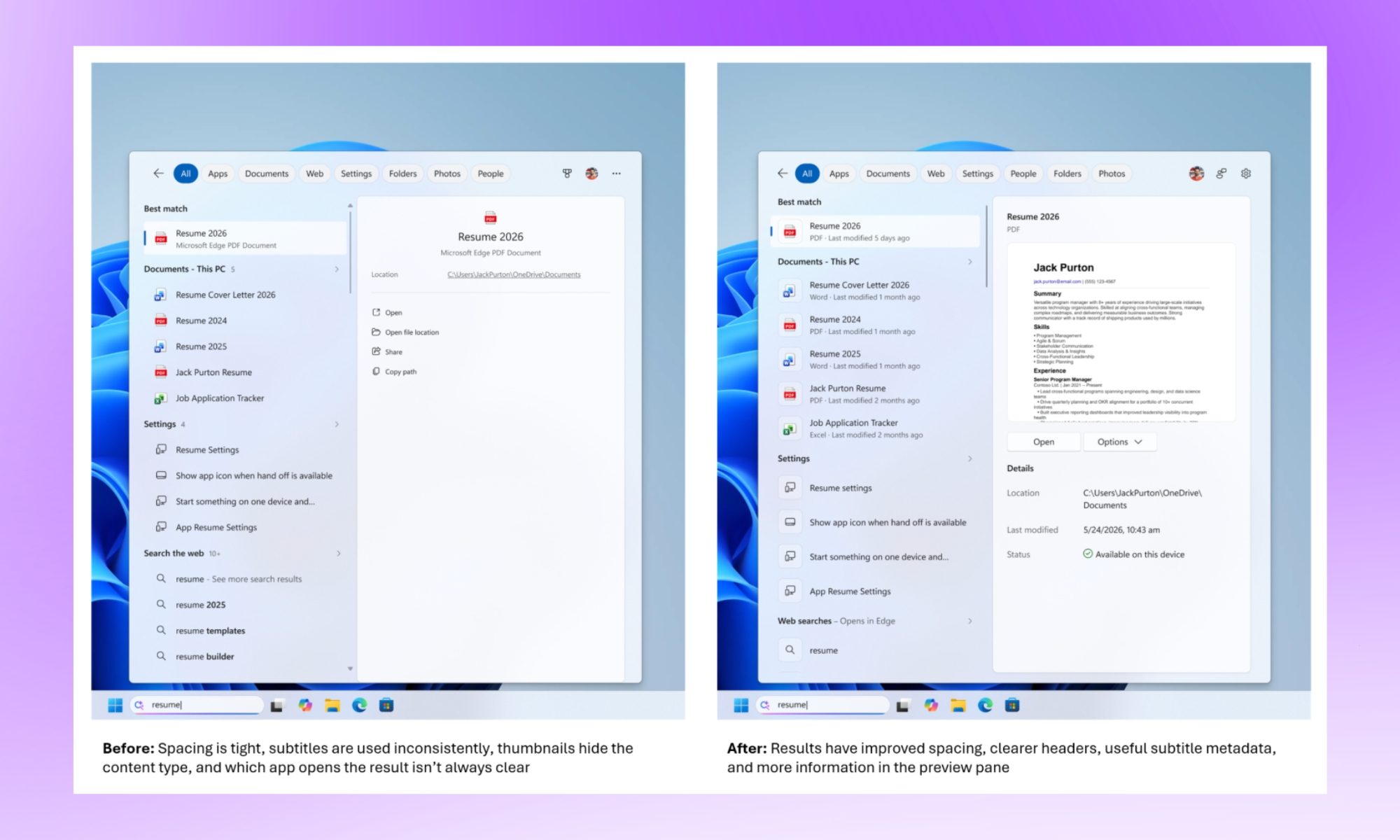
The bigger win, I’d say, is in the results themselves. Search now labels where each result actually comes from, whether that’s an app, a setting, a file, or a web suggestion. So, you won’t be guessing what you’re about to click into. 

Promotional content and sponsored product carousels have also been stripped from web results, which was long overdue, in my opinion. Nobody typing “running plan” into their taskbar wanted a “Shop now” button shoved into the answer. 
Page, Text, White Board

What else is new?

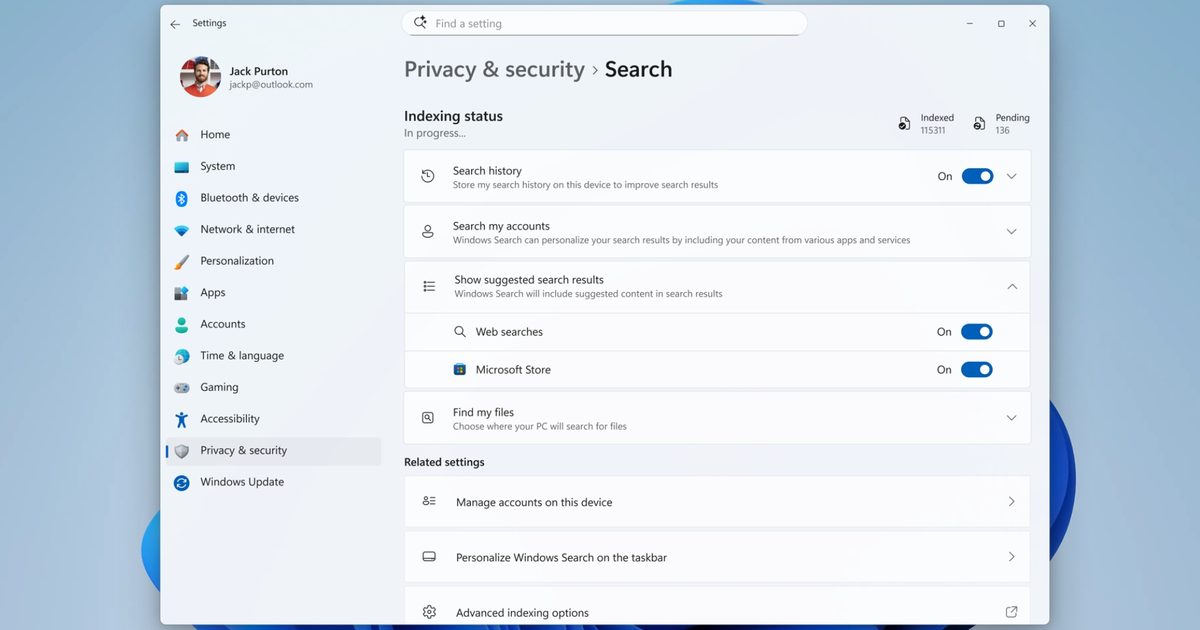
A new toggle in Settings > Privacy & Security > Search lets you turn off web and Microsoft Store suggestions entirely if you’d rather stick to results from your own PC, something that I’d personally enable from day one. Typo tolerance has improved too, so “utlook” will still surface Outlook instead of shrugging at you.

Local files and settings are also getting prioritized more aggressively when they’re the better match. Furthermore, two-character file searches are now supported. Microsoft says reliability fixes are baked in as well, targeting the crashes and loading hiccups longtime Insiders have flagged for months.

None of this reinvents Search. It just makes it behave as it should have all along. While all the changes are live for Insiders (in the Experimental channel), they should be rolled out as part of a stable Windows update in a few months.

Share. Facebook Twitter Pinterest LinkedIn Telegram Reddit Email
Previous ArticleHow to install iOS 27 public beta on your iPhone?
Next Article OnePlus is ending its US operations pretty soon, says report

Related Articles

OnePlus is ending its US operations pretty soon, says report

OnePlus is ending its US operations pretty soon, says report

14 July 2026
How to install iOS 27 public beta on your iPhone?

How to install iOS 27 public beta on your iPhone?

14 July 2026
Google Home Speaker (2026) review: Smarter and punchier, with a subscription pinch

Google Home Speaker (2026) review: Smarter and punchier, with a subscription pinch

14 July 2026
How to install macOS 27 Golden Gate public beta on your Mac?

How to install macOS 27 Golden Gate public beta on your Mac?

14 July 2026
This Android malware can spy on your screen, read your texts, and control your phone remotely

This Android malware can spy on your screen, read your texts, and control your phone remotely

13 July 2026
iOS 27’s public beta is finally here, and you don’t need a developer account to get in

iOS 27’s public beta is finally here, and you don’t need a developer account to get in

13 July 2026
Demo
Stay In Touch
  • Facebook
  • Twitter
  • Pinterest
  • Instagram
  • YouTube
  • Vimeo
Don't Miss
Microsoft is finally fixing the worst thing about Windows Search, but you can’t try it just yet

Microsoft is finally fixing the worst thing about Windows Search, but you can’t try it just yet

By News Room14 July 2026

Windows Search has been a mess for years, and I do not use that word…

How to install iOS 27 public beta on your iPhone?

How to install iOS 27 public beta on your iPhone?

14 July 2026
Google Home Speaker (2026) review: Smarter and punchier, with a subscription pinch

Google Home Speaker (2026) review: Smarter and punchier, with a subscription pinch

14 July 2026
How to install macOS 27 Golden Gate public beta on your Mac?

How to install macOS 27 Golden Gate public beta on your Mac?

14 July 2026
Tech Savvyed
Facebook X (Twitter) Instagram Pinterest
  • Privacy Policy
  • Terms of use
  • Advertise
  • Contact
© 2026 Tech Savvyed. All Rights Reserved.

Type above and press Enter to search. Press Esc to cancel.



