

Close Menu
Tech Savvyed
  • Home
  • News
  • Artificial Intelligence
  • Gadgets
  • Apps
  • Mobile
  • Gaming
  • Accessories
  • More
    • Web Stories
    • Spotlight
    • Press Release

Subscribe to Updates

Get the latest tech news and updates directly to your inbox.

What's On
Apple’s next big health bet could be turning glasses and headsets into fitness companions.

Apple’s next big health bet could be turning glasses and headsets into fitness companions.

2 August 2026
OpenAI is investigating more incidents of AI agents going rogue days after hack

OpenAI is investigating more incidents of AI agents going rogue days after hack

2 August 2026
Pixel 11 leak predicts a weird mix of upgrades and downgrades for a higher price

Pixel 11 leak predicts a weird mix of upgrades and downgrades for a higher price

2 August 2026
Facebook X (Twitter) Instagram
Tech Savvyed
SUBSCRIBE
  • Home
  • News
  • Artificial Intelligence
  • Gadgets
  • Apps
  • Mobile
  • Gaming
  • Accessories
  • More
    • Web Stories
    • Spotlight
    • Press Release
Tech Savvyed
Home»News»Instagram is letting people generate AI images of you. Here’s how to stop it.
News

Instagram is letting people generate AI images of you. Here’s how to stop it.

News RoomBy News Room11 July 20264 Mins Read
Instagram is letting people generate AI images of you. Here’s how to stop it.
Share
Facebook Twitter Reddit Telegram Pinterest Email

Instagram recently released its Muse AI, the company’s very own image and video generation service. On the surface, it looks like a good tool to help creators bring their imagination to life. But under the hood, it hides a scary detail that all Instagram users should be aware of. 

Even if you don’t care about the rise in AI slop this will enable, you should care that someone might be using your images and videos to do it. Yes, you read it right. Using Muse AI, anyone can use your Instagram photos and videos to create AI-generated content. 

The truly devious part about this feature is that Meta didn’t tell you about it, and you are already enrolled in it. In this guide, I will explain how this feature works and how to disable it on your account to prevent others from generating AI images and videos using your content. 

Quick answer: How to stop others from generating AI images of you on Instagram

Here’s the quick version of the steps you need to take to stop other Instagram users from generating your AI images.

  • Launch Instagram and open your profile.
  • Open the hamburger menu and tap on “Sharing and reuse.”
  • Under Allow people to reuse your content, turn off the Posts and Reels toggle.

Why Muse AI is a privacy problem waiting to happen

If you have a public profile, then anyone can use Muse AI to generate images and videos using your photos as a reference. All they need to do is use @ to tag your profile in the prompt, and the AI will use your content for generating the image. 

While this is not bad in itself and can result in some cool collaborations. A platform with over 3 billion monthly active users will have thousands of bad actors who could use it to create misleading or harmful images of others.

Introducing Muse Image and Muse Video, the first media generation models developed by Meta Superintelligence Labs.

Muse Image is our most advanced image generation model yet. It follows instructions faithfully, edits with precision, composes from multiple references, and draws… pic.twitter.com/byNpQZO1RW

— AI at Meta (@AIatMeta) July 7, 2026

X was recently in hot water as it was flooded with nonconsensual adult content created using Grok. People were using it to create sexualized images of girls and even minors and flooding the feeds. 
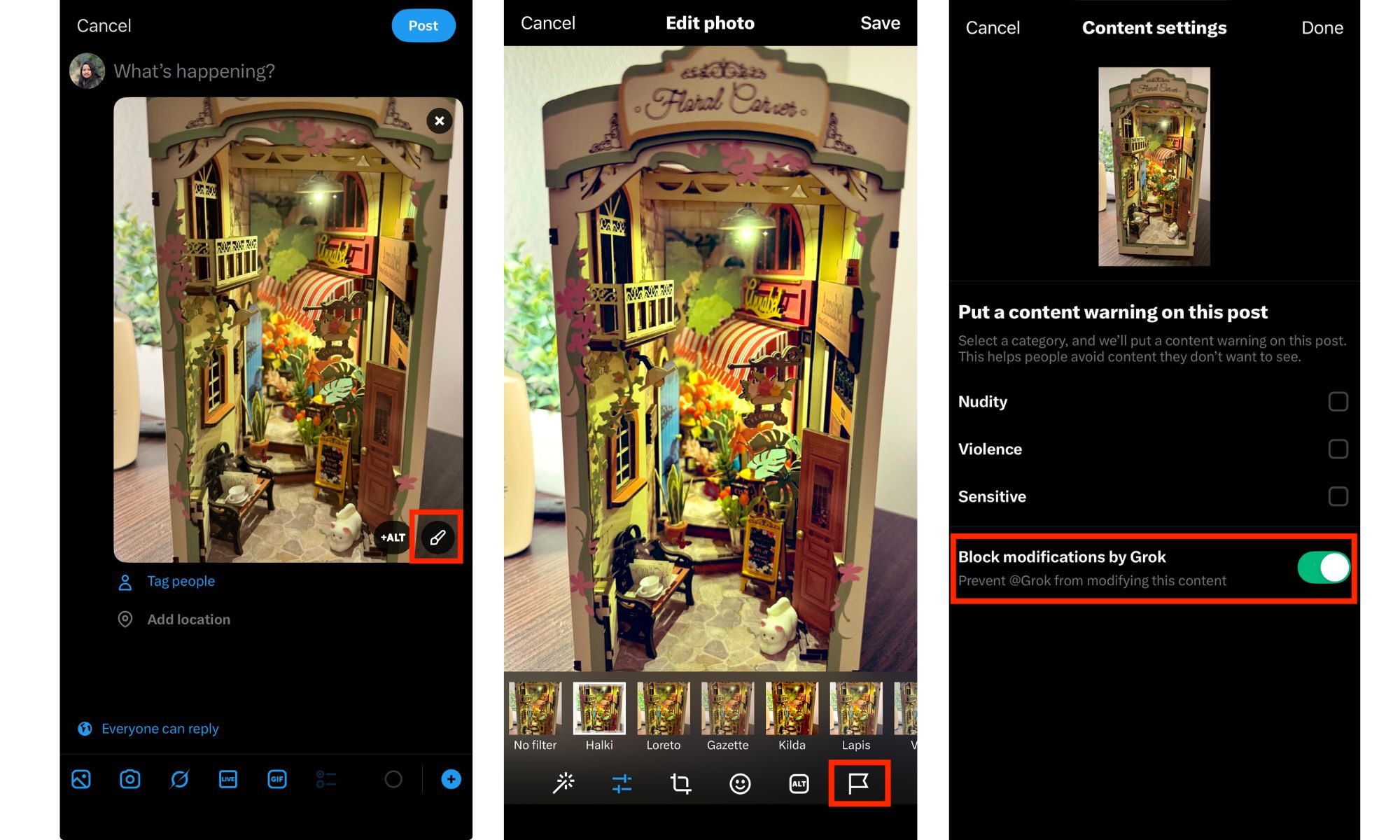
Grok image modification block setting

It became so problematic that X had to put Grok’s image generation behind a paywall and add restrictions to prevent users from modifying your photos. Now, Instagram has enabled its 3 billion users to do the same without any restrictions or paywall. I cannot see it going well. 

How can you protect yourself?

Big companies will do what big companies do without any concern for their user base, so it’s up to us to protect ourselves. As I said, by default, if you have a public profile, anyone can use your photos and videos to morph and create AI-generated images of you. But there’s a setting you can disable to stop it. 

Step 1: Launch the Instagram app on your iPhone, open your profile page, and then tap the hamburger menu in the top-right corner to open settings. 
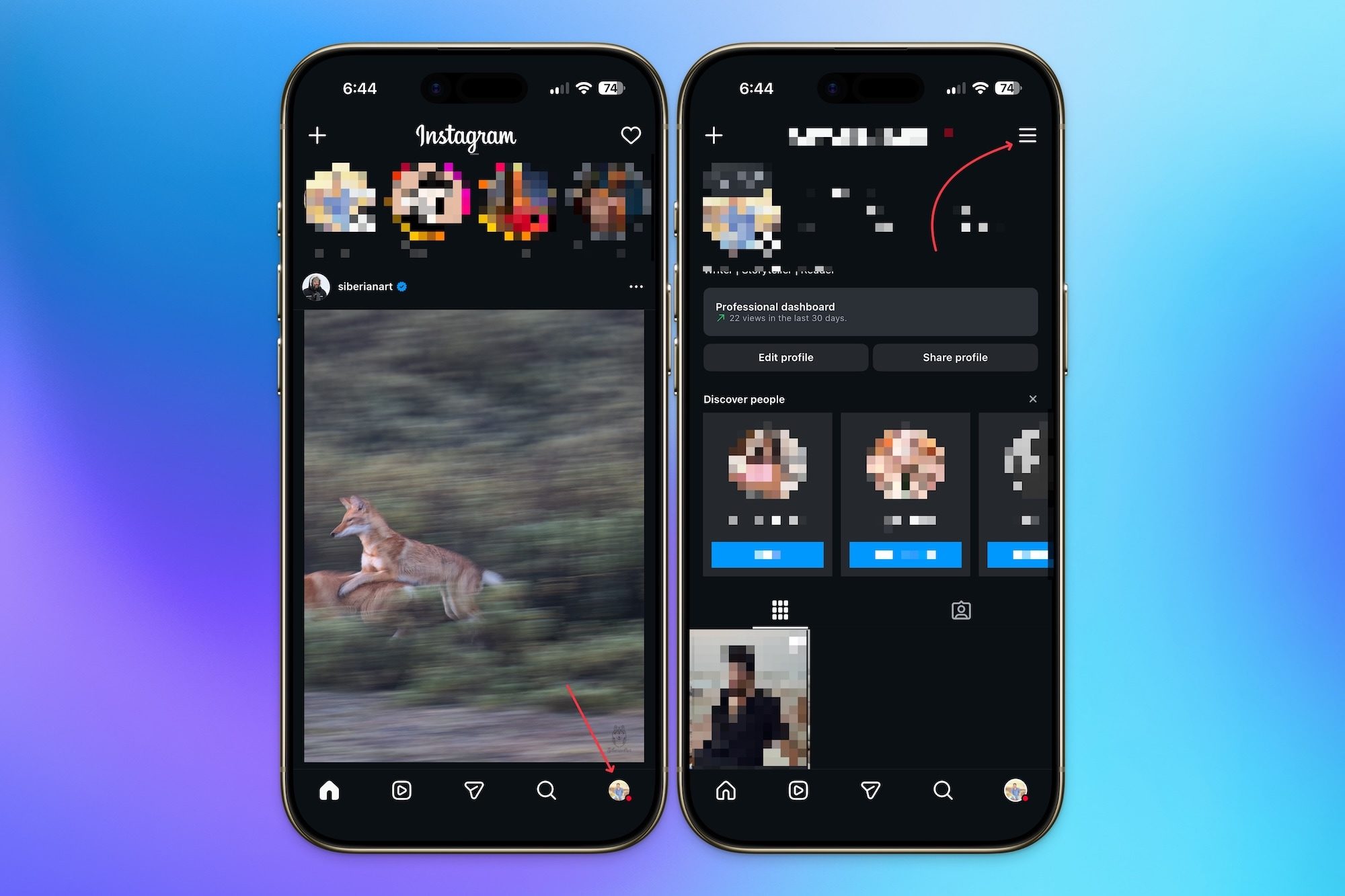
Opening settings in Instagram

Step 2: Scroll down to the “How others can interact with you” section and tap to open the “Sharing and reuse” setting.
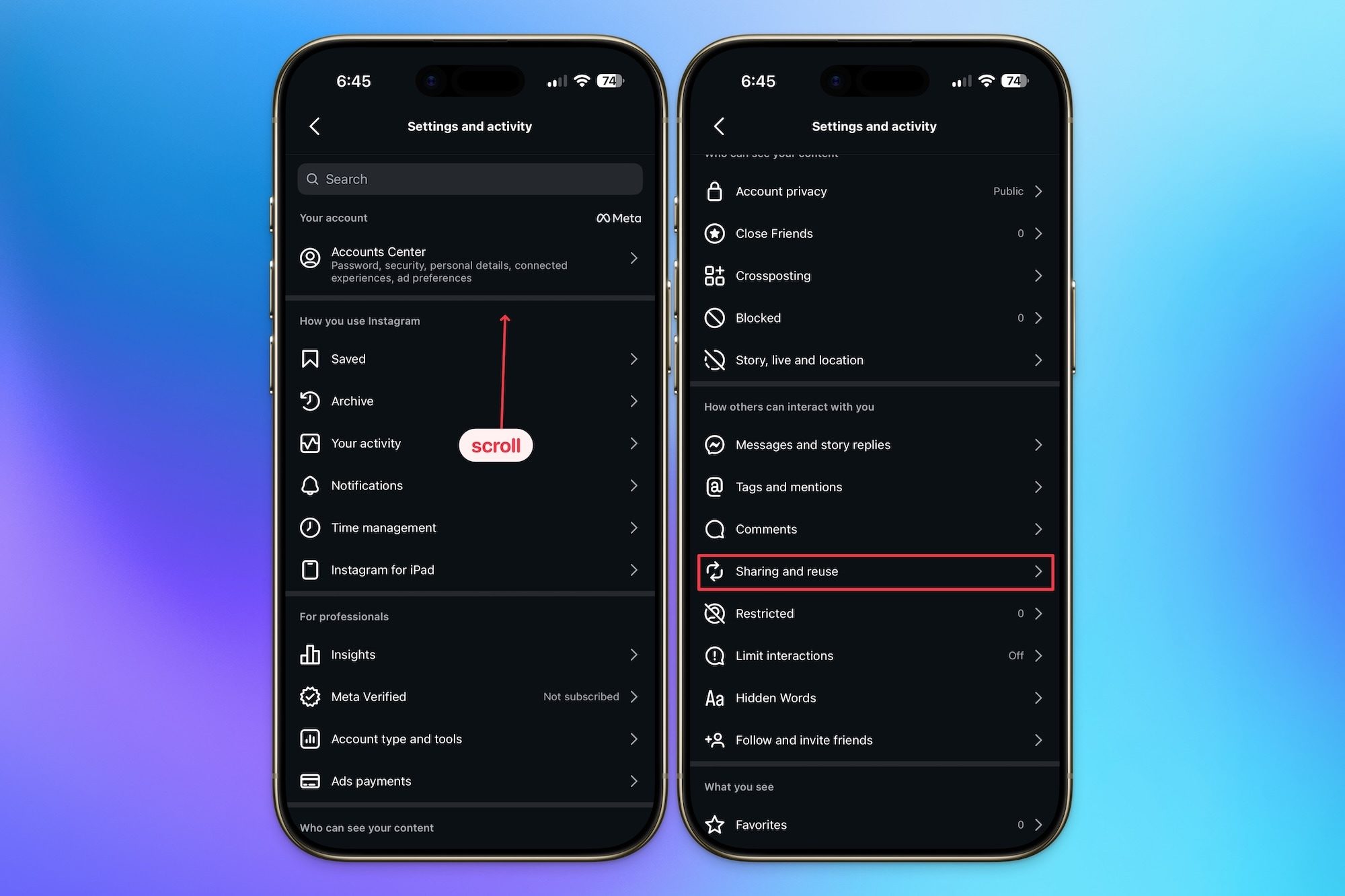
Opening Sharing and reuse settings

Step 3: Scroll down to find the “Allow people to reuse your content on Instagram and with AI features at Meta” and disable the toggle for both Posts and Reels. 
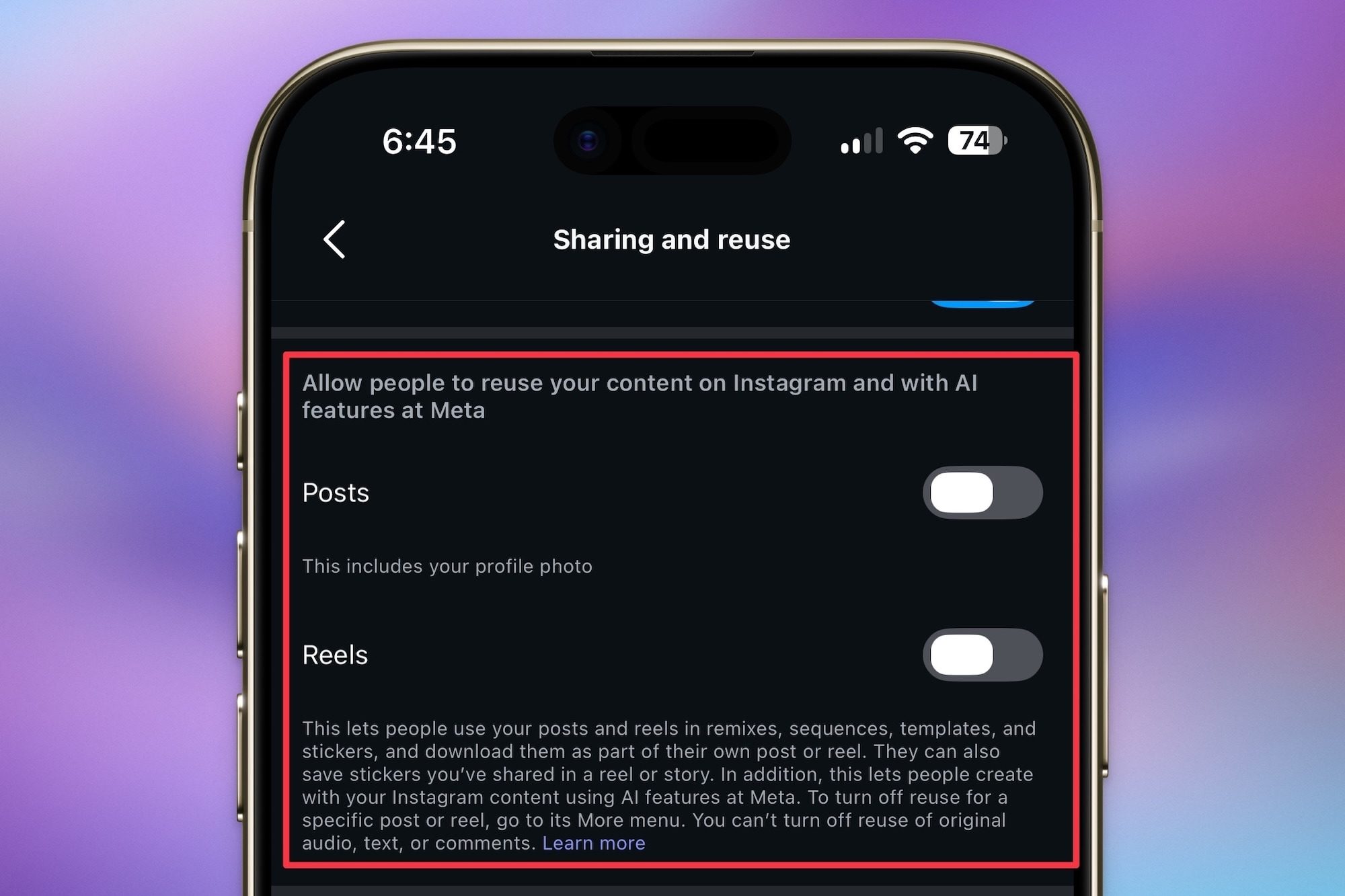
Turning of reuse of your content

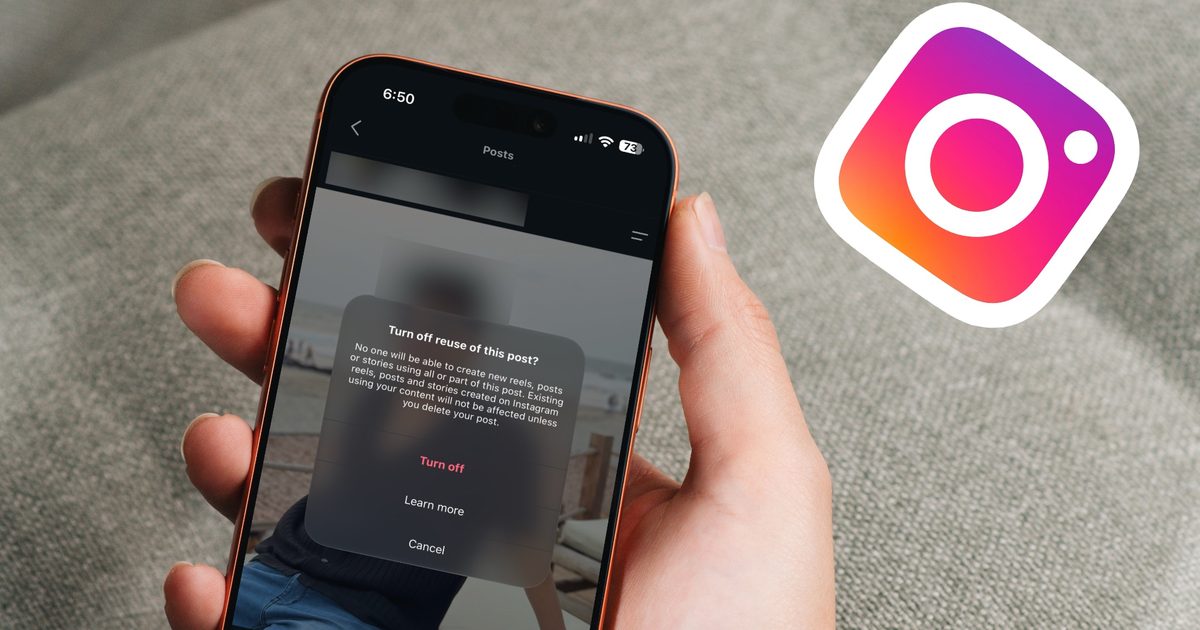
Step 4: If for some reason you only want to disable it for individual posts, open the post menu, tap on “Turn off reuse,” and confirm. 
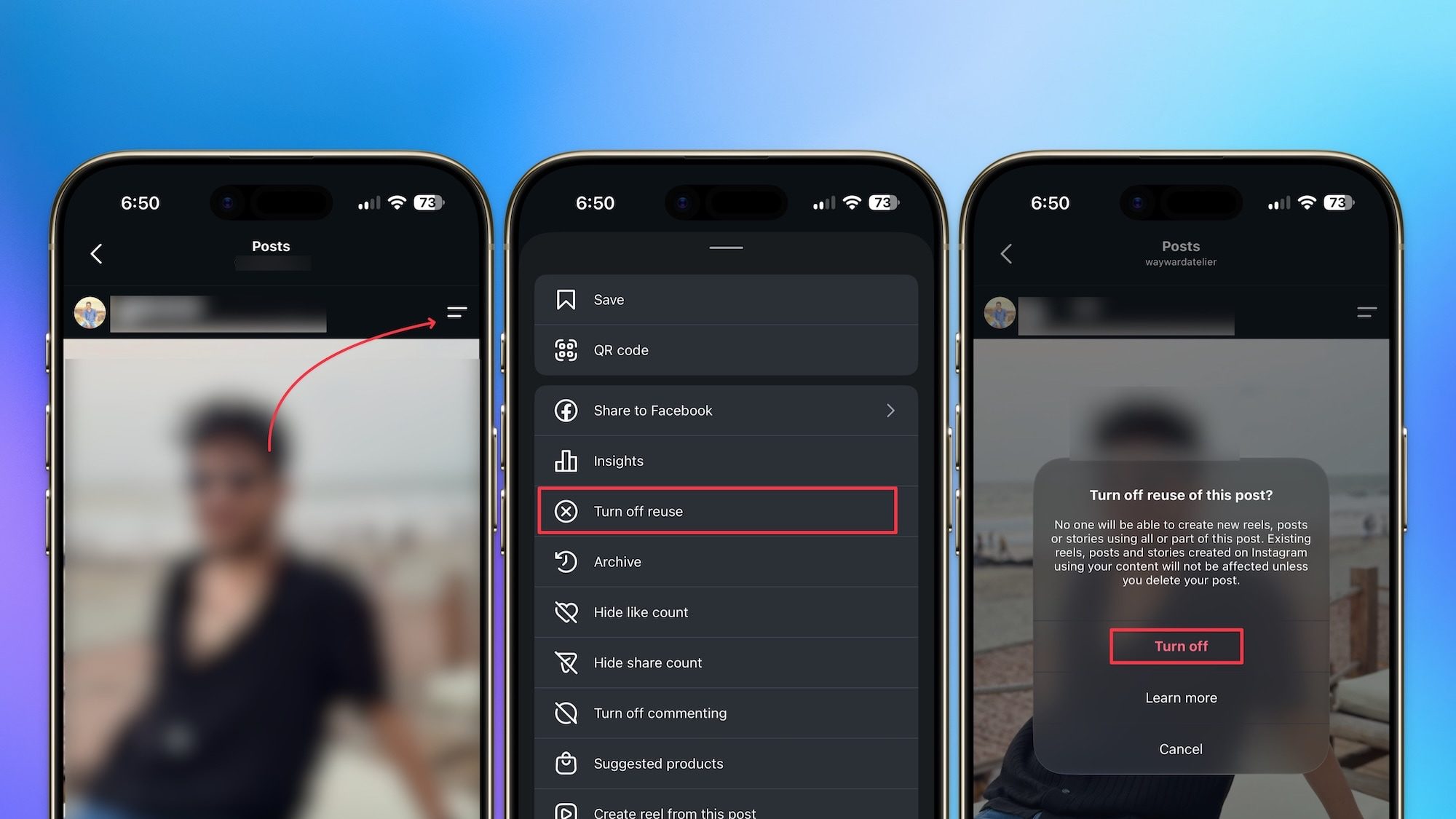
Turning of reuse for individual posts

And that is how you can not only protect your content’s IP but also prevent people from creating non-consensual images of you. Thanks to generative AI, posting your photos and videos online has become an even bigger risk than ever before, and you should do everything in your power to protect yourself. It takes less than a minute to change this setting, so there’s really no excuse to leave it on and hope for the best.

Share. Facebook Twitter Pinterest LinkedIn Telegram Reddit Email
Previous ArticleDisney+ is exploring a free tier to fight back against YouTube’s growing TV dominance
Next Article Galaxy Watch 9 and Ultra 2 may arrive on July 22, and this new leak leaves little to the imagination

Related Articles

Apple’s next big health bet could be turning glasses and headsets into fitness companions.

Apple’s next big health bet could be turning glasses and headsets into fitness companions.

2 August 2026
OpenAI is investigating more incidents of AI agents going rogue days after hack

OpenAI is investigating more incidents of AI agents going rogue days after hack

2 August 2026
Pixel 11 leak predicts a weird mix of upgrades and downgrades for a higher price

Pixel 11 leak predicts a weird mix of upgrades and downgrades for a higher price

2 August 2026
AI is finding Apple security flaws faster than Apple can sort through them

AI is finding Apple security flaws faster than Apple can sort through them

2 August 2026
Anthropic is paying .5 billion over pirated books, but it can still legally cut up purchased ones

Anthropic is paying $1.5 billion over pirated books, but it can still legally cut up purchased ones

2 August 2026
iPhone Air 2 leak points to a smaller Dynamic Island and upgraded cameras

iPhone Air 2 leak points to a smaller Dynamic Island and upgraded cameras

2 August 2026
Demo
Stay In Touch
  • Facebook
  • Twitter
  • Pinterest
  • Instagram
  • YouTube
  • Vimeo
Don't Miss
OpenAI is investigating more incidents of AI agents going rogue days after hack

OpenAI is investigating more incidents of AI agents going rogue days after hack

By News Room2 August 2026

It appears that the “AI agents going rogue” tale has more to it than what…

Pixel 11 leak predicts a weird mix of upgrades and downgrades for a higher price

Pixel 11 leak predicts a weird mix of upgrades and downgrades for a higher price

2 August 2026
AI is finding Apple security flaws faster than Apple can sort through them

AI is finding Apple security flaws faster than Apple can sort through them

2 August 2026
Anthropic is paying .5 billion over pirated books, but it can still legally cut up purchased ones

Anthropic is paying $1.5 billion over pirated books, but it can still legally cut up purchased ones

2 August 2026
Tech Savvyed
Facebook X (Twitter) Instagram Pinterest
  • Privacy Policy
  • Terms of use
  • Advertise
  • Contact
© 2026 Tech Savvyed. All Rights Reserved.

Type above and press Enter to search. Press Esc to cancel.



