




Close Menu
Tech Savvyed
  • Home
  • News
  • Artificial Intelligence
  • Gadgets
  • Apps
  • Mobile
  • Gaming
  • Accessories
  • More
    • Web Stories
    • Spotlight
    • Press Release

Subscribe to Updates

Get the latest tech news and updates directly to your inbox.

What's On
An unpatched Shark vacuum flaw could put your smart home at risk

An unpatched Shark vacuum flaw could put your smart home at risk

22 July 2026
Beatbot AquaSense X review: The pool cleaner for those that want to be pampered

Beatbot AquaSense X review: The pool cleaner for those that want to be pampered

22 July 2026
The AI game-dev boom has a dark side: fewer jobs for the people starting out

The AI game-dev boom has a dark side: fewer jobs for the people starting out

22 July 2026
Facebook X (Twitter) Instagram
Tech Savvyed
SUBSCRIBE
  • Home
  • News
  • Artificial Intelligence
  • Gadgets
  • Apps
  • Mobile
  • Gaming
  • Accessories
  • More
    • Web Stories
    • Spotlight
    • Press Release
Tech Savvyed
Home»News»I tried a hidden video trick in iOS 27, and it saved me a ton of frustration
News

I tried a hidden video trick in iOS 27, and it saved me a ton of frustration

News RoomBy News Room30 June 20263 Mins Read
I tried a hidden video trick in iOS 27, and it saved me a ton of frustration
Share
Facebook Twitter Reddit Telegram Pinterest Email

If you’ve ever been on vacation and chose to record video instead of taking photos only to avoid missing the fun moments, thinking you’d pause and take screenshots later, you might have ended up questioning your decision later. 

You see, the process involves multiple steps, starting from hunting for the right frame, pausing, and taking a screenshot. If it doesn’t look good, you go back to the video, pause somewhere else, and try taking another screenshot. You see where I’m going with this?

It’s a specific little misery that iOS 27 has now quietly fixed, and I genuinely can’t believe it took this long.

How does the new “Save video frame as photo” feature work?

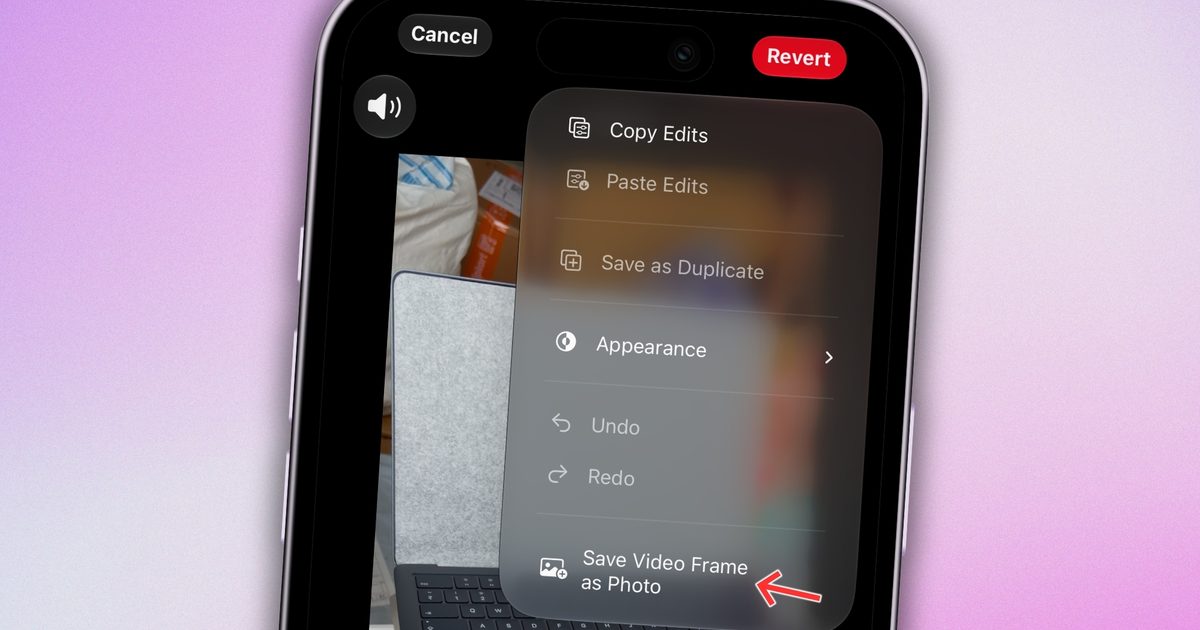
The new “Save Video Frame as Photo” option in the Photos app does exactly what it sounds like. You can save a single frame from a video directly to the gallery as a photo, without the hassle of capturing screenshots. You can use it in two ways.

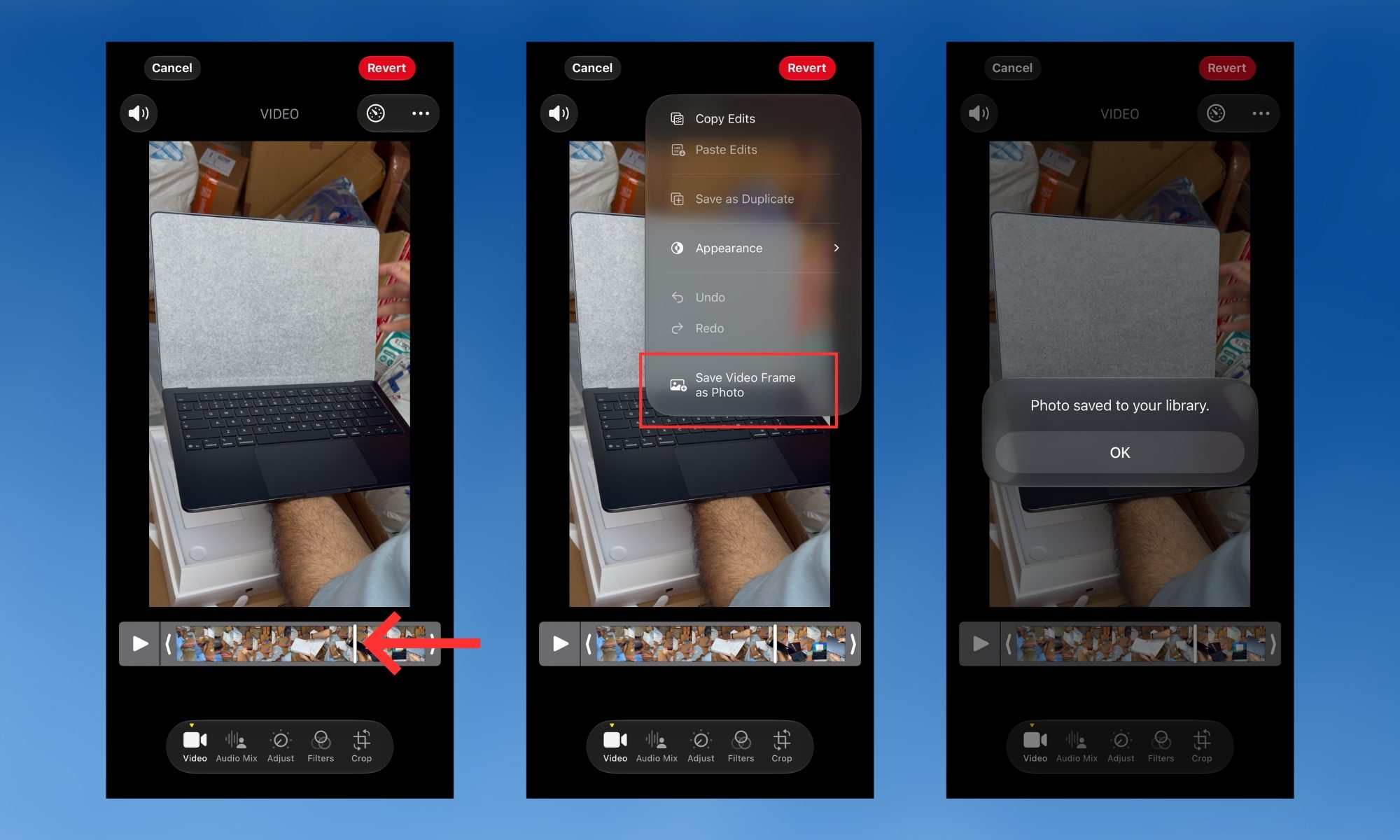
The first one lets you use the feature quickly and save a video frame as a photo in as little time as possible. Open the video in the Photos app, scrub to the moment you want, pause, tap the three-dot menu at the top right of the screen, then tap the “Save Video Frame as Photo” button. 

You should see a “Saved Video Frame” dialogue box pop up at the bottom of the screen. The saved frame shows up in your library, right next to the video you’ve extracted it from.
Electronics, Phone, Mobile Phone

However, if you need frame-by-frame flexibility, open a video, then tap the hamburger menu at the bottom to enter the edit menu. Use the timeline at the bottom of the screen to scrub through the video one frame at a time. 

Once you find the exact moment, tap the three-dot menu again and tap “Save Video Frame as Photo.” You should see a “Photo saved to your library” message on the screen. Tap the “OK” button below it, and you’re good to go.
Electronics, Person, Computer

The feature is genuinely better than capturing screenshots

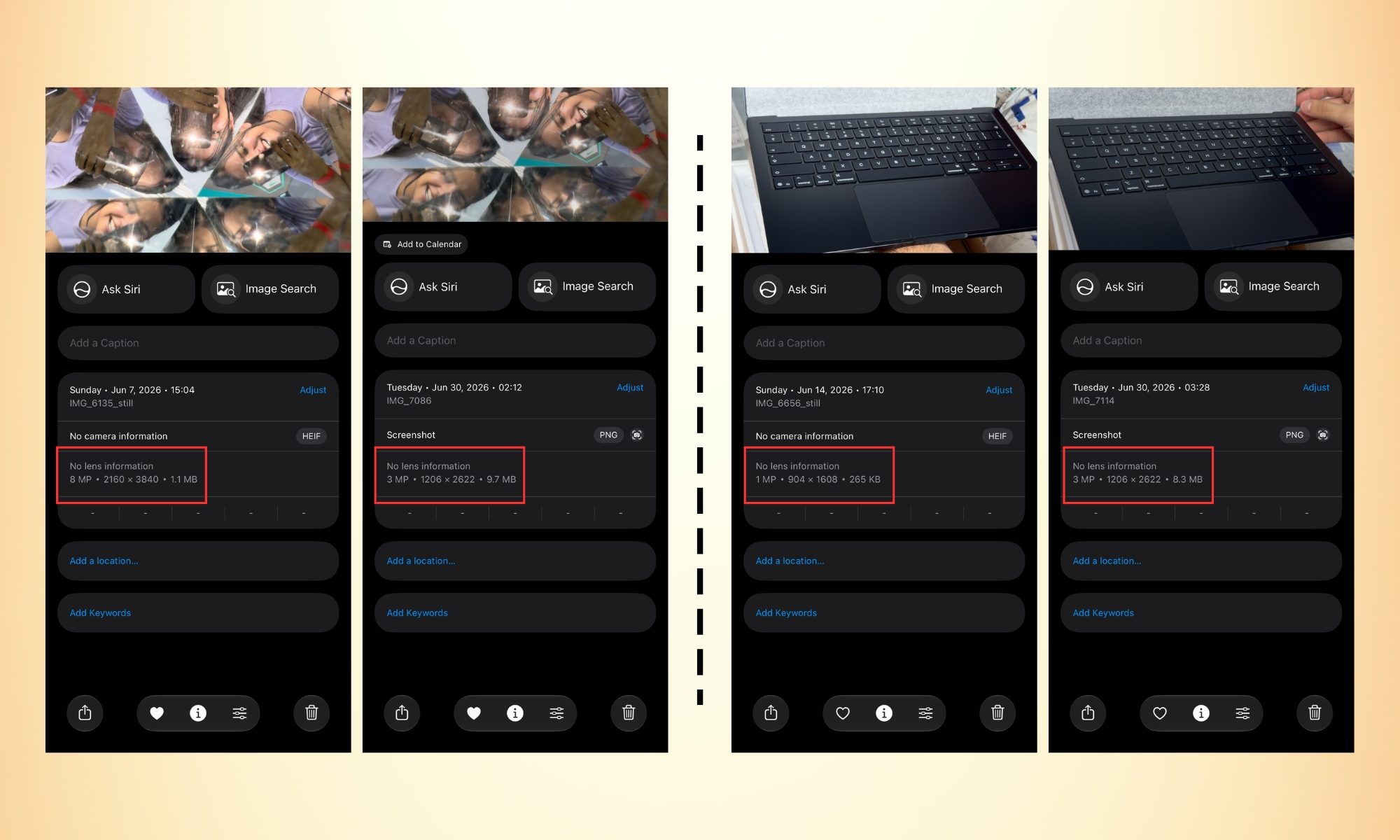
The difference in quality here is worth understanding. Saving a video frame as a picture is the same as taking a picture when you’re recording a 4K video at 60 fps; the saved frame comes out as an 8 MP photo (in Apple’s HEIF format). 

Screenshots, on the other hand, save as PNG files that are lower in resolution but larger in file size. In a nutshell, the frame-extracted picture has both a smaller file size and a higher resolution than screenshots. 

Furthermore, it doesn’t capture unwanted visual elements, such as the video progress bar at the bottom or a notification pop-up that shows up at the exact moment (I hate those).  

It’s one of those iOS 27 features Apple didn’t announce onstage, and yet once you know it exists, you’ll wonder how you ever managed without it.

Share. Facebook Twitter Pinterest LinkedIn Telegram Reddit Email
Previous ArticleSony’s next PlayStation could break free of the living room and I think it’s worth the risk
Next Article Apple has six new iPhones lined up for 2027 with some serious upgrade muscle

Related Articles

An unpatched Shark vacuum flaw could put your smart home at risk

An unpatched Shark vacuum flaw could put your smart home at risk

22 July 2026
Beatbot AquaSense X review: The pool cleaner for those that want to be pampered

Beatbot AquaSense X review: The pool cleaner for those that want to be pampered

22 July 2026
The AI game-dev boom has a dark side: fewer jobs for the people starting out

The AI game-dev boom has a dark side: fewer jobs for the people starting out

22 July 2026
The future of AI may depend on this one behind-the-scenes change

The future of AI may depend on this one behind-the-scenes change

22 July 2026
Samsung is reportedly preparing for the biggest foldable battle yet

Samsung is reportedly preparing for the biggest foldable battle yet

22 July 2026
Samsung’s free storage doubling for preorders is gone in Austria, and the replacement isn’t as sweet

Samsung’s free storage doubling for preorders is gone in Austria, and the replacement isn’t as sweet

21 July 2026
Demo
Stay In Touch
  • Facebook
  • Twitter
  • Pinterest
  • Instagram
  • YouTube
  • Vimeo
Don't Miss
Beatbot AquaSense X review: The pool cleaner for those that want to be pampered

Beatbot AquaSense X review: The pool cleaner for those that want to be pampered

By News Room22 July 2026

“The Beatbot AquaSense X is the most complete pool robot ever made” Pros Phenomenal cleaning…

The AI game-dev boom has a dark side: fewer jobs for the people starting out

The AI game-dev boom has a dark side: fewer jobs for the people starting out

22 July 2026
The future of AI may depend on this one behind-the-scenes change

The future of AI may depend on this one behind-the-scenes change

22 July 2026
Samsung is reportedly preparing for the biggest foldable battle yet

Samsung is reportedly preparing for the biggest foldable battle yet

22 July 2026
Tech Savvyed
Facebook X (Twitter) Instagram Pinterest
  • Privacy Policy
  • Terms of use
  • Advertise
  • Contact
© 2026 Tech Savvyed. All Rights Reserved.

Type above and press Enter to search. Press Esc to cancel.



