


I’m an avid YouTube Shorts viewer. Don’t get me wrong — I’m not proud of it. But the doomscrolling habit has firmly taken hold, and at this point, I’m not sure there’s any way out.
That said, spending this much time on Shorts has also made me notice the little things that get in the way. I’ve never liked the dislike button or the bottom bar constantly popping up while I’m trying to watch videos. It’s an annoyance that adds up when you’re endlessly scrolling. Thankfully, that’s changed — and for the better. YouTube has introduced a couple of new features for Shorts that have genuinely changed the way I use the app.
Life’s too short for long Shorts
The first thing I did after the update was start watching Shorts my way. I’m not a fan of Shorts that stretch to two or even three minutes. They’re called Shorts for a reason, but some creators seem determined to see just how far they can push that definition. To be fair, a lot of those longer videos are genuinely interesting. I don’t want to skip them halfway through and risk missing something important, but I also don’t want to sit through them at normal speed when I’m in full-on doomscroll mode.
That’s where the new double-speed playback comes in. More often than not, I watch longer Shorts at 2x speed. It lets me get through the content much faster without feeling like I’m missing the point. For someone who consumes an embarrassing number of Shorts every day, this has genuinely been one of the most useful additions YouTube has made. It feels like I’m getting the same information, just without the unnecessary waiting.
Not interested ≠ I hated it
One thing I’ve never really liked about YouTube Shorts is the dislike button. Because I almost never use it the way it’s meant to be used. Most of the time, I don’t dislike a video. I’m just… not interested. Maybe it’s another football edit, celebrity gossip, or a video explaining why a random gadget changed someone’s life. Someone else might love it, but it does absolutely nothing for me. That doesn’t mean the creator deserves a dislike. It just means YouTube guessed my interests wrong.
That’s why I actually don’t mind seeing the dislike button disappear from Shorts. It matches the way I’ve been using the app all along. If a video isn’t my thing, I simply scroll away. And, if I’m being picky, having one less button on the screen also makes the interface feel a little cleaner while I’m watching.
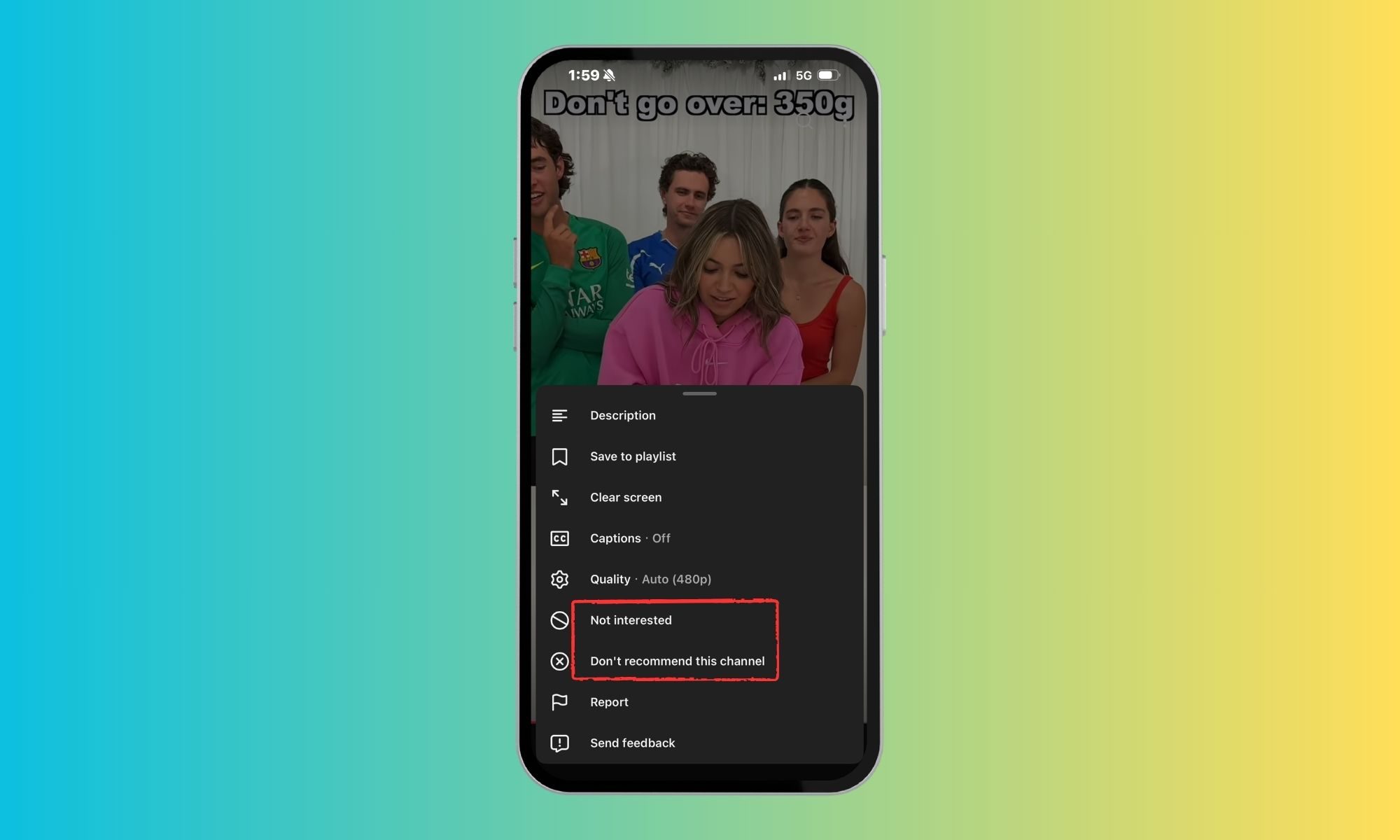
What I do appreciate is what YouTube has put in its place. Instead of forcing me to choose between liking something or disliking it, I can now tell YouTube exactly what I mean with Not Interested or Don’t recommend this channel. That’s far more useful for someone like me, whose interests change depending on the day.
As for the new heart icon replacing the classic thumbs-up, I honestly don’t have strong feelings about it. I still tap it for videos I enjoy, just like I always did. Whether it’s a thumbs-up or a heart doesn’t really change how I use Shorts. If anything, it just makes the app feel a bit more like every other short-video platform.
The best thing YouTube did was disappear
This is the feature I’ve been waiting for the most. When I’m watching a Short, I want to watch the video — not a screen filled with buttons, captions, channel names, and other UI elements fighting for my attention. There have been so many times when a creator points to something near the edge of the frame or adds tiny on-screen text, only for it to end up hidden behind YouTube’s own controls. That’s exactly why the new Clear Screen mode feels like such a welcome addition. With a simple tap, it temporarily hides all icons and text, leaving only the video.
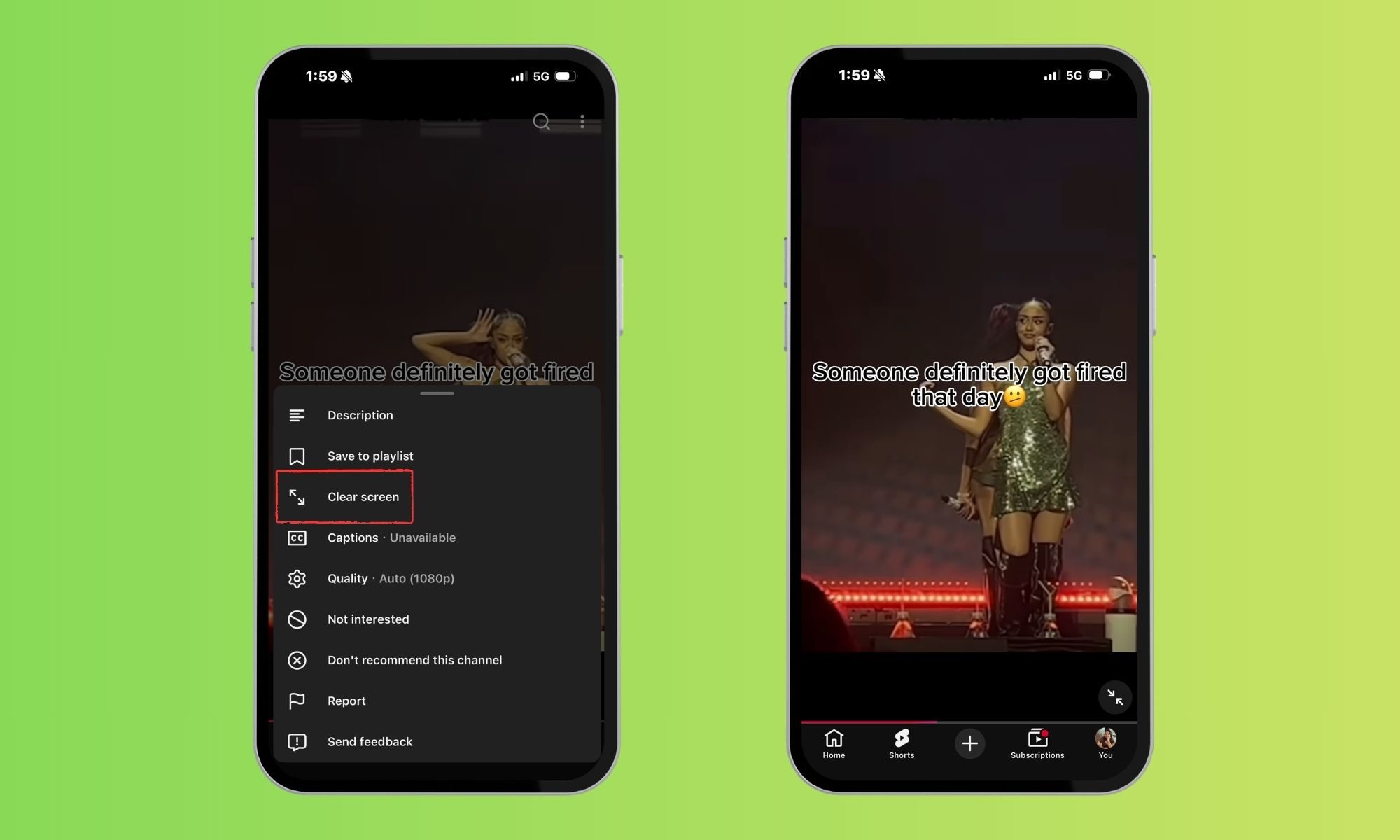
Whether I’m watching a travel clip with beautiful scenery or a recipe where every ingredient matters, the distraction-free view just feels better. It lets the content take center stage instead of YouTube’s controls. It’s one of those quality-of-life features that doesn’t sound particularly exciting, but once you start using it, you wonder why it wasn’t there all along.
Who knew less could feel like more?
As someone who spends a lot of time scrolling through YouTube Shorts every single day, even the smallest quality-of-life improvements make a noticeable difference. Even if you’re not the person who loses hours to doomscrolling as I do, these are the kinds of changes you’ll appreciate the moment you open Shorts. Sometimes, making an app better isn’t about adding more — it’s about getting out of your way.