



Close Menu
Tech Savvyed
  • Home
  • News
  • Artificial Intelligence
  • Gadgets
  • Apps
  • Mobile
  • Gaming
  • Accessories
  • More
    • Web Stories
    • Spotlight
    • Press Release

Subscribe to Updates

Get the latest tech news and updates directly to your inbox.

What's On
The hottest tech trend right now is making your phone slower

The hottest tech trend right now is making your phone slower

24 August 2026
A mysterious app just appeared on millions of Android phones, and it’s actually there to help

A mysterious app just appeared on millions of Android phones, and it’s actually there to help

24 August 2026
The flagship phone chip race just got another monster

The flagship phone chip race just got another monster

24 August 2026
Facebook X (Twitter) Instagram
Tech Savvyed
SUBSCRIBE
  • Home
  • News
  • Artificial Intelligence
  • Gadgets
  • Apps
  • Mobile
  • Gaming
  • Accessories
  • More
    • Web Stories
    • Spotlight
    • Press Release
Tech Savvyed
Home»News»I found a free universal TV remote app for iOS and Android that doesn’t spam ads
News

I found a free universal TV remote app for iOS and Android that doesn’t spam ads

News RoomBy News Room7 July 20263 Mins Read
I found a free universal TV remote app for iOS and Android that doesn’t spam ads
Share
Facebook Twitter Reddit Telegram Pinterest Email

I have been looking for a universal TV remote app that just works without being annoying. Most of the ones I tried had some kind of catch. Some asked me to create an account before I could even connect to a TV. Some showed annoying un-skippable ads before a simple action. A few locked basic controls like volume behind a paywall, while others simply did not work as advertised.

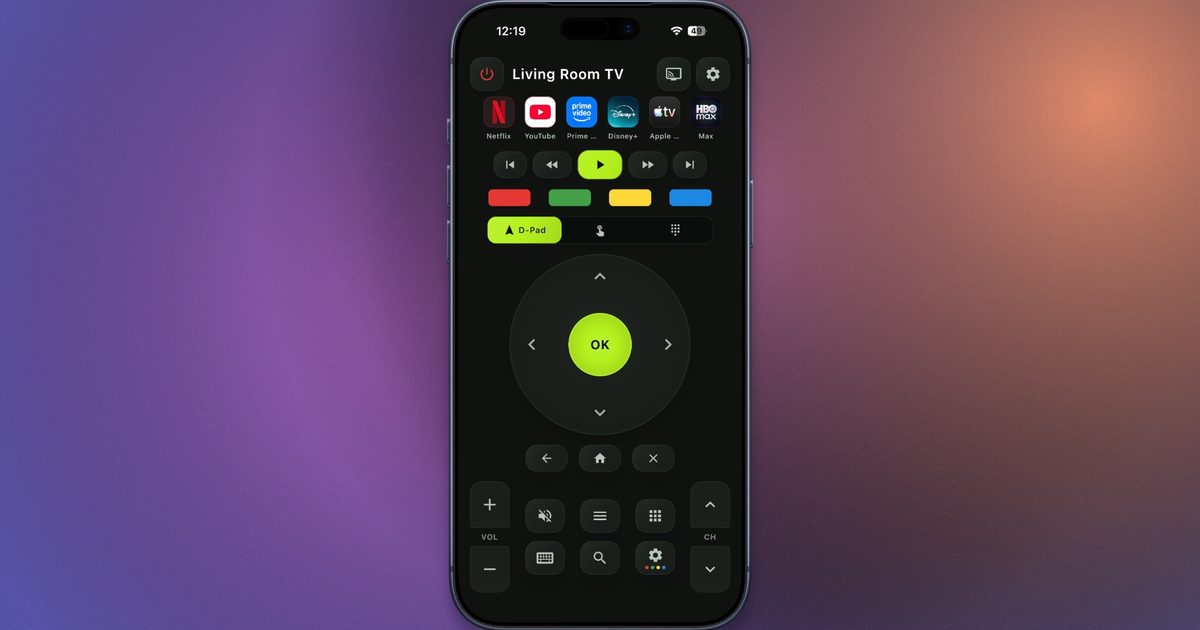
In that search, I recently came across AnyRemote, a free universal TV remote app available on both iOS and Android. It turns your phone into a remote for your TV or streaming device without forcing a login or making you pay for the core buttons.

How AnyRemote works

AnyRemote works over Wi-Fi, so your phone and TV need to be connected to the same network. Once you open the app, it scans for nearby devices and lets you pick your TV or streaming device from the list. If the TV asks for permission, you approve the connection on the screen and start using your phone as the remote.

The app claims support for most major TV brands and streaming platforms, including Samsung, LG, Sony, TCL, Hisense, Philips, Vizio, Roku, Android TV, Google TV, Fire TV, Chromecast, Apple TV, Nvidia Shield TV, Xiaomi TV, and more.

The app covers almost everything you would expect from a proper TV remote. You get volume controls, channel buttons, mute, power, playback controls, app-launch shortcuts, a D-pad, a touchpad, auto-reconnect, and screen mirroring. Keyboard input is especially useful for typing passwords, email addresses, or search terms from your phone instead of slowly moving letter by letter on a TV’s on-screen keyboard. There is voice control as well, which should help if you prefer searching for shows, opening apps, or controlling your TV through spoken commands.

The best part is the pricing

The pricing part is where AnyRemote gets a little more interesting. The app keeps its core features free, and there are no full-screen ads interrupting basic actions. Instead, it shows a small ribbon ad at the bottom of the screen.

The ad can be removed through a paid option, although it does not appear to be available in my region right now. So, for me, the free version still means living with the small banner. There is another option if you want a completely ad-free remote app. TVRem offers a similar set of features without ads or paywalls, but it is only available on iOS.

Share. Facebook Twitter Pinterest LinkedIn Telegram Reddit Email
Previous ArticleezCater is solving a workplace challenge most businesses didn’t see coming
Next Article Bentley’s first-ever fully electric SUV will be called Torcal

Related Articles

The hottest tech trend right now is making your phone slower

The hottest tech trend right now is making your phone slower

24 August 2026
A mysterious app just appeared on millions of Android phones, and it’s actually there to help

A mysterious app just appeared on millions of Android phones, and it’s actually there to help

24 August 2026
The flagship phone chip race just got another monster

The flagship phone chip race just got another monster

24 August 2026
Google’s 9 Pixel 11 can’t properly play Genshin Impact, and we’ve been here before

Google’s $899 Pixel 11 can’t properly play Genshin Impact, and we’ve been here before

24 August 2026
ASUS Zenbook A14 review: The dreamy ultraportable laptop I’ve been waiting for, almost.

ASUS Zenbook A14 review: The dreamy ultraportable laptop I’ve been waiting for, almost.

24 August 2026
Samsung thinks Exynos 2700 can beat Qualcomm’s best next-gen chip

Samsung thinks Exynos 2700 can beat Qualcomm’s best next-gen chip

24 August 2026
Demo
Stay In Touch
  • Facebook
  • Twitter
  • Pinterest
  • Instagram
  • YouTube
  • Vimeo
Don't Miss
A mysterious app just appeared on millions of Android phones, and it’s actually there to help

A mysterious app just appeared on millions of Android phones, and it’s actually there to help

By News Room24 August 2026

If Android Pulse showed up in your Play Store updates this weekend and looked a…

The flagship phone chip race just got another monster

The flagship phone chip race just got another monster

24 August 2026
Google’s 9 Pixel 11 can’t properly play Genshin Impact, and we’ve been here before

Google’s $899 Pixel 11 can’t properly play Genshin Impact, and we’ve been here before

24 August 2026
ASUS Zenbook A14 review: The dreamy ultraportable laptop I’ve been waiting for, almost.

ASUS Zenbook A14 review: The dreamy ultraportable laptop I’ve been waiting for, almost.

24 August 2026
Tech Savvyed
Facebook X (Twitter) Instagram Pinterest
  • Privacy Policy
  • Terms of use
  • Advertise
  • Contact
© 2026 Tech Savvyed. All Rights Reserved.

Type above and press Enter to search. Press Esc to cancel.



