



Close Menu
Tech Savvyed
  • Home
  • News
  • Artificial Intelligence
  • Gadgets
  • Apps
  • Mobile
  • Gaming
  • Accessories
  • More
    • Web Stories
    • Spotlight
    • Press Release

Subscribe to Updates

Get the latest tech news and updates directly to your inbox.

What's On
Tech giants are gaga over AI, but employees say the AI race is making their jobs harder

Tech giants are gaga over AI, but employees say the AI race is making their jobs harder

10 August 2026
Chinese startup claims its brain implant takes just 10 minutes to place, no skull surgery required

Chinese startup claims its brain implant takes just 10 minutes to place, no skull surgery required

10 August 2026
Hoy combines AirDrop, Loom, and voice messages in the Mac menu bar

Hoy combines AirDrop, Loom, and voice messages in the Mac menu bar

10 August 2026
Facebook X (Twitter) Instagram
Tech Savvyed
SUBSCRIBE
  • Home
  • News
  • Artificial Intelligence
  • Gadgets
  • Apps
  • Mobile
  • Gaming
  • Accessories
  • More
    • Web Stories
    • Spotlight
    • Press Release
Tech Savvyed
Home»News»Hoy combines AirDrop, Loom, and voice messages in the Mac menu bar
News

Hoy combines AirDrop, Loom, and voice messages in the Mac menu bar

News RoomBy News Room10 August 20262 Mins Read
Hoy combines AirDrop, Loom, and voice messages in the Mac menu bar
Share
Facebook Twitter Reddit Telegram Pinterest Email

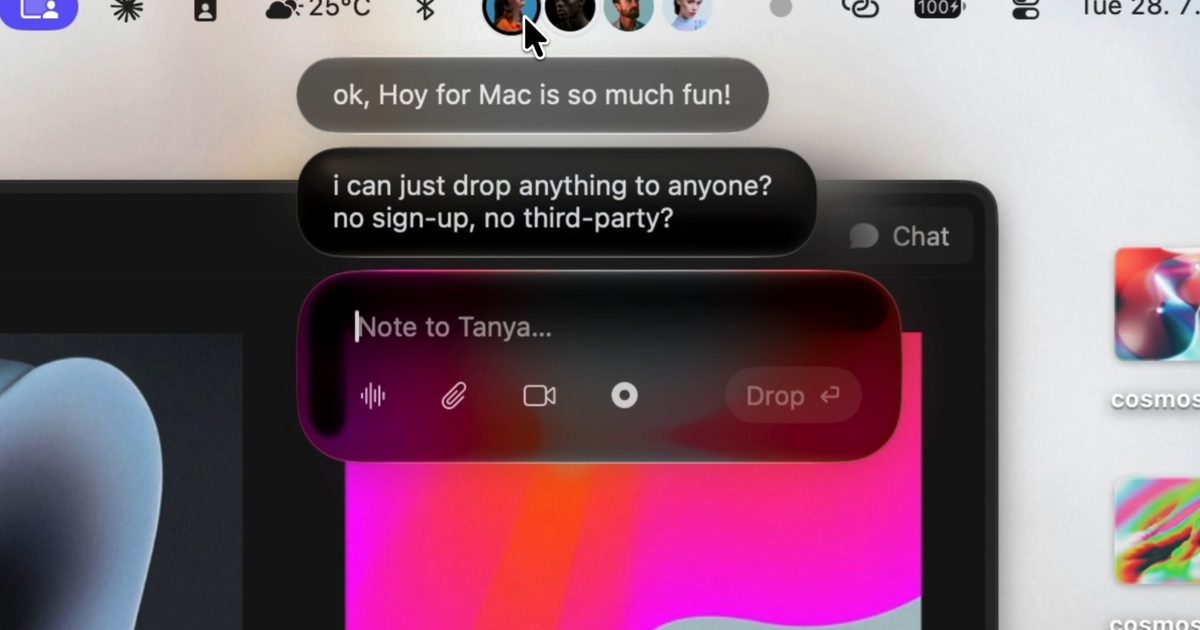
Hoy wants sending something from your Mac to feel as casual as dropping a file onto someone’s desk. Instead of opening another app, you drag it onto that person’s face sitting in the menu bar.

The pre-release Mac app folds file sharing, voice notes, and screen recording into one lightweight interface. The person you’re sending something to effectively becomes the shortcut, which makes Hoy feel less like another messenger and more like a communication layer built into macOS.

How does Hoy actually work

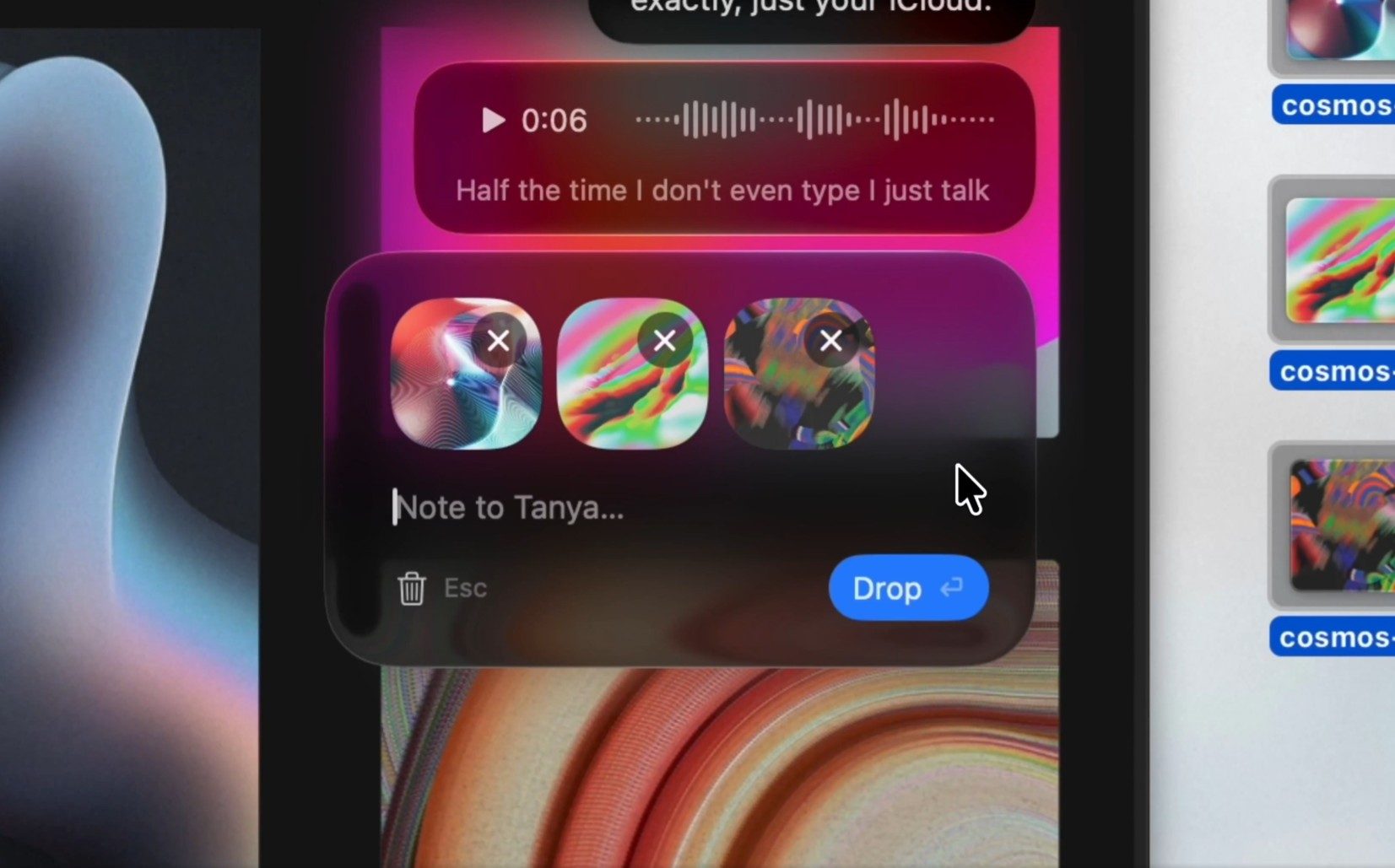
Once someone joins a channel, Hoy puts their avatar in your Mac’s menu bar. You can drag a file onto their face, click to type, or record a voice note without first opening a full conversation window.

Screen recording follows the same logic. Hoy can capture your display with an optional camera bubble, then send the recording directly to the recipient.

That gives it a useful spot between quick sharing and asynchronous feedback. AirDrop is still the obvious choice when someone is nearby. Hoy is built for the moments when they’re across town, working remotely, or simply checking in later.

Why iCloud does the heavy lifting

Hoy doesn’t run its own content server for messages or recordings. Everything moves through Apple’s CloudKit, with each channel stored against the host’s iCloud account.

That setup comes with a practical catch. Larger files and recordings count against the host’s available iCloud storage. Hoy says it can’t access the content inside those channels, while voice transcription happens locally on the Mac.
Text, Electronics, Mobile Phone

Calling Hoy serverless would still oversell the idea. The app may avoid operating its own messaging backend, but Apple’s infrastructure is doing plenty of work behind the scenes.

Who is Hoy really for

The bigger challenge is convincing people to install it. Messages already covers many of the same basics on every Mac, so Hoy has to earn its place by making common exchanges noticeably faster.

Its strongest case right now is probably small remote teams that send quick feedback and screen recordings throughout the day. The free tier includes three hosted channels, which makes it easy enough to test without committing.

An iPhone companion is planned for later this year. Until then, Hoy’s appeal comes down to whether putting people directly in the menu bar saves enough friction to become a habit.

Share. Facebook Twitter Pinterest LinkedIn Telegram Reddit Email
Previous ArticleGoogle Chrome is working on new feature which lets you open PDF files in your preferred app
Next Article Chinese startup claims its brain implant takes just 10 minutes to place, no skull surgery required

Related Articles

Tech giants are gaga over AI, but employees say the AI race is making their jobs harder

Tech giants are gaga over AI, but employees say the AI race is making their jobs harder

10 August 2026
Chinese startup claims its brain implant takes just 10 minutes to place, no skull surgery required

Chinese startup claims its brain implant takes just 10 minutes to place, no skull surgery required

10 August 2026
Google Chrome is working on new feature which lets you open PDF files in your preferred app

Google Chrome is working on new feature which lets you open PDF files in your preferred app

10 August 2026
Your MacBook trackpad can now purr like a cat, and it’s surprisingly convincing

Your MacBook trackpad can now purr like a cat, and it’s surprisingly convincing

10 August 2026
Apple could be eyeing a round display as it plans smartwatch refresh

Apple could be eyeing a round display as it plans smartwatch refresh

10 August 2026
The Apple Watch could get outrageouly expensive with new premium models planned

The Apple Watch could get outrageouly expensive with new premium models planned

10 August 2026
Demo
Stay In Touch
  • Facebook
  • Twitter
  • Pinterest
  • Instagram
  • YouTube
  • Vimeo
Don't Miss
Chinese startup claims its brain implant takes just 10 minutes to place, no skull surgery required

Chinese startup claims its brain implant takes just 10 minutes to place, no skull surgery required

By News Room10 August 2026

Brain implants, like the ones made by Elon Musk’s Neuralink, typically involve open-skull surgery. But…

Hoy combines AirDrop, Loom, and voice messages in the Mac menu bar

Hoy combines AirDrop, Loom, and voice messages in the Mac menu bar

10 August 2026
Google Chrome is working on new feature which lets you open PDF files in your preferred app

Google Chrome is working on new feature which lets you open PDF files in your preferred app

10 August 2026
Your MacBook trackpad can now purr like a cat, and it’s surprisingly convincing

Your MacBook trackpad can now purr like a cat, and it’s surprisingly convincing

10 August 2026
Tech Savvyed
Facebook X (Twitter) Instagram Pinterest
  • Privacy Policy
  • Terms of use
  • Advertise
  • Contact
© 2026 Tech Savvyed. All Rights Reserved.

Type above and press Enter to search. Press Esc to cancel.



