




Close Menu
Tech Savvyed
  • Home
  • News
  • Artificial Intelligence
  • Gadgets
  • Apps
  • Mobile
  • Gaming
  • Accessories
  • More
    • Web Stories
    • Spotlight
    • Press Release

Subscribe to Updates

Get the latest tech news and updates directly to your inbox.

What's On
What are the easiest ways to accept payments online and in person?

What are the easiest ways to accept payments online and in person?

16 July 2026
Hate editing videos? This new AI app turns your camera roll into ready-to-post reels

Hate editing videos? This new AI app turns your camera roll into ready-to-post reels

16 July 2026
Apple now lets you pay for cellular iPads over 3 years, and it’s a sign of a pricey trend that won’t halt soon

Apple now lets you pay for cellular iPads over 3 years, and it’s a sign of a pricey trend that won’t halt soon

16 July 2026
Facebook X (Twitter) Instagram
Tech Savvyed
SUBSCRIBE
  • Home
  • News
  • Artificial Intelligence
  • Gadgets
  • Apps
  • Mobile
  • Gaming
  • Accessories
  • More
    • Web Stories
    • Spotlight
    • Press Release
Tech Savvyed
Home»News»Hate editing videos? This new AI app turns your camera roll into ready-to-post reels
News

Hate editing videos? This new AI app turns your camera roll into ready-to-post reels

News RoomBy News Room16 July 20262 Mins Read
Hate editing videos? This new AI app turns your camera roll into ready-to-post reels
Share
Facebook Twitter Reddit Telegram Pinterest Email

Your camera roll is probably packed with vacation photos, birthday videos, and random clips that never make it to Instagram or TikTok. If video editing has kept you from posting more on social media, a new app wants to take that job off your plate entirely.

Reelful is an iOS app that uses AI to automatically turn your existing photos and videos into polished, ready-to-post reels for TikTok and Instagram.

How does Reelful turn your clips into polished social media videos?

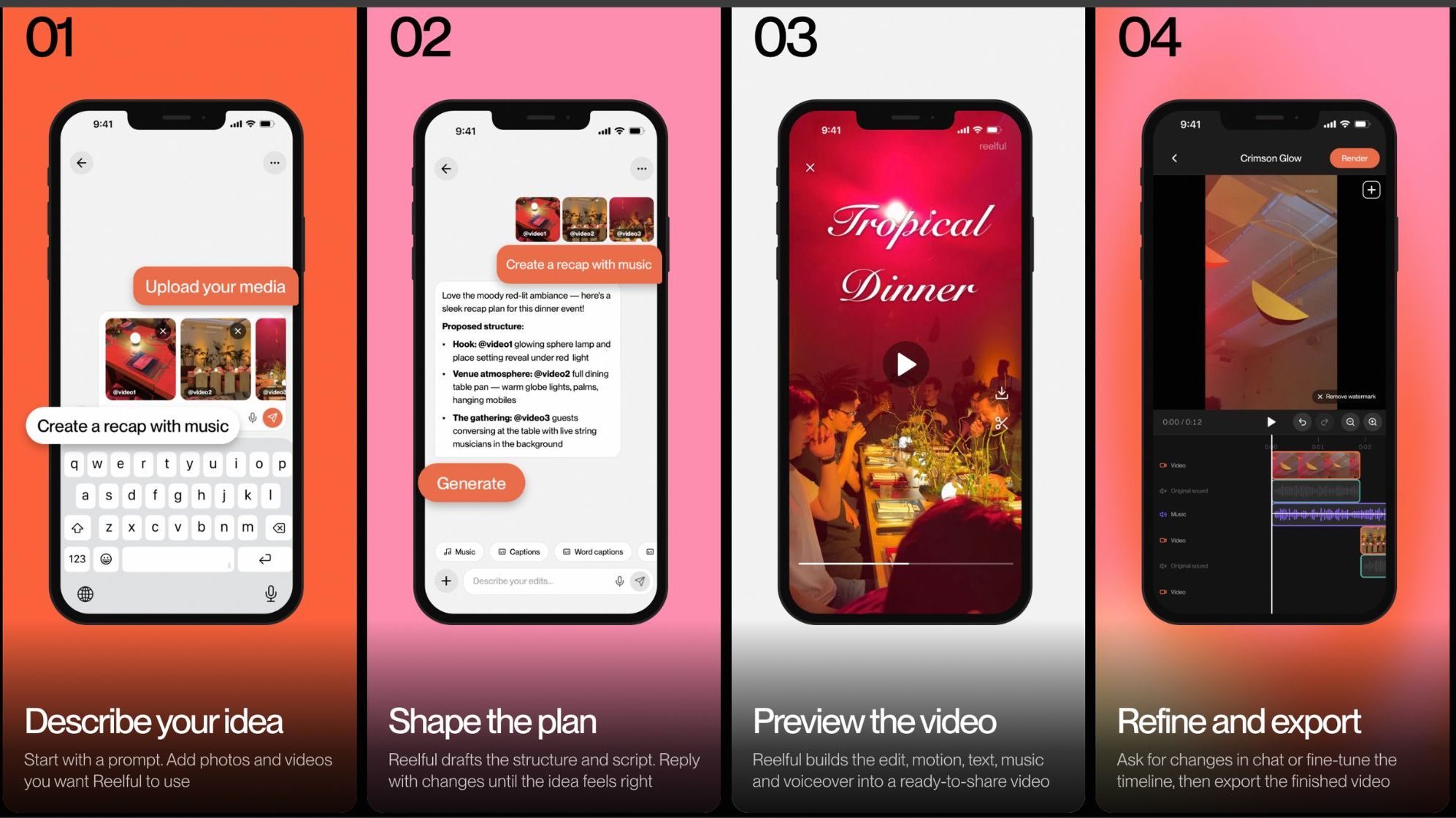
You start by typing a prompt where you describe the story you want to tell, whether that is a travel recap, a product demo, or an event highlight. Next, you record a 30-second voice sample so the app can create a voice clone to narrate your video.

Then you simply select the photos and clips from your camera roll that you want included. Reelful takes over from there, planning the video, writing the script, adding your AI voiceover, and assembling the final cut complete with captions, music, and sound effects.

The app can even animate still photos into short video clips, so a picture of someone holding a beer could turn into a brief moving clip of that same person taking a sip. Once your video is ready, you can keep refining it by chatting with the app to swap the music, tweak the script, or adjust other details.
reelful-ios-ai-app-for-reels

What does Reelful cost?

Reelful offers one-time credit purchases or monthly subscriptions, depending on how often you create content. Credit bundles start at five videos for $15, 15 videos for $43, or 33 videos for $90.

Regular creators can choose the Creator plan at $25 a month for 10 videos or the Pro plan at $50 a month for 25 videos. Heavy users can opt for the Studio plan, which includes 60 videos a month for $100. The app is currently only available on iOS, with Android and web versions expected down the line.

Share. Facebook Twitter Pinterest LinkedIn Telegram Reddit Email
Previous ArticleApple now lets you pay for cellular iPads over 3 years, and it’s a sign of a pricey trend that won’t halt soon
Next Article What are the easiest ways to accept payments online and in person?

Related Articles

What are the easiest ways to accept payments online and in person?

What are the easiest ways to accept payments online and in person?

16 July 2026
Apple now lets you pay for cellular iPads over 3 years, and it’s a sign of a pricey trend that won’t halt soon

Apple now lets you pay for cellular iPads over 3 years, and it’s a sign of a pricey trend that won’t halt soon

16 July 2026
How can businesses simplify invoicing and payment processing?

How can businesses simplify invoicing and payment processing?

15 July 2026
Galaxy Z Fold 8: Everything we know about Samsung’s wider and shorter foldable

Galaxy Z Fold 8: Everything we know about Samsung’s wider and shorter foldable

15 July 2026
5 Questions Every CIO Should Ask Before Adding Another Software Tool 

5 Questions Every CIO Should Ask Before Adding Another Software Tool 

15 July 2026
Google just teased a Pixel 11 feature we have been waiting months to see

Google just teased a Pixel 11 feature we have been waiting months to see

15 July 2026
Demo
Stay In Touch
  • Facebook
  • Twitter
  • Pinterest
  • Instagram
  • YouTube
  • Vimeo
Don't Miss
Hate editing videos? This new AI app turns your camera roll into ready-to-post reels

Hate editing videos? This new AI app turns your camera roll into ready-to-post reels

By News Room16 July 2026

Your camera roll is probably packed with vacation photos, birthday videos, and random clips that…

Apple now lets you pay for cellular iPads over 3 years, and it’s a sign of a pricey trend that won’t halt soon

Apple now lets you pay for cellular iPads over 3 years, and it’s a sign of a pricey trend that won’t halt soon

16 July 2026
FX’s Live-Action Far Cry Anthology Series Casts Steve Buscemi

FX’s Live-Action Far Cry Anthology Series Casts Steve Buscemi

15 July 2026
How can businesses simplify invoicing and payment processing?

How can businesses simplify invoicing and payment processing?

15 July 2026
Tech Savvyed
Facebook X (Twitter) Instagram Pinterest
  • Privacy Policy
  • Terms of use
  • Advertise
  • Contact
© 2026 Tech Savvyed. All Rights Reserved.

Type above and press Enter to search. Press Esc to cancel.



