

Close Menu
Tech Savvyed
  • Home
  • News
  • Artificial Intelligence
  • Gadgets
  • Apps
  • Mobile
  • Gaming
  • Accessories
  • More
    • Web Stories
    • Spotlight
    • Press Release

Subscribe to Updates

Get the latest tech news and updates directly to your inbox.

What's On
I saw HONOR’s Magic 9 Pro Max go head-to-head with an ARRI cinema camera. Here’s what surprised me

I saw HONOR’s Magic 9 Pro Max go head-to-head with an ARRI cinema camera. Here’s what surprised me

7 November 2026
Digging Into Our Tomb Raider Cover Story

Digging Into Our Tomb Raider Cover Story

7 November 2026
Samsung’s Galaxy S27 Ultra might stick with Snapdragon after all

Samsung’s Galaxy S27 Ultra might stick with Snapdragon after all

7 November 2026
Facebook X (Twitter) Instagram
Tech Savvyed
SUBSCRIBE
  • Home
  • News
  • Artificial Intelligence
  • Gadgets
  • Apps
  • Mobile
  • Gaming
  • Accessories
  • More
    • Web Stories
    • Spotlight
    • Press Release
Tech Savvyed
Home»News»Gemini can now remember where you store your belongings so you don’t have to
News

Gemini can now remember where you store your belongings so you don’t have to

News RoomBy News Room2 September 20263 Mins Read
Gemini can now remember where you store your belongings so you don’t have to
Share
Facebook Twitter Reddit Telegram Pinterest Email

If you constantly forget where you store important documents, Gemini’s latest update might actually help. 

Google will soon roll out a new Gemini feature that remembers item locations as described by you. It arrives alongside four other Android updates arriving this month as the September Android Drop.

With the latest @Android Drop, you’ll be able to:

• Keep track of items in Find Hub that don’t require tracker tags — just ask Gemini.
• Help reduce motion sickness in the passenger seat with Motion Assist, a subtle bubble overlay on your screen that moves with the vehicle.… pic.twitter.com/JhATecsSQ6

— Google (@Google) September 1, 2026

So what exactly does this new Gemini feature do?

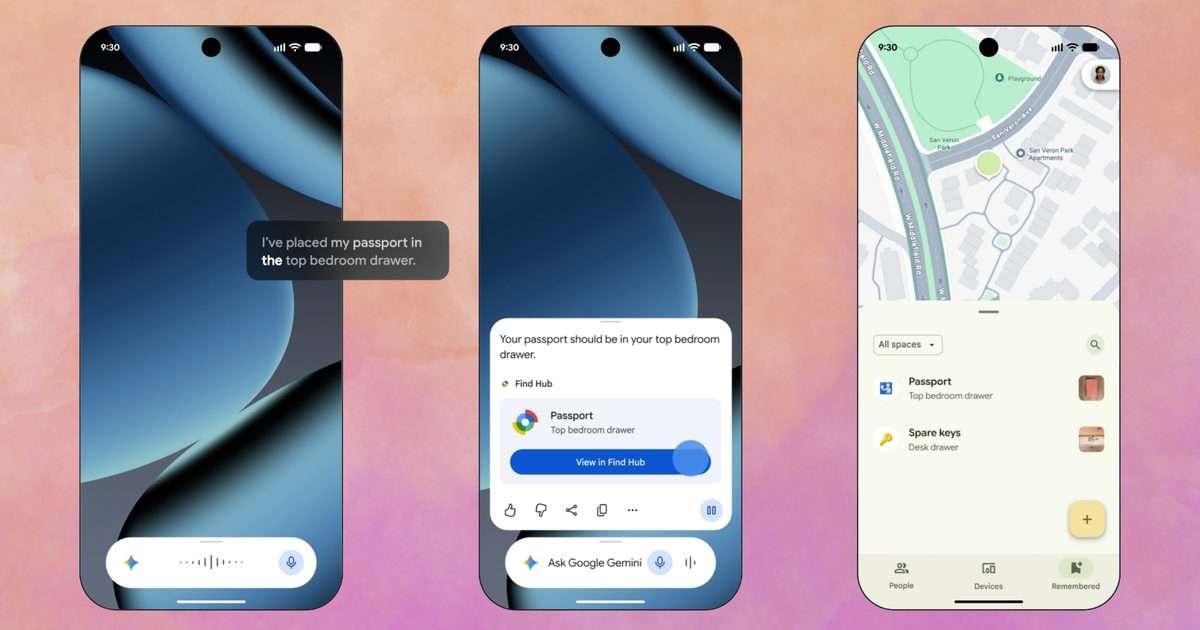
When the feature arrives, you should be able to tell Gemini something like “I put my passport in the bedroom drawer,” toss in a photo, and make it save that location in Find Hub. No accessory required, nothing to pair or charge or change batteries of.

Later, when you’ve forgotten again (and it looks like Google’s counting on it), just ask Gemini where you left it or open Find Hub directly and check the ‘remembered’ items tab. The feature needs Android 16 or newer. Further, it only works in countries where both Gemini and Find Hub are available. 

However, it’s worth understanding that this isn’t the same as tracking. Gemini will merely remember what you told it, and that’s it. To be honest, I’ve been doing that in the Notes app on my iPhone, and I don’t really understand why Google wants to know where you keep your important documents. 

What if being a passenger princess 👑 didn’t come with the passenger sickness? 💅

Motion Assist is designed to help reduce motion sickness so you can finally catch up on texts and reading while in the car. pic.twitter.com/C6mK2DLzif

— Android (@Android) September 1, 2026

What else is rolling out this month?

Motion Assist, a feature that targets carsickness from staring at your phone (a stationary object) in a moving vehicle. It overlays small bubbles on your screen that move along to the motion of the ride. 

Finally, three relatively smaller but equally important additions will round out the September Drop. The first one, Guided vision, is aimed at blind and low-vision users. It narrates whatever your camera sees during a Gemini Live session, including reading labels or menus aloud.

Google Keep will soon live directly inside a Google Messages thread. This will let a group build a shared list without leaving the conversation. Chat themes let you swap in custom backgrounds and colors per conversation. Both of those last two are already live today, while the others will arrive later this month.

Share. Facebook Twitter Pinterest LinkedIn Telegram Reddit Email
Previous ArticleYouTube TV now lets you stream ESPN Unlimited right inside the app
Next Article Claude Fable 5.1 and Mythos 5.1 arrive with better coding and cost cuts for developers

Related Articles

I saw HONOR’s Magic 9 Pro Max go head-to-head with an ARRI cinema camera. Here’s what surprised me

I saw HONOR’s Magic 9 Pro Max go head-to-head with an ARRI cinema camera. Here’s what surprised me

7 November 2026
Samsung’s Galaxy S27 Ultra might stick with Snapdragon after all

Samsung’s Galaxy S27 Ultra might stick with Snapdragon after all

7 November 2026
Call of Duty: Warzone has finally said goodbye to PS4 and Xbox One

Call of Duty: Warzone has finally said goodbye to PS4 and Xbox One

7 November 2026
How Do I Make a Video From Text With AI?

How Do I Make a Video From Text With AI?

7 November 2026
Razer’s new  earbuds have ANC and RGB, and you don’t need to charge them

Razer’s new $80 earbuds have ANC and RGB, and you don’t need to charge them

7 November 2026
How I used Filmora 16 to build a solid video from raw clips without wracking my brain for hours

How I used Filmora 16 to build a solid video from raw clips without wracking my brain for hours

6 November 2026
Demo
Stay In Touch
  • Facebook
  • Twitter
  • Pinterest
  • Instagram
  • YouTube
  • Vimeo
Don't Miss
Digging Into Our Tomb Raider Cover Story

Digging Into Our Tomb Raider Cover Story

By News Room7 November 2026

This week on The Game Informer Show, we’ve got a new magazine cover to discuss!…

Samsung’s Galaxy S27 Ultra might stick with Snapdragon after all

Samsung’s Galaxy S27 Ultra might stick with Snapdragon after all

7 November 2026
Call of Duty: Warzone has finally said goodbye to PS4 and Xbox One

Call of Duty: Warzone has finally said goodbye to PS4 and Xbox One

7 November 2026
How Do I Make a Video From Text With AI?

How Do I Make a Video From Text With AI?

7 November 2026
Tech Savvyed
Facebook X (Twitter) Instagram Pinterest
  • Privacy Policy
  • Terms of use
  • Advertise
  • Contact
© 2026 Tech Savvyed. All Rights Reserved.

Type above and press Enter to search. Press Esc to cancel.