



Close Menu
Tech Savvyed
  • Home
  • News
  • Artificial Intelligence
  • Gadgets
  • Apps
  • Mobile
  • Gaming
  • Accessories
  • More
    • Web Stories
    • Spotlight
    • Press Release

Subscribe to Updates

Get the latest tech news and updates directly to your inbox.

What's On
Fire Emblem: Fortune’s Weave Review: Let The Games Begin

Fire Emblem: Fortune’s Weave Review: Let The Games Begin

16 September 2026
Trails in the Sky 2nd Chapter Review: A Superb Sequel

Trails in the Sky 2nd Chapter Review: A Superb Sequel

16 September 2026
Kingdom Hearts Comes To Fortnite This Week

Kingdom Hearts Comes To Fortnite This Week

15 September 2026
Facebook X (Twitter) Instagram
Tech Savvyed
SUBSCRIBE
  • Home
  • News
  • Artificial Intelligence
  • Gadgets
  • Apps
  • Mobile
  • Gaming
  • Accessories
  • More
    • Web Stories
    • Spotlight
    • Press Release
Tech Savvyed
Home»News»ChatGPT’s new search tool saves you from digging through old chats, files, and images
News

ChatGPT’s new search tool saves you from digging through old chats, files, and images

News RoomBy News Room16 July 20262 Mins Read
ChatGPT’s new search tool saves you from digging through old chats, files, and images
Share
Facebook Twitter Reddit Telegram Pinterest Email

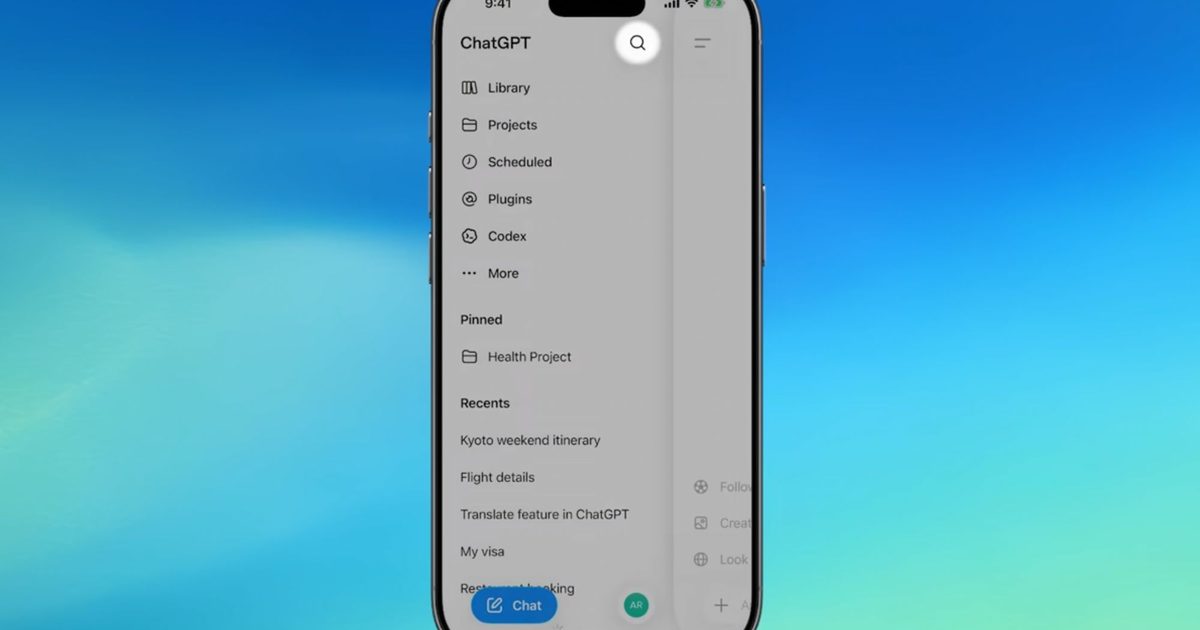
If you have ever lost a great ChatGPT answer somewhere in your endless chat history, that headache is finally over. OpenAI has rolled out a major search upgrade that lets you find old chats, projects, documents, and images all from one place.

Before this update, the sidebar search only pulled up past conversations, leaving uploaded files, projects, and generated images completely out of reach. The new search option is now available across web, iOS, and Android, on every ChatGPT plan, including free accounts.

Search across your chats just got faster and more powerful 🔎

From the sidebar, you can search chats, projects, images, and documents in one place across web, iOS, and Android.

Use filters to narrow results, then select anything to open it directly in ChatGPT. pic.twitter.com/wYNi2a39wh

— ChatGPT (@ChatGPTapp) July 15, 2026

How does the new ChatGPT search work?

You can start searching right from the ChatGPT sidebar, just like before, except now it covers everything in your account instead of only chats. If you want to narrow things down, there are filters that let you search by specific content type, such as pulling up only images or files tied to one particular project. Once you find what you need, selecting a result opens that chat, project, or file directly inside ChatGPT to skip endless scrolling.

This rollout also lines up closely with OpenAI’s recent GPT-5.6 launch, which brought its own wave of upgrades, including a new AI agent called ChatGPT Work that takes on entire projects instead of single questions. It connects to your apps and files, works through multi-step tasks, and can keep running in the background even after you close ChatGPT.

Why does it matter?

The new ChatGPT search does not change what it stores; it simply makes everything already saved much easier to surface. That’s useful if you regularly use ChatGPT for ongoing projects, research, or document analysis. By bringing everything together in one searchable place, you can look for what you need, filter the results, and jump back into your work within seconds.

Share. Facebook Twitter Pinterest LinkedIn Telegram Reddit Email
Previous ArticleYou can now link your favorite apps to AI Mode in Google Search to get things done
Next Article The Open Beta For Marvel Tōkon: Fighting Souls Starts Next Week

Related Articles

Soundcore Space 2 Pro headphones promise crystal-clear calls with Anker’s new AI chip

Soundcore Space 2 Pro headphones promise crystal-clear calls with Anker’s new AI chip

3 September 2026
Xbox Cloud Gaming is about to become a lot more appealing to casual gamers with a new pay-as-you-go option

Xbox Cloud Gaming is about to become a lot more appealing to casual gamers with a new pay-as-you-go option

3 September 2026
Lenovo reveals iMac rival that upstages Apple with more goodies at a lower price

Lenovo reveals iMac rival that upstages Apple with more goodies at a lower price

3 September 2026
Motorola’s new Edge 70 Plus packs a 200MP camera and a massive battery

Motorola’s new Edge 70 Plus packs a 200MP camera and a massive battery

3 September 2026
We got GTA VI limited-edition DualSense controllers before GTA VI

We got GTA VI limited-edition DualSense controllers before GTA VI

3 September 2026
Anker unveils smarter chargers and power banks built to fight heat and battery degradation

Anker unveils smarter chargers and power banks built to fight heat and battery degradation

3 September 2026
Demo
Stay In Touch
  • Facebook
  • Twitter
  • Pinterest
  • Instagram
  • YouTube
  • Vimeo
Don't Miss
Trails in the Sky 2nd Chapter Review: A Superb Sequel

Trails in the Sky 2nd Chapter Review: A Superb Sequel

By News Room16 September 2026

Coming-of-age stories are a dime a dozen in video games, especially if you’re talking about…

Kingdom Hearts Comes To Fortnite This Week

Kingdom Hearts Comes To Fortnite This Week

15 September 2026
Here’s How To Get A Steam Frame – Sep 14, 2026

Here’s How To Get A Steam Frame – Sep 14, 2026

14 September 2026
Heroes Of The Storm Gets First New Character In – Sep 12, 2026

Heroes Of The Storm Gets First New Character In – Sep 12, 2026

13 September 2026
Tech Savvyed
Facebook X (Twitter) Instagram Pinterest
  • Privacy Policy
  • Terms of use
  • Advertise
  • Contact
© 2026 Tech Savvyed. All Rights Reserved.

Type above and press Enter to search. Press Esc to cancel.



