



Close Menu
Tech Savvyed
  • Home
  • News
  • Artificial Intelligence
  • Gadgets
  • Apps
  • Mobile
  • Gaming
  • Accessories
  • More
    • Web Stories
    • Spotlight
    • Press Release

Subscribe to Updates

Get the latest tech news and updates directly to your inbox.

What's On
Silent Hill: Townfall Review: Addressing The Trauma

Silent Hill: Townfall Review: Addressing The Trauma

21 September 2026
Fire Emblem: Fortune’s Weave After 130+ Hours – Was It Worth It?

Fire Emblem: Fortune’s Weave After 130+ Hours – Was It Worth It?

19 September 2026
The Video Games And More You Should Play This Weekend – September 18, 2026

The Video Games And More You Should Play This Weekend – September 18, 2026

18 September 2026
Facebook X (Twitter) Instagram
Tech Savvyed
SUBSCRIBE
  • Home
  • News
  • Artificial Intelligence
  • Gadgets
  • Apps
  • Mobile
  • Gaming
  • Accessories
  • More
    • Web Stories
    • Spotlight
    • Press Release
Tech Savvyed
Home»News»Canva Code 2.0 just made vibe coding way less intimidating for everyone
News

Canva Code 2.0 just made vibe coding way less intimidating for everyone

News RoomBy News Room15 July 20262 Mins Read
Canva Code 2.0 just made vibe coding way less intimidating for everyone
Share
Facebook Twitter Reddit Telegram Pinterest Email

Coding used to be reserved for developers who spent years learning complex languages. That has slowly changed with vibe coding, which lets you build apps and websites using simple, plain-language prompts. 

The problem is that most of these tools still feel intimidating for regular folks, as they still need to understand the code to make any meaningful changes. If not, everything you make tends to look the same.

Canva wants to fix that. Today, the company is rolling out Canva Code 2.0 to its entire community, combining AI-powered coding with its design tools, giving users an easy way to customize their apps and websites.

What can you build with it?

You can start from a simple prompt, pick from over 50 new templates, or import your existing HTML if you built something elsewhere. Once you have a starting point, you can create right inside your other Canva projects, whether that’s a page, a whiteboard, or a deck.

The best part is you are not stuck with whatever the AI gives you. You can drag in your own photos, tweak colors and fonts from the familiar toolbar, or click into any section and retype the text yourself. If you would rather chat your way through edits, Canva AI can handle that too.

Why does this matter?

Here’s the thing about most vibe coding tools: most of them generate a working prototype that looks exactly like everything else people are churning out. Canva Code takes a different route by living right inside the editor where your brand kit already sits, so what you make looks like you actually made it.
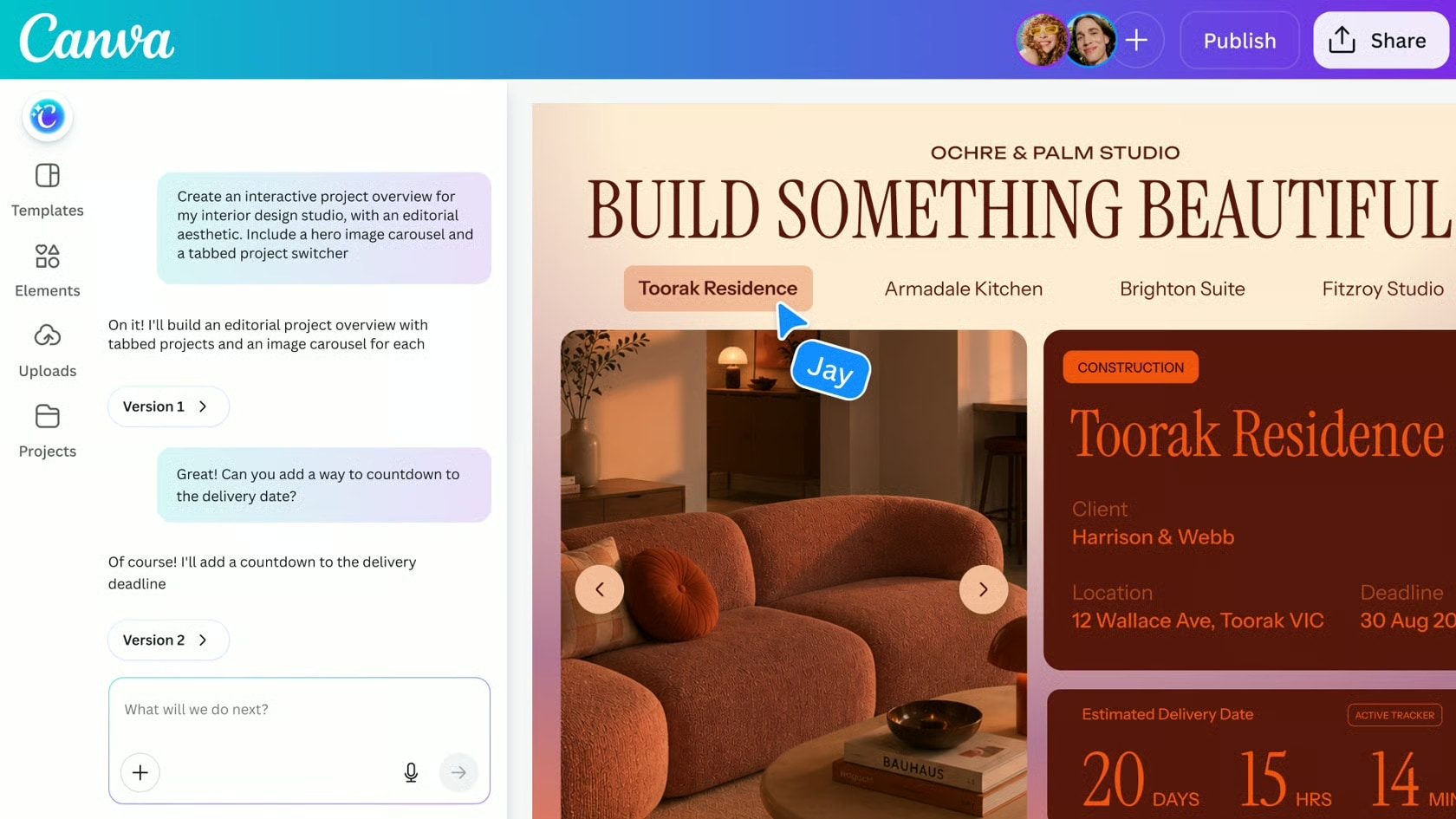
Canva Code 2.0 Website example

You can also build alongside your team in real time, drop comments straight in the editor, and send your creation off wherever it needs to go when you are done. Grab a custom domain in Canva, go with a free one, or keep it private within your organization.

With Canva Code 2.0, you are not only using vibe coding but also the design tools inside Canva to create something unique for your brand, which most vibe coding tools cannot do. For creators who care as much about how something looks as how it works, that’s a compelling advantage.

Share. Facebook Twitter Pinterest LinkedIn Telegram Reddit Email
Previous ArticleFrontier joins the Starlink club with high-speed in-flight internet
Next Article Samsung’s new Flex Titanium tech could make foldable creases less noticeable

Related Articles

Soundcore Space 2 Pro headphones promise crystal-clear calls with Anker’s new AI chip

Soundcore Space 2 Pro headphones promise crystal-clear calls with Anker’s new AI chip

3 September 2026
Xbox Cloud Gaming is about to become a lot more appealing to casual gamers with a new pay-as-you-go option

Xbox Cloud Gaming is about to become a lot more appealing to casual gamers with a new pay-as-you-go option

3 September 2026
Lenovo reveals iMac rival that upstages Apple with more goodies at a lower price

Lenovo reveals iMac rival that upstages Apple with more goodies at a lower price

3 September 2026
Motorola’s new Edge 70 Plus packs a 200MP camera and a massive battery

Motorola’s new Edge 70 Plus packs a 200MP camera and a massive battery

3 September 2026
We got GTA VI limited-edition DualSense controllers before GTA VI

We got GTA VI limited-edition DualSense controllers before GTA VI

3 September 2026
Anker unveils smarter chargers and power banks built to fight heat and battery degradation

Anker unveils smarter chargers and power banks built to fight heat and battery degradation

3 September 2026
Demo
Stay In Touch
  • Facebook
  • Twitter
  • Pinterest
  • Instagram
  • YouTube
  • Vimeo
Don't Miss
Fire Emblem: Fortune’s Weave After 130+ Hours – Was It Worth It?

Fire Emblem: Fortune’s Weave After 130+ Hours – Was It Worth It?

By News Room19 September 2026

A lot of hours went into this week’s episode of The Game Informer Show, as…

The Video Games And More You Should Play This Weekend – September 18, 2026

The Video Games And More You Should Play This Weekend – September 18, 2026

18 September 2026
Metal Gear Solid 4: Guns Of The Patriots: Part 4 – Rosemary’s Return

Metal Gear Solid 4: Guns Of The Patriots: Part 4 – Rosemary’s Return

18 September 2026
More Than Anything, Zach Cregger’s Resident Evil Movie Understands How It Feels To Play A Resident Evil Game

More Than Anything, Zach Cregger’s Resident Evil Movie Understands How It Feels To Play A Resident Evil Game

18 September 2026
Tech Savvyed
Facebook X (Twitter) Instagram Pinterest
  • Privacy Policy
  • Terms of use
  • Advertise
  • Contact
© 2026 Tech Savvyed. All Rights Reserved.

Type above and press Enter to search. Press Esc to cancel.



