



Close Menu
Tech Savvyed
  • Home
  • News
  • Artificial Intelligence
  • Gadgets
  • Apps
  • Mobile
  • Gaming
  • Accessories
  • More
    • Web Stories
    • Spotlight
    • Press Release

Subscribe to Updates

Get the latest tech news and updates directly to your inbox.

What's On
The Internet Archive just made decades of vintage AI playable in your browser, and it’s fascinating

The Internet Archive just made decades of vintage AI playable in your browser, and it’s fascinating

31 August 2026
You worry about AI taking your job because you know too much about AI, research finds

You worry about AI taking your job because you know too much about AI, research finds

31 August 2026
Anthropic just showed an early version of self-improving AI

Anthropic just showed an early version of self-improving AI

31 August 2026
Facebook X (Twitter) Instagram
Tech Savvyed
SUBSCRIBE
  • Home
  • News
  • Artificial Intelligence
  • Gadgets
  • Apps
  • Mobile
  • Gaming
  • Accessories
  • More
    • Web Stories
    • Spotlight
    • Press Release
Tech Savvyed
Home»News»Apple is finally bringing one of my favorite Continuity features to Windows
News

Apple is finally bringing one of my favorite Continuity features to Windows

News RoomBy News Room4 August 20262 Mins Read
Apple is finally bringing one of my favorite Continuity features to Windows
Share
Facebook Twitter Reddit Telegram Pinterest Email

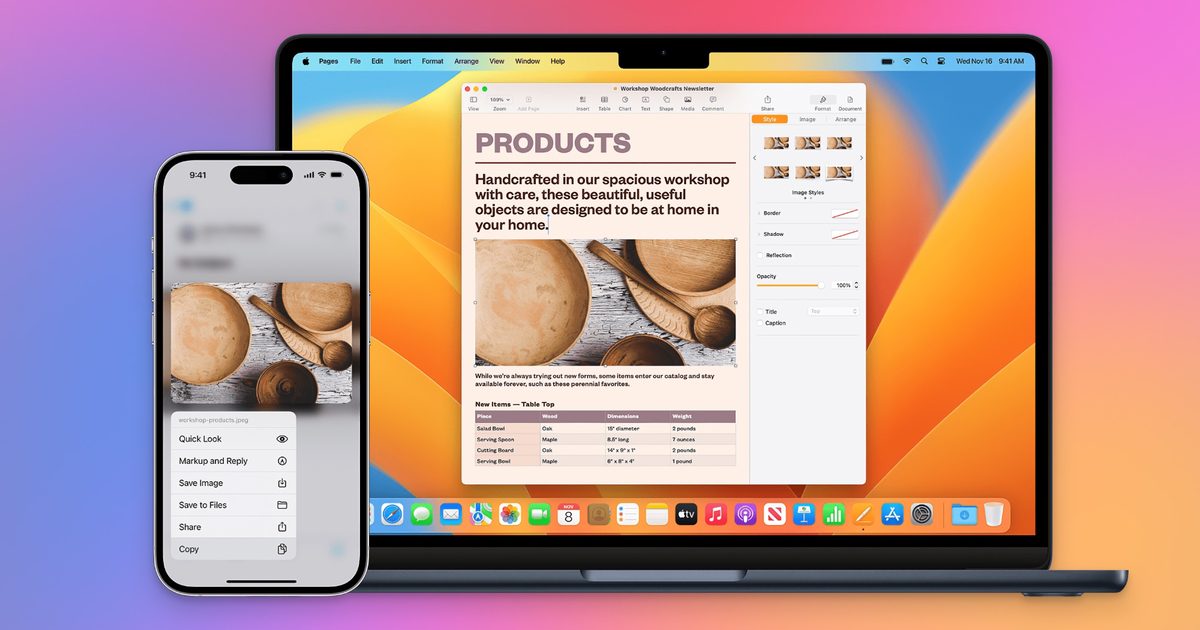
I recently wrote about Apple’s Continuity features and how they play a big role in keeping me trapped inside the Apple ecosystem. One of the smallest but most-used and favorite Continuity features is the Universal Clipboard, which lets me copy and paste text and files between multiple Apple devices. 

Now, it seems that feature is finally coming to Windows PCs. As per MacRumors, Apple is reportedly working on letting you copy something on your iPhone and paste it straight into a Windows PC, no third-party app required. 

Why is Apple finally doing this?

Apple is not doing this out of the goodness of their hearts. Microsoft submitted a request through Apple’s EU interoperability program, a channel Apple built to comply with the Digital Markets Act. Apple began reviewing the ask in March and returned with a project plan by June 26.

According to Microsoft, the idea is simple. You copy text or other content on your iPhone, and it should show up ready to paste on your Windows PC, and the other way around too. It shouldn’t require a third-party app to get this to work. Basically, they want what Apple offers to its iPhone and Mac users. And thanks to the EU’s strict policies, Apple had to comply. 

How would Apple make this work?

Apple’s proposed fix leans on a familiar tool, AccessorySetupKit, the same system it already uses for pairing third-party wearables in the EU. You would give your paired Windows PC one-time permission to receive content from your iPhone’s pasteboard, and after that, the syncing should work in the background.

When can you actually use it?

Don’t hold your breath. Apple says building this out is a major engineering task, and it doesn’t expect to wrap up until fall 2027. Even then, it will land in a developer beta first, so regular users might not see it until early 2028.

iOS 26.3 Notification Forwarding screenshot on blue background.

There is also a good chance this feature will be limited to the EU, similar to how Apple rolled out wearable pairing and notification forwarding for third-party accessories only in Europe so far. Some DMA features do eventually go global, so it isn’t impossible. For now, this is still just a plan on paper, but it’s a promising one.

Share. Facebook Twitter Pinterest LinkedIn Telegram Reddit Email
Previous ArticleThese $89 AI glasses sold out overnight, and they’re already sparking privacy fears
Next Article Apple’s OpenAI lawsuit just tripped over an embarrassing wrong-recipient email

Related Articles

The Internet Archive just made decades of vintage AI playable in your browser, and it’s fascinating

The Internet Archive just made decades of vintage AI playable in your browser, and it’s fascinating

31 August 2026
You worry about AI taking your job because you know too much about AI, research finds

You worry about AI taking your job because you know too much about AI, research finds

31 August 2026
Anthropic just showed an early version of self-improving AI

Anthropic just showed an early version of self-improving AI

31 August 2026
Researchers built a  gadget that can find hidden cameras in seconds

Researchers built a $7 gadget that can find hidden cameras in seconds

31 August 2026
A new watchdog is tracking when AI goes rogue, and more than 300 incidents were reported in July

A new watchdog is tracking when AI goes rogue, and more than 300 incidents were reported in July

30 August 2026
Sony and Warner just sued Anthropic over copyrighted music used to train Claude, seeking 0,000 per track

Sony and Warner just sued Anthropic over copyrighted music used to train Claude, seeking $150,000 per track

30 August 2026
Demo
Stay In Touch
  • Facebook
  • Twitter
  • Pinterest
  • Instagram
  • YouTube
  • Vimeo
Don't Miss
You worry about AI taking your job because you know too much about AI, research finds

You worry about AI taking your job because you know too much about AI, research finds

By News Room31 August 2026

If you have been paying close attention to artificial intelligence, you may have noticed your…

Anthropic just showed an early version of self-improving AI

Anthropic just showed an early version of self-improving AI

31 August 2026
Researchers built a  gadget that can find hidden cameras in seconds

Researchers built a $7 gadget that can find hidden cameras in seconds

31 August 2026
A new watchdog is tracking when AI goes rogue, and more than 300 incidents were reported in July

A new watchdog is tracking when AI goes rogue, and more than 300 incidents were reported in July

30 August 2026
Tech Savvyed
Facebook X (Twitter) Instagram Pinterest
  • Privacy Policy
  • Terms of use
  • Advertise
  • Contact
© 2026 Tech Savvyed. All Rights Reserved.

Type above and press Enter to search. Press Esc to cancel.



