


Close Menu
Tech Savvyed
  • Home
  • News
  • Artificial Intelligence
  • Gadgets
  • Apps
  • Mobile
  • Gaming
  • Accessories
  • More
    • Web Stories
    • Spotlight
    • Press Release

Subscribe to Updates

Get the latest tech news and updates directly to your inbox.

What's On
This gaming mouse has a Noctua fan inside, and it finally has a launch date

This gaming mouse has a Noctua fan inside, and it finally has a launch date

16 July 2026
Lady Deathstrike Faces Logan In New Marvel’s Wolverine Cinematic Trailer

Lady Deathstrike Faces Logan In New Marvel’s Wolverine Cinematic Trailer

16 July 2026
Galaxy Z Fold 8 Ultra: Everything we know about Samsung’s next flagship foldable

Galaxy Z Fold 8 Ultra: Everything we know about Samsung’s next flagship foldable

16 July 2026
Facebook X (Twitter) Instagram
Tech Savvyed
SUBSCRIBE
  • Home
  • News
  • Artificial Intelligence
  • Gadgets
  • Apps
  • Mobile
  • Gaming
  • Accessories
  • More
    • Web Stories
    • Spotlight
    • Press Release
Tech Savvyed
Home»News»ChatGPT’s new search tool saves you from digging through old chats, files, and images
News

ChatGPT’s new search tool saves you from digging through old chats, files, and images

News RoomBy News Room16 July 20262 Mins Read
ChatGPT’s new search tool saves you from digging through old chats, files, and images
Share
Facebook Twitter Reddit Telegram Pinterest Email

If you have ever lost a great ChatGPT answer somewhere in your endless chat history, that headache is finally over. OpenAI has rolled out a major search upgrade that lets you find old chats, projects, documents, and images all from one place.

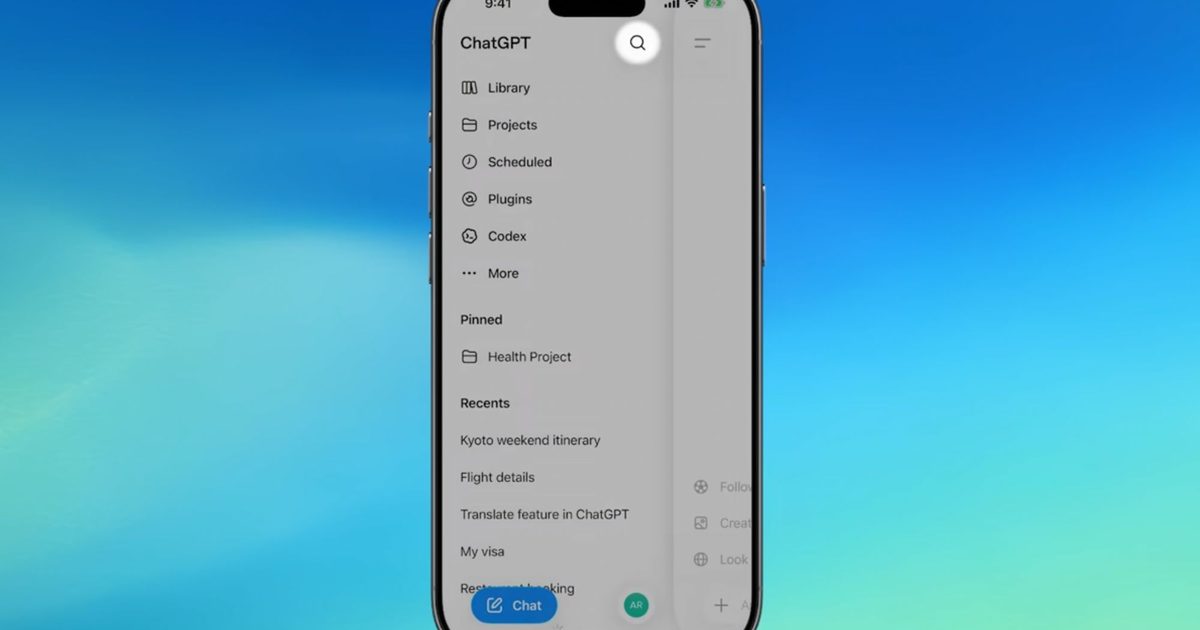
Before this update, the sidebar search only pulled up past conversations, leaving uploaded files, projects, and generated images completely out of reach. The new search option is now available across web, iOS, and Android, on every ChatGPT plan, including free accounts.

Search across your chats just got faster and more powerful 🔎

From the sidebar, you can search chats, projects, images, and documents in one place across web, iOS, and Android.

Use filters to narrow results, then select anything to open it directly in ChatGPT. pic.twitter.com/wYNi2a39wh

— ChatGPT (@ChatGPTapp) July 15, 2026

How does the new ChatGPT search work?

You can start searching right from the ChatGPT sidebar, just like before, except now it covers everything in your account instead of only chats. If you want to narrow things down, there are filters that let you search by specific content type, such as pulling up only images or files tied to one particular project. Once you find what you need, selecting a result opens that chat, project, or file directly inside ChatGPT to skip endless scrolling.

This rollout also lines up closely with OpenAI’s recent GPT-5.6 launch, which brought its own wave of upgrades, including a new AI agent called ChatGPT Work that takes on entire projects instead of single questions. It connects to your apps and files, works through multi-step tasks, and can keep running in the background even after you close ChatGPT.

Why does it matter?

The new ChatGPT search does not change what it stores; it simply makes everything already saved much easier to surface. That’s useful if you regularly use ChatGPT for ongoing projects, research, or document analysis. By bringing everything together in one searchable place, you can look for what you need, filter the results, and jump back into your work within seconds.

Share. Facebook Twitter Pinterest LinkedIn Telegram Reddit Email
Previous ArticleYou can now link your favorite apps to AI Mode in Google Search to get things done
Next Article The Open Beta For Marvel Tōkon: Fighting Souls Starts Next Week

Related Articles

This gaming mouse has a Noctua fan inside, and it finally has a launch date

This gaming mouse has a Noctua fan inside, and it finally has a launch date

16 July 2026
Galaxy Z Fold 8 Ultra: Everything we know about Samsung’s next flagship foldable

Galaxy Z Fold 8 Ultra: Everything we know about Samsung’s next flagship foldable

16 July 2026
You can now link your favorite apps to AI Mode in Google Search to get things done

You can now link your favorite apps to AI Mode in Google Search to get things done

16 July 2026
Your OnePlus phone is switching to ColorOS, whether you like it or not

Your OnePlus phone is switching to ColorOS, whether you like it or not

16 July 2026
You can now edit videos in Google Vids by simply describing the changes

You can now edit videos in Google Vids by simply describing the changes

16 July 2026
NotebookLM just got a new name and a serious upgrade for Google AI Pro subscribers

NotebookLM just got a new name and a serious upgrade for Google AI Pro subscribers

16 July 2026
Demo
Stay In Touch
  • Facebook
  • Twitter
  • Pinterest
  • Instagram
  • YouTube
  • Vimeo
Don't Miss
Lady Deathstrike Faces Logan In New Marvel’s Wolverine Cinematic Trailer

Lady Deathstrike Faces Logan In New Marvel’s Wolverine Cinematic Trailer

By News Room16 July 2026

A new cinematic trailer for Marvel’s Wolverine trades gameplay for an action-packed look at another…

Galaxy Z Fold 8 Ultra: Everything we know about Samsung’s next flagship foldable

Galaxy Z Fold 8 Ultra: Everything we know about Samsung’s next flagship foldable

16 July 2026
The Open Beta For Marvel Tōkon: Fighting Souls Starts Next Week

The Open Beta For Marvel Tōkon: Fighting Souls Starts Next Week

16 July 2026
ChatGPT’s new search tool saves you from digging through old chats, files, and images

ChatGPT’s new search tool saves you from digging through old chats, files, and images

16 July 2026
Tech Savvyed
Facebook X (Twitter) Instagram Pinterest
  • Privacy Policy
  • Terms of use
  • Advertise
  • Contact
© 2026 Tech Savvyed. All Rights Reserved.

Type above and press Enter to search. Press Esc to cancel.



