

Close Menu
Tech Savvyed
  • Home
  • News
  • Artificial Intelligence
  • Gadgets
  • Apps
  • Mobile
  • Gaming
  • Accessories
  • More
    • Web Stories
    • Spotlight
    • Press Release

Subscribe to Updates

Get the latest tech news and updates directly to your inbox.

What's On
Samsung thinks Exynos 2700 can beat Qualcomm’s best next-gen chip

Samsung thinks Exynos 2700 can beat Qualcomm’s best next-gen chip

24 August 2026
I never cared about Mac desktop widgets until I found this app

I never cared about Mac desktop widgets until I found this app

24 August 2026
Apple’s September 2026 event: Everything we know about the iPhone 18 Pro and iPhone Ultra launch event

Apple’s September 2026 event: Everything we know about the iPhone 18 Pro and iPhone Ultra launch event

24 August 2026
Facebook X (Twitter) Instagram
Tech Savvyed
SUBSCRIBE
  • Home
  • News
  • Artificial Intelligence
  • Gadgets
  • Apps
  • Mobile
  • Gaming
  • Accessories
  • More
    • Web Stories
    • Spotlight
    • Press Release
Tech Savvyed
Home»News»Halide 3.1 update brings straighter photos, a warmer look, and smarter focus taps
News

Halide 3.1 update brings straighter photos, a warmer look, and smarter focus taps

News RoomBy News Room9 July 20262 Mins Read
Halide 3.1 update brings straighter photos, a warmer look, and smarter focus taps
Share
Facebook Twitter Reddit Telegram Pinterest Email

Smartphone photography has become an over-processed mess, prioritizing algorithms over authenticity. I recently saw an Instagram post comparing iPhone 6 Photos to iPhone 17 Pro photos, and honestly, in some shots I preferred the results from the decade-old camera. It’s one of the reasons why apps like Halide have become so popular. 

People prefer authenticity now, and Halide’s Process Zero mode, which strips away all the extra processing Apple piles onto your photos, is a breath of fresh air. A few weeks back, Halide released its Mark III update that introduced features like Looks, a set of film-inspired color profiles, along with a full Photo Lab for editing RAW files, complete with a histogram, a Film tab for grain and vignetting, and support for importing RAW files from external cameras.

Now, Lux Optics, the company behind Halide, is all set to release the Halide 3.1 update, adding a couple of new features that make the app even better. 

What’s new in Halide 3.1?

Inside the Photo Lab, the Frame tab now lets you rotate and flip photos, perfect for those times you capture a shot in the wrong orientation. There’s also a new perspective correction dial that works without any AI involved, similar to the keystone correction photographers have used for years with tilt-shift lenses.

Halide 3.1 also introduces Scarlet, a new color profile built around warmth and medium-high contrast, with a noticeable boost to red tones. It’s a great pick for sunsets or anything with bold reds you want to pop, like fireworks.

Halide Scarlet

What else did Halide change under the hood?

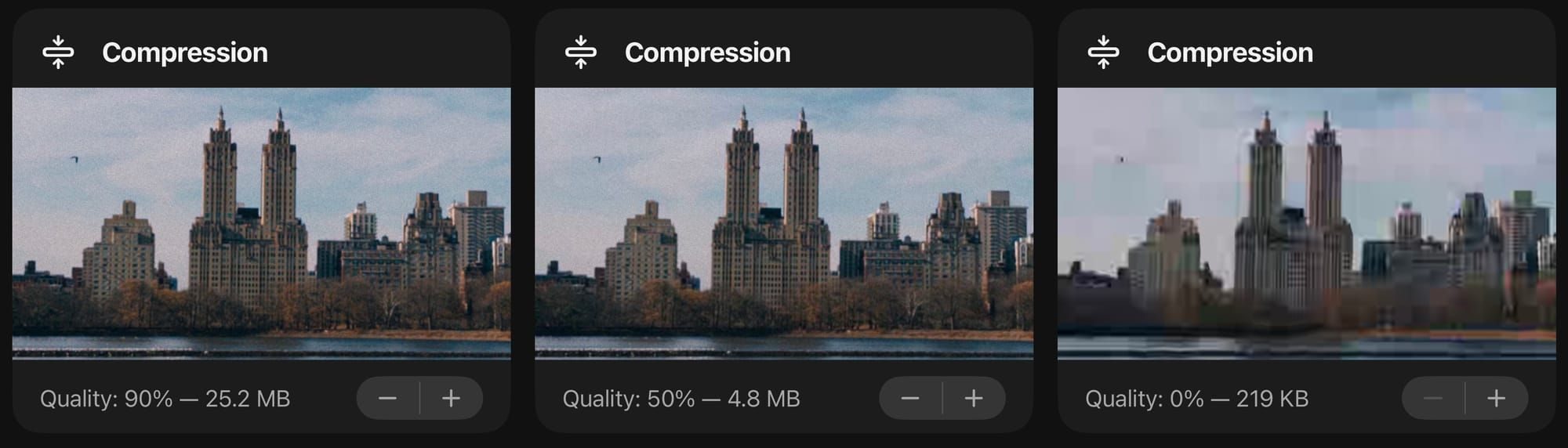
Beyond that, Halide has tidied up its settings. UI themes and icon options now live under Customization, and you can fine-tune compression to balance texture against file size. Advanced shooters can also opt into a RAW-only capture mode, though Halide warns you first, since most third-party apps struggle to render RAW files properly.
Halide compression

Lastly, tapping the viewfinder no longer changes focus or exposure while you’re in manual mode, a small tweak based on user feedback that should make manual shooting feel more predictable.

None of these changes are flashy on their own, but they are the features that users wanted, and Halide has delivered. If Halide keeps refining things at this pace, it might just cement itself as the only camera app most of us ever need.


Share. Facebook Twitter Pinterest LinkedIn Telegram Reddit Email
Previous ArticleX could soon alert you when a post you liked or reposted gets fact-checked
Next Article Google Home’s latest update makes it easier for you to start using automations

Related Articles

Samsung thinks Exynos 2700 can beat Qualcomm’s best next-gen chip

Samsung thinks Exynos 2700 can beat Qualcomm’s best next-gen chip

24 August 2026
I never cared about Mac desktop widgets until I found this app

I never cared about Mac desktop widgets until I found this app

24 August 2026
Apple’s September 2026 event: Everything we know about the iPhone 18 Pro and iPhone Ultra launch event

Apple’s September 2026 event: Everything we know about the iPhone 18 Pro and iPhone Ultra launch event

24 August 2026
Samsung may be planning two Galaxy S27 Ultra sizes next year

Samsung may be planning two Galaxy S27 Ultra sizes next year

24 August 2026
In China, AI has reached dumpling shops where you also get to feed on compute tokens

In China, AI has reached dumpling shops where you also get to feed on compute tokens

23 August 2026
Silicon Valley wants AI everywhere. It just doesn’t want us to notice

Silicon Valley wants AI everywhere. It just doesn’t want us to notice

23 August 2026
Demo
Stay In Touch
  • Facebook
  • Twitter
  • Pinterest
  • Instagram
  • YouTube
  • Vimeo
Don't Miss
I never cared about Mac desktop widgets until I found this app

I never cared about Mac desktop widgets until I found this app

By News Room24 August 2026

Apple added desktop widgets to Mac with macOS Sonoma back in 2023. I remember dragging…

Apple’s September 2026 event: Everything we know about the iPhone 18 Pro and iPhone Ultra launch event

Apple’s September 2026 event: Everything we know about the iPhone 18 Pro and iPhone Ultra launch event

24 August 2026
Samsung may be planning two Galaxy S27 Ultra sizes next year

Samsung may be planning two Galaxy S27 Ultra sizes next year

24 August 2026
In China, AI has reached dumpling shops where you also get to feed on compute tokens

In China, AI has reached dumpling shops where you also get to feed on compute tokens

23 August 2026
Tech Savvyed
Facebook X (Twitter) Instagram Pinterest
  • Privacy Policy
  • Terms of use
  • Advertise
  • Contact
© 2026 Tech Savvyed. All Rights Reserved.

Type above and press Enter to search. Press Esc to cancel.