



Close Menu
Tech Savvyed
  • Home
  • News
  • Artificial Intelligence
  • Gadgets
  • Apps
  • Mobile
  • Gaming
  • Accessories
  • More
    • Web Stories
    • Spotlight
    • Press Release

Subscribe to Updates

Get the latest tech news and updates directly to your inbox.

What's On
Team Ninja Answers Our Burning Questions About – Aug 18, 2026

Team Ninja Answers Our Burning Questions About – Aug 18, 2026

18 August 2026
Ugreen’s latest travel adapter packs 100W, four ports, and a screen into one charger

Ugreen’s latest travel adapter packs 100W, four ports, and a screen into one charger

18 August 2026
Samsung’s cheaper Galaxy S26 FE may get one camera feature I absolutely loved

Samsung’s cheaper Galaxy S26 FE may get one camera feature I absolutely loved

18 August 2026
Facebook X (Twitter) Instagram
Tech Savvyed
SUBSCRIBE
  • Home
  • News
  • Artificial Intelligence
  • Gadgets
  • Apps
  • Mobile
  • Gaming
  • Accessories
  • More
    • Web Stories
    • Spotlight
    • Press Release
Tech Savvyed
Home»News»Gemini will now take notes for you in Google Meet for you, if you the minimum $20 AI tax
News

Gemini will now take notes for you in Google Meet for you, if you the minimum $20 AI tax

News RoomBy News Room30 June 20262 Mins Read
Gemini will now take notes for you in Google Meet for you, if you the minimum  AI tax
Share
Facebook Twitter Reddit Telegram Pinterest Email

Google has just released a useful Gemini feature, which you can try if you are a paying member of course. The company is now bringing “Take notes for me” for Gemini, which will be available in Google Meet for Google AI Pro and Google AI Ultra subscribers, along with eligible Workspace business customers.

For personal users, the feature starts with Google AI Pro, which costs $19.99 per month in the US. In other words, Gemini can now take your Google Meet notes, provided you pay the minimum AI tax.

What the feature actually does

Once enabled in a meeting, Gemini works in the background to transcribe the conversation and create a summary with key action items. The notes are saved automatically as a Google Doc in your Drive, and after the call ends, Google sends an email recap with the summary and next steps.

Meeting summaries, action items, and even searchable notes sound really useful if you’ve ever been a part of a long meeting. Users can start note-taking during a call by clicking the pencil icon at the top of the Meet window. They can also turn it on for all calls through Meet settings under Meeting records. Google says all meeting participants will be notified when note-taking is enabled, which is important because nobody wants to discover afterward that Gemini was quietly transcribing the entire discussion.
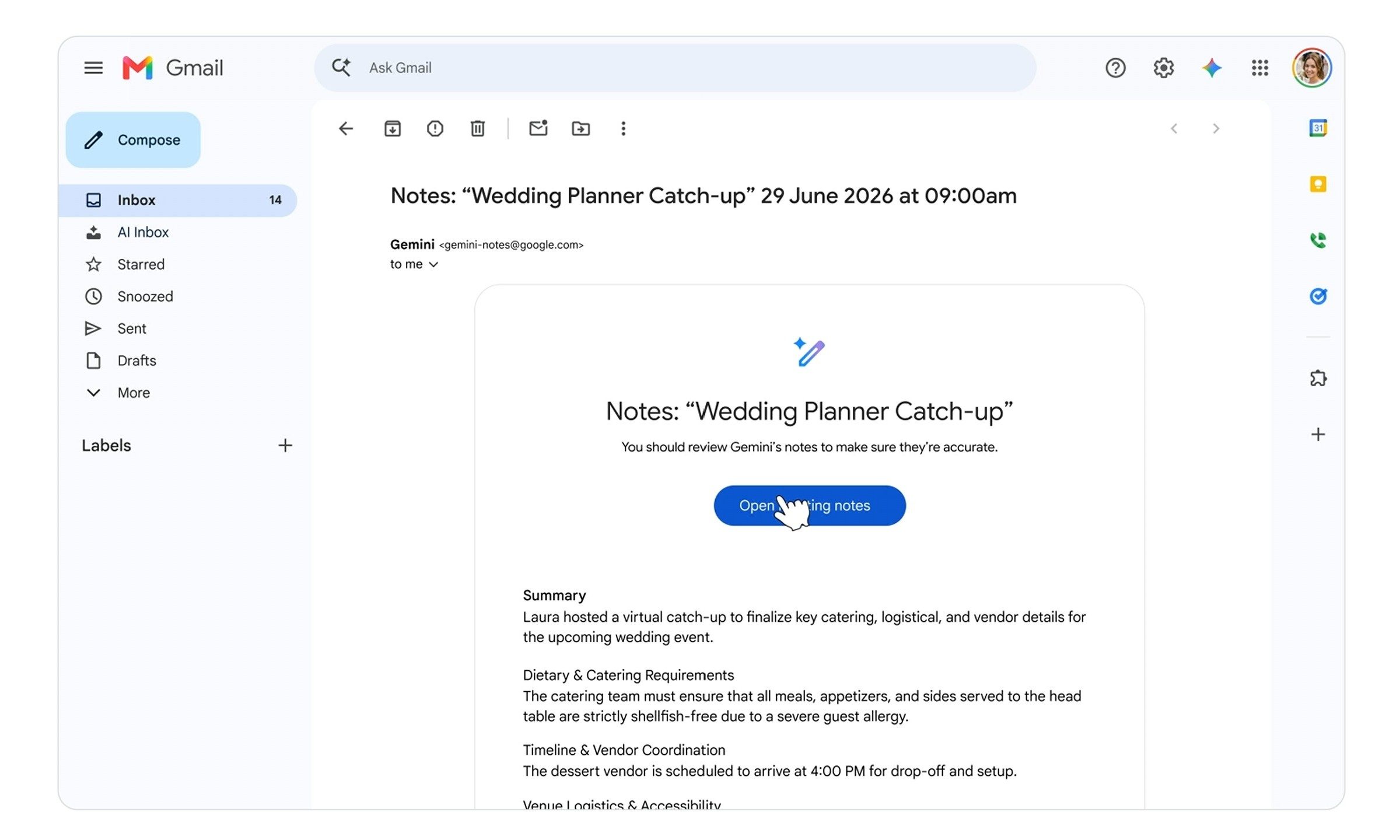
Google Meet Take Notes for me Gemini sends email summaries

Still behind a paywall

The company has been stuffing Gemini into Workspace for a while, and AI meeting tools are quickly becoming table stakes across productivity software. But the story is the same, and you still have to pay. Gemini’s “Take notes for me” is not a big update, but for Google Meet regulars can get a lot of mileage out of this one.
Share. Facebook Twitter Pinterest LinkedIn Telegram Reddit Email
Previous ArticleMeta’s Brain2Qwerty v2 turns thoughts into text, and it doesn’t need brain implants
Next Article Wearables are helping the elderly as record heat blasts across Europe

Related Articles

Ugreen’s latest travel adapter packs 100W, four ports, and a screen into one charger

Ugreen’s latest travel adapter packs 100W, four ports, and a screen into one charger

18 August 2026
Samsung’s cheaper Galaxy S26 FE may get one camera feature I absolutely loved

Samsung’s cheaper Galaxy S26 FE may get one camera feature I absolutely loved

18 August 2026
Spotify’s Playlist Notes make it easier to add context to your favorite picks

Spotify’s Playlist Notes make it easier to add context to your favorite picks

18 August 2026
YouTube is making view counts bigger, but creators aren’t getting any richer

YouTube is making view counts bigger, but creators aren’t getting any richer

18 August 2026
Viture Pro 2 review: Affordable glasses that I loved more for work than play

Viture Pro 2 review: Affordable glasses that I loved more for work than play

18 August 2026
Apple just accidentally revealed its camera-equipped AirPods

Apple just accidentally revealed its camera-equipped AirPods

18 August 2026
Demo
Stay In Touch
  • Facebook
  • Twitter
  • Pinterest
  • Instagram
  • YouTube
  • Vimeo
Don't Miss
Ugreen’s latest travel adapter packs 100W, four ports, and a screen into one charger

Ugreen’s latest travel adapter packs 100W, four ports, and a screen into one charger

By News Room18 August 2026

With the number of gadgets I use every day, I have reached the point where…

Samsung’s cheaper Galaxy S26 FE may get one camera feature I absolutely loved

Samsung’s cheaper Galaxy S26 FE may get one camera feature I absolutely loved

18 August 2026
Spotify’s Playlist Notes make it easier to add context to your favorite picks

Spotify’s Playlist Notes make it easier to add context to your favorite picks

18 August 2026
YouTube is making view counts bigger, but creators aren’t getting any richer

YouTube is making view counts bigger, but creators aren’t getting any richer

18 August 2026
Tech Savvyed
Facebook X (Twitter) Instagram Pinterest
  • Privacy Policy
  • Terms of use
  • Advertise
  • Contact
© 2026 Tech Savvyed. All Rights Reserved.

Type above and press Enter to search. Press Esc to cancel.